20
GREEN
BLUE
RED
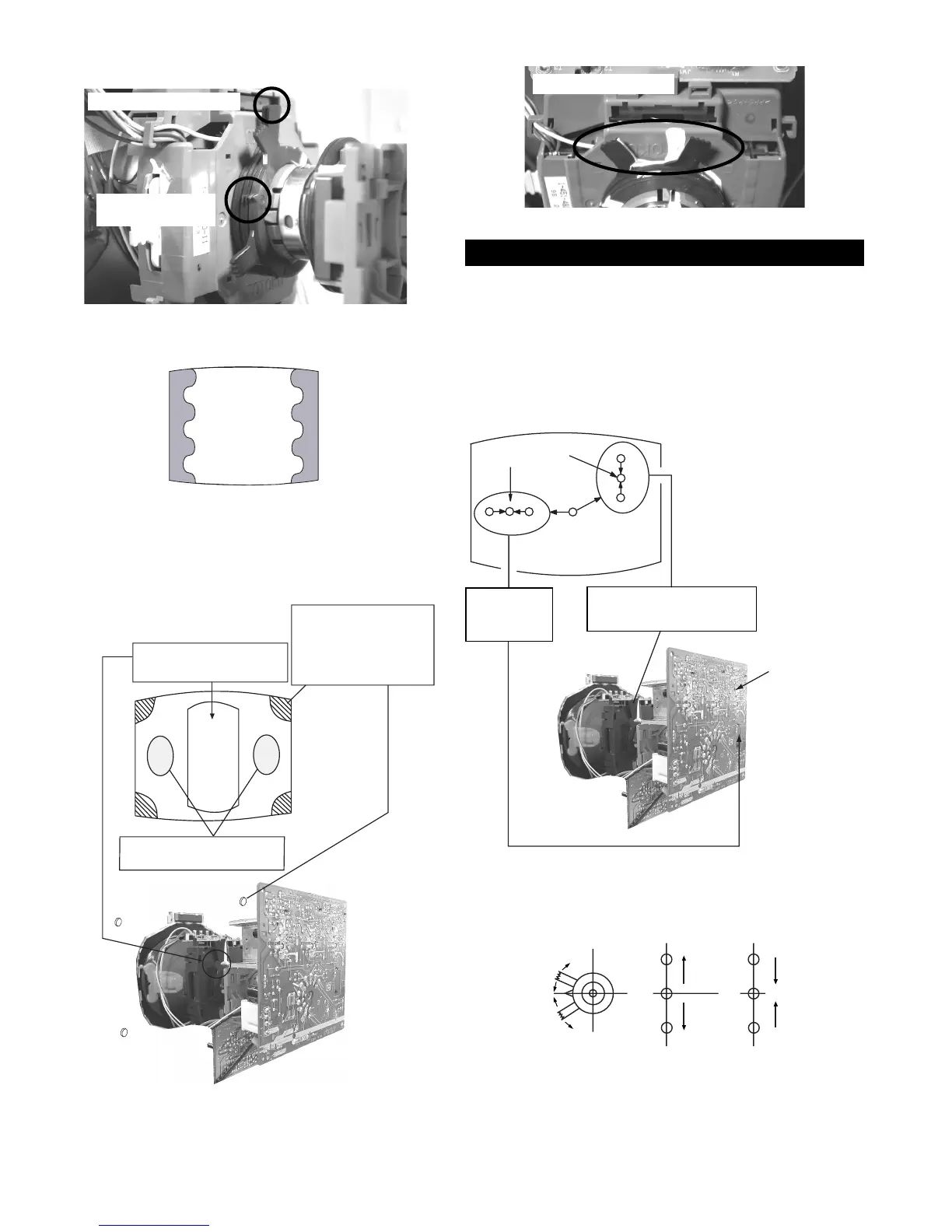
(1) Screen centre convergence [Static convergence]
1. Input a dot pattern signal from the pattern generator.
2. Normalize the picture setting.
3. [Moving vertically], adjust the V.STAT magnet so that the
vertical red, green and blue dots coincide at the centre of the
screen.
3-2. Convergence
By opening or closing the V.STAT magnet, the red green and blue
dots move in the direction indicated below.
Note: Do not adjust the H.STAT by rotating the V.STAT
magnets as this can affect the focus setting.
Fig.3-5
Purity control
magnets
Purity control corrects
this area
Disk magnets or
rotatable disk
magnets correct
these areas (a-d)
Deflection yoke positioning
corrects these areas
a
cd
b
Disk Magnets
V.STAT
Vertical Static Magnet
H.STAT
convergence
control
Centre dot
R G B
R
G
B
C Board
RV5375 (H STAT)
H STAT Convergence
(on mount side)
Purity magnets
Align pips on
each magnet
Fig.3-4
Align both Purity magnets
to the vertical position







 To Next Page