EasyManua.ls Logo

Sony Trinitron KV-9PT40 - Page 10

Sony Trinitron KV-9PT40
48 pages
Print Icon
To Next Page IconTo Next Page
To Previous Page IconTo Previous Page
Loading...
Erasing
or
adding
channels
1
Press
the
0-9
buttons
and
then
press
ENTER
to
select
the
channel
to
be
added
or
erased.
O@®
‘)
(0)
ENTER
©©O
Cao!
2
Press
ADD
to
add
channels.
e
.
A
“+”
appears
before
the
number
for
a
moment.
This
channel
has
now
been
added
to
the
channel
scan
memory.
Press
ERASE
to
erase
channels.
%
.
A
“—”
appears
before
the
number
for
a
moment.
This
channel
has
now
been
erased
from
the
channel
scan
memory.
The
next
time
you
press
CH
+/-,
this
channel
will
be
skipped.
Repeat
steps
1
and
2
to
add
or
erase
other
channels.
Note
When
you
erase
a
VHF
or
UHF
channel,
the
cable
TV
channel
with
the
same
number
is
also
erased,
and
vice
versa.
|Q-EN
|
Getting
Started
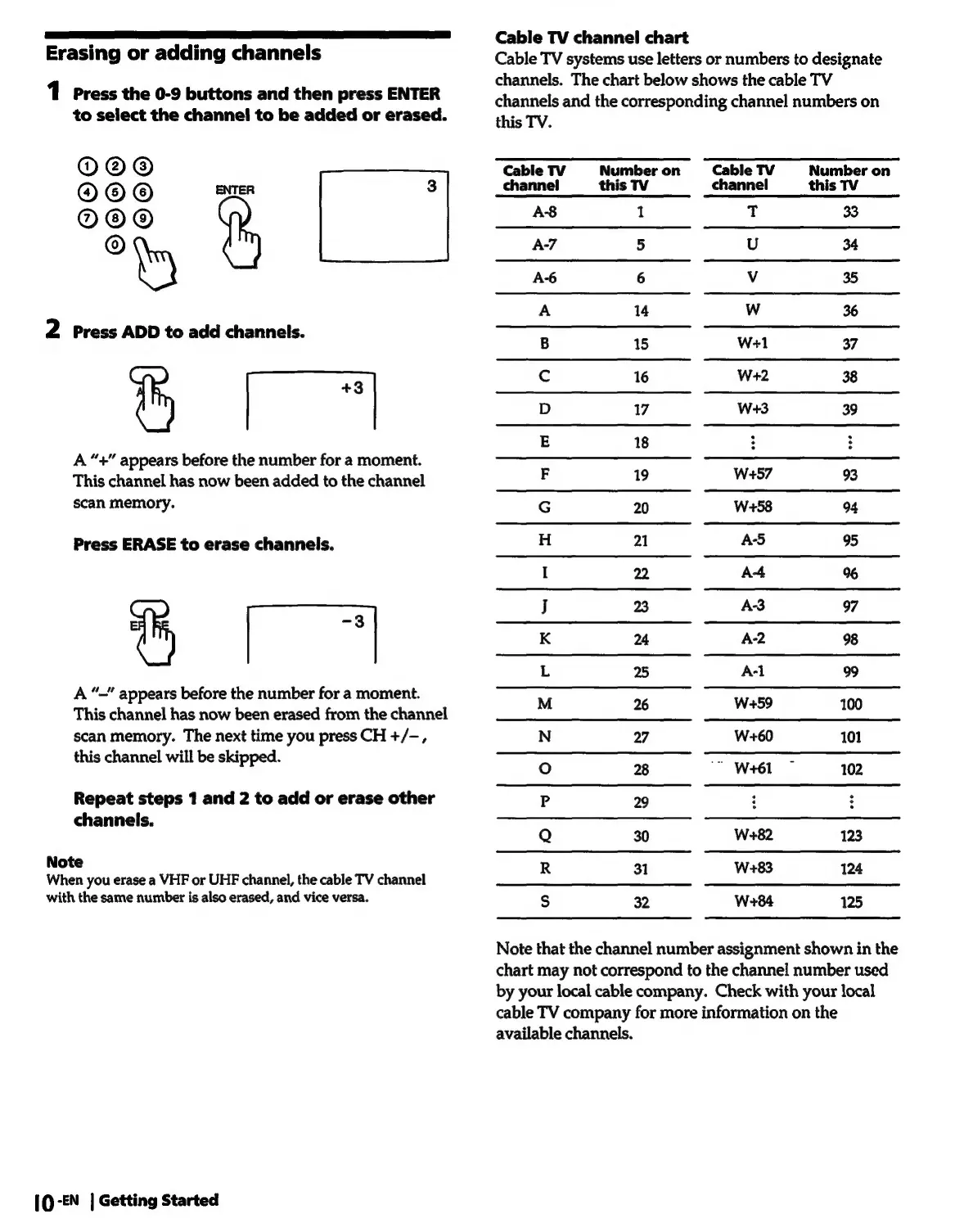
Cable
TV
channel
chart
Cable
TV
systems
use
letters
or
numbers
to
designate
channels.
The
chart
below
shows
the
cable
TV
channels
and
the
corresponding
channel
numbers
on
this
TV.
Cable
TV
Number
on
Cable
TV
Number
on
channel
this
TV
channel
this
TV
A8
1
T
33
A-7
5
U
34
A-6
6
Vv
35
A
14
Ww
36
B
15
Wel
37
Cc
16
W+2
38
D
17
W+3
39
E
18
F
19
W+57
93
G
20
W-+58
94
H
21
A-5
95
I
22
A-4
%
J
23
A-3
97
K
24
A-2
98
L
25
A-l
99
M
26
W+59
100
N
27
W+60
101
oO
28
"
W+61
102
P
29
Q
30
W+82
123
R
31
W+83
124
Ss
32
W+84
125
Note
that
the
channel
number
assignment
shown
in
the
chart
may
not
correspond
to
the
channel
number
used
by
your
local
cable
company.
Check
with
your
local
cable
TV
company
for
more
information
on
the
available
channels.

Related product manuals