EasyManua.ls Logo

Sony Trinitron KV-9PT40 - Adjusting Picture Quality; Connecting Video Equipment

Sony Trinitron KV-9PT40
48 pages
Print Icon
To Next Page IconTo Next Page
To Previous Page IconTo Previous Page
Loading...
Adjusting
Picture
|
|
ol
alal=Teadiale
mate
(=re)
Quality
Equipment
|
|
_
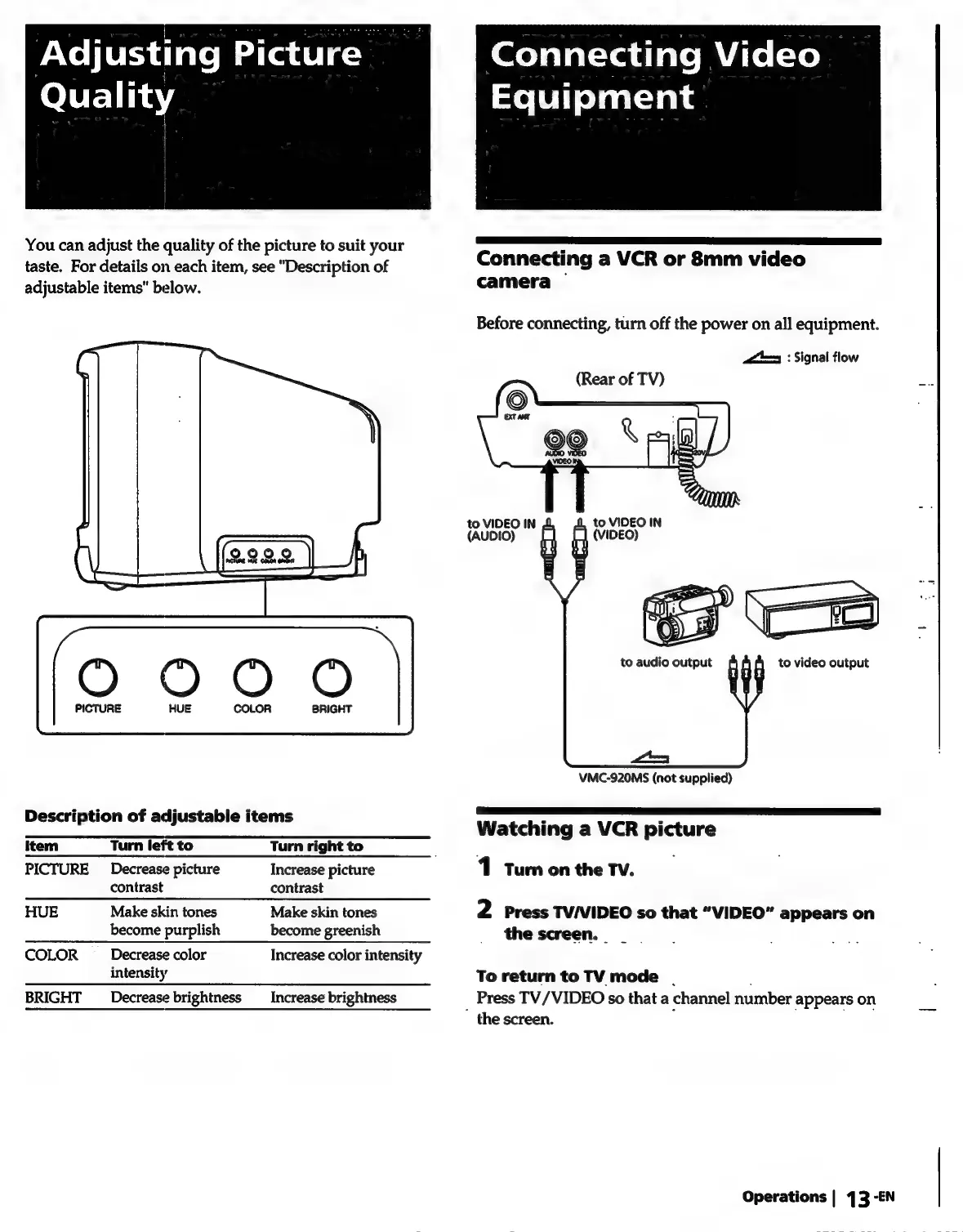
You
can
adjust
the
quality
of
the
picture
to
suit
your
F
=
taste.
For
details
on
each
item,
see
"Description
of
Connecting
a
VCR
or
8mm
video
adjustable
items”
below.
camera
Before
connecting,
turn
off
the
power
on
all
equipment.
a=
:
Signal
flow
(Rear
of
TV)
to
VIDEO
IN
(AUDIO)
VMC-920MS
(not
supplied)
Descri
tion
of
adiustable
items
—E—E—E—EeE—e—eEeE———————————
e
Watching
a
VCR
picture
Item
Turn
left
to
Turn
right
to
:
PICTURE
Decrease
picture
Increase
picture
1
Turn
on
the
TV.
contrast
contrast
HUE
Make
skin
tones
Make
skin
tones
2
Press
TV/VIDEO
so
that
“VIDEO”
appears
on
become
purplish
become
greenish
_
thescreen.
_
COLOR
__
Decrease
color
Increase
color
intensity
intensity
To
return
to
TV
mode
.
BRIGHT
__
Decrease
brightness
_
Increase
brightness
Press
TV/VIDEO
so
that
a
channel
number
appears
on
"
the
screen.
.
Operations
|
43
-EN

Related product manuals