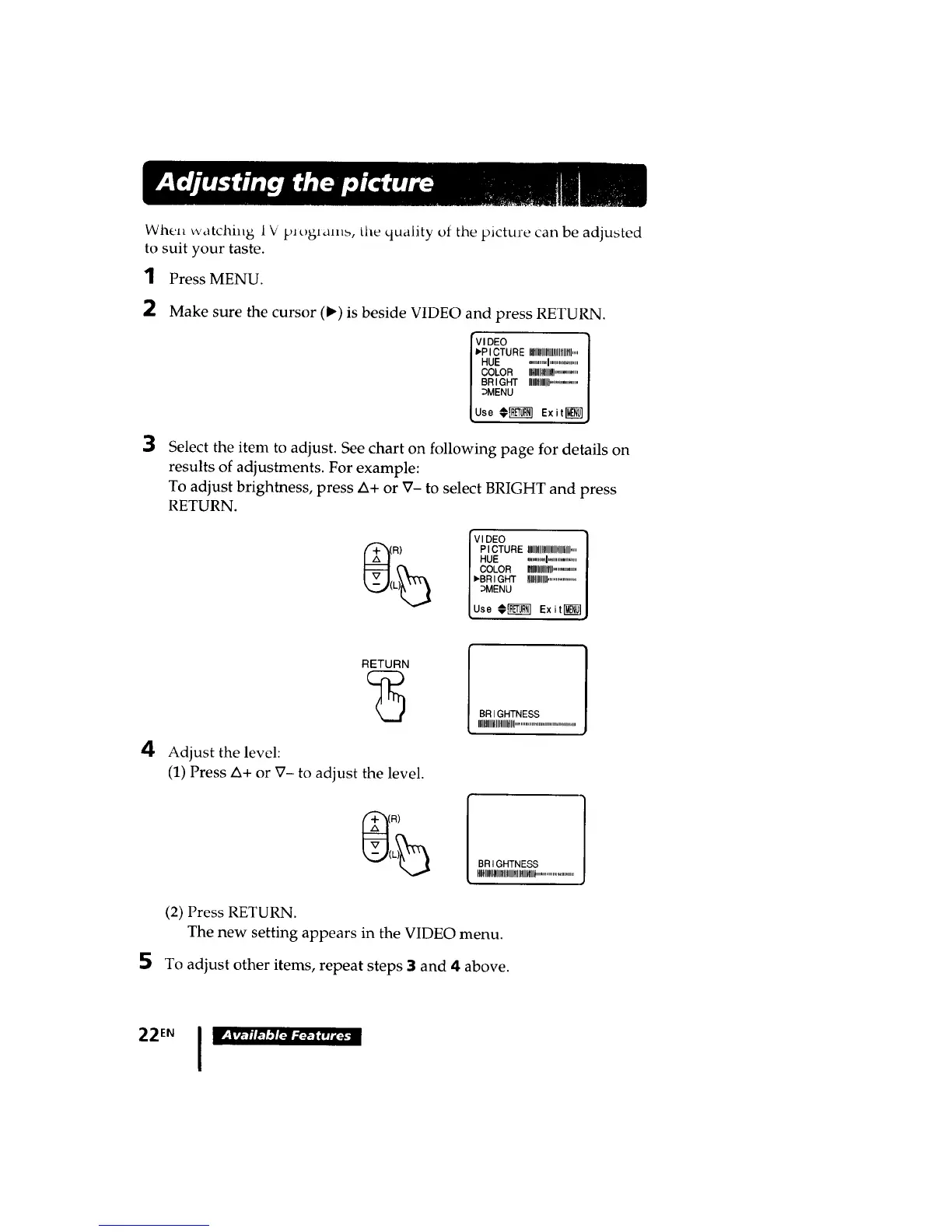
When watching; 1V pJt)glam>, tile quality of the picture can be adjusted
to suit your taste.
I Press MENU.
2
3
Make sure the cursor (1_)is beside VIDEO and press RETURN.
IvD°1
_P ICTURE IIIIIIIIIIIIIIII)llllrlH....
HUE ............I...................
COLOR IIIIIIIIIllllllll................
BRIGHT IIIIIIIIIIIIII...................
_MENU
Use _U_I Exited]
Select the item to adjust. See chart on following page for details on
results of adjustments. For example:
To adjust brightness, press ZX+or V- to select BRIGHT and press
RETURN.
VIDEO I
PICTURE lUllllllllflll!llllfllllllll.,,|
HUE ............I...................I
COLOR mllllllB ................|
I'BRI GHT IIIIIIIIIIIIil...................]
:_MENU I
use #_ ExitI_lJ
4
RETURN
Adjust the level:
(1) Press A+ or XT-to adjust the level.
BR I GHTNESS
II[llllllllllllllllltll!l.........................................
BR I GHTNESS
IIIlllllHII!llllllllflllltllllllllt..........................
5
(2) Press RETURN.
The new setting appears in the VIDEO menu.
To adjust other items, repeat steps 3 and 4 above.
22EN I








 To Next Page