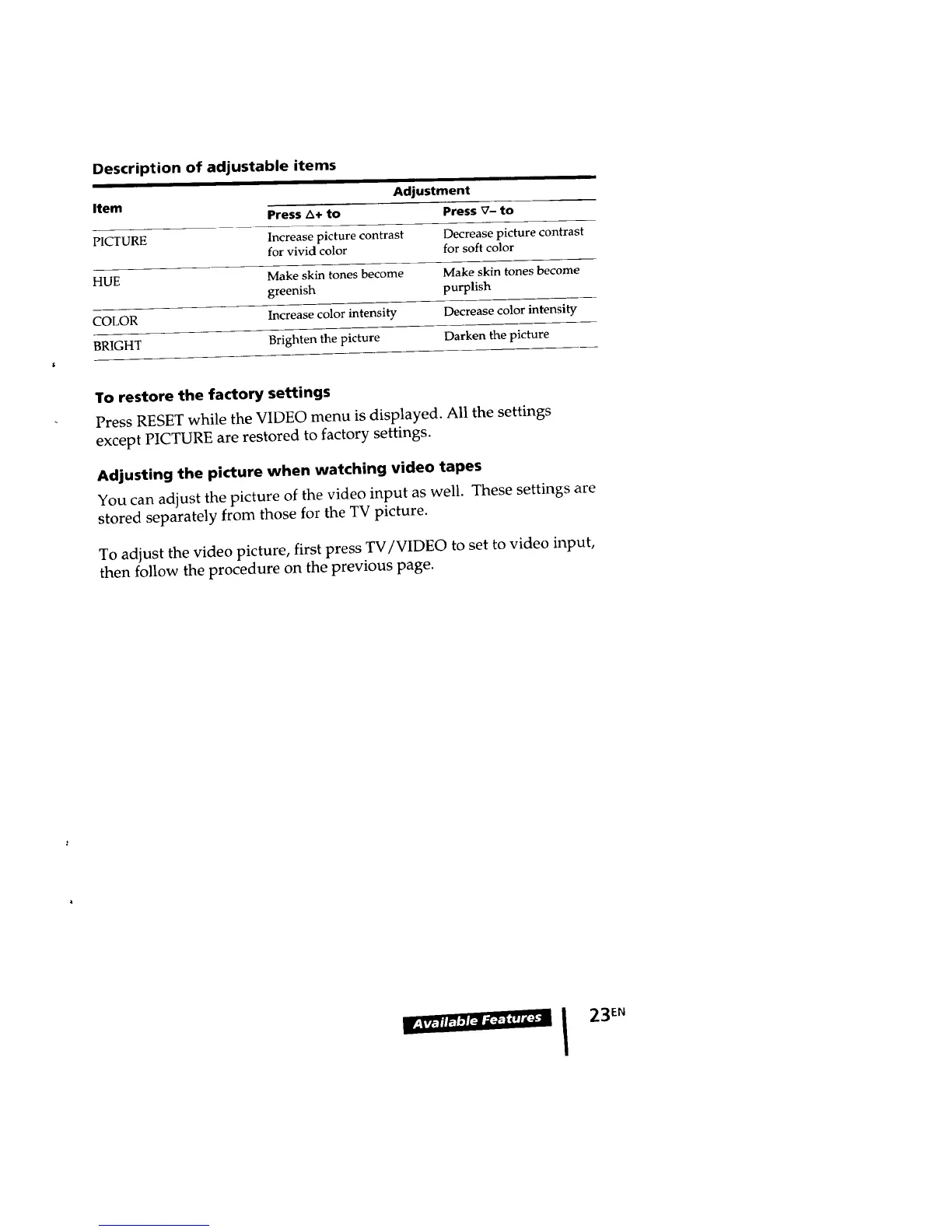
Description of adjustable items
i
Item Adjustment
Press A+ to Press V- to
PICTURE Increase picture contrast Decrease picture contrast
for vivid color for soft color
HUE Make skin tones become Make skin tones become
greenish purplish
COLOR Increase color intensity Decrease color intensity
BRIGHT Brighten the picture Darken the picture
To restore the factory settings
Press RESET while the VIDEO menu is displayed. All the settings
except PICTURE are restored to factory settings.
Adjusting the picture when watching video tapes
You can adjust the picture of the video input as well. These settings are
stored separately from those for the TV picture.
To adjust the video picture, first press TV/VIDEO to set to video input,
then follow the procedure on the previous page.
IF:_Fri_r_,_-_ I 23EN








 To Next Page