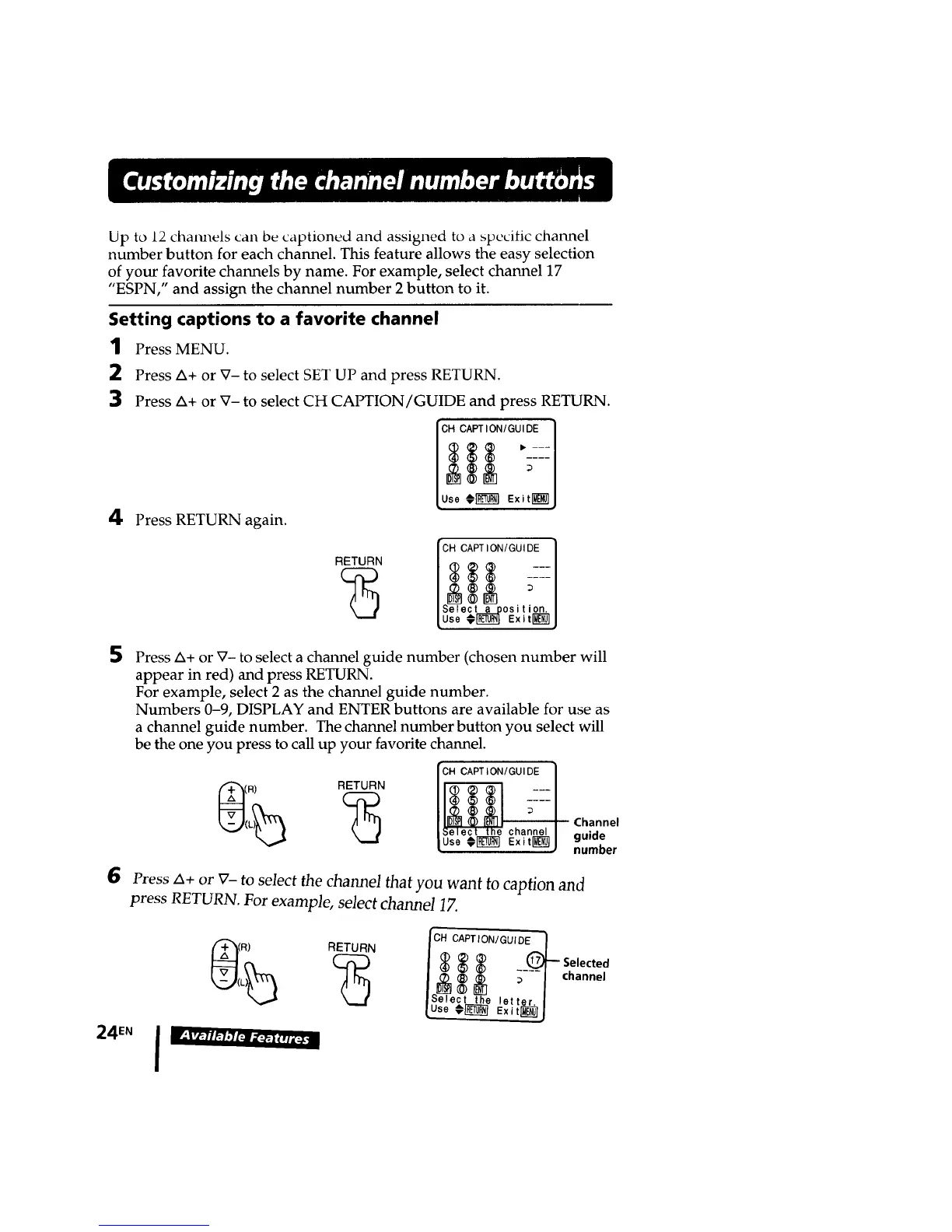
Up to 12 cham_els can be captioned and assigned to a specific channel
number button for each channel. This feature allows the easy selection
of your favorite channels by name. For example, select channel 17
"ESPN," and assign the channel number 2 button to it.
Setting captions to a favorite channel
1
2
3
4
Press MENU.
Press A+ or V- to select SET UP and press RETURN.
Press ZX+or V- to select CH CAPTION/GUIDE and press RETURN.
ICHCAPT,ON'GU,DE I
_ • ---
[Use ¢r_'_ Exitr_ J
Press RETURN again.
CH CAPTION[GUIDE I
RETURN / $ -=:1
I
D
/Select a _osition. I
5
6
Press A+ or X7-to select a channel guide number (chosen number will
appear in red) and press RETURN.
For example, select 2 as the channel guide number.
Numbers 0-9, DISPLAY and ENTER buttons are available for use as
a channel guide number. The channel number button you select will
be the one you press to call up your favorite channel.
_RL_ RETURN
CAPTION/GUIDE
Channel
guide
number
Press A+ or V- to select the channel that you want to caption and
press RETURN. For example, select channel 1Z
24EN
RETURN
let
Exi
channel








 To Next Page