l'his feature allows you to i_,_c_cnt children trom watching unsuitable
programs.
1
2
3
Press MENU.
Press A+ or V- to select SET UP and press RETURN.
Press A+ or V- to select CH BLOCK and press RETURN.
_(R) RETURN [ _IHA_HI_EL_BLOCK
(_ / 2.CH__
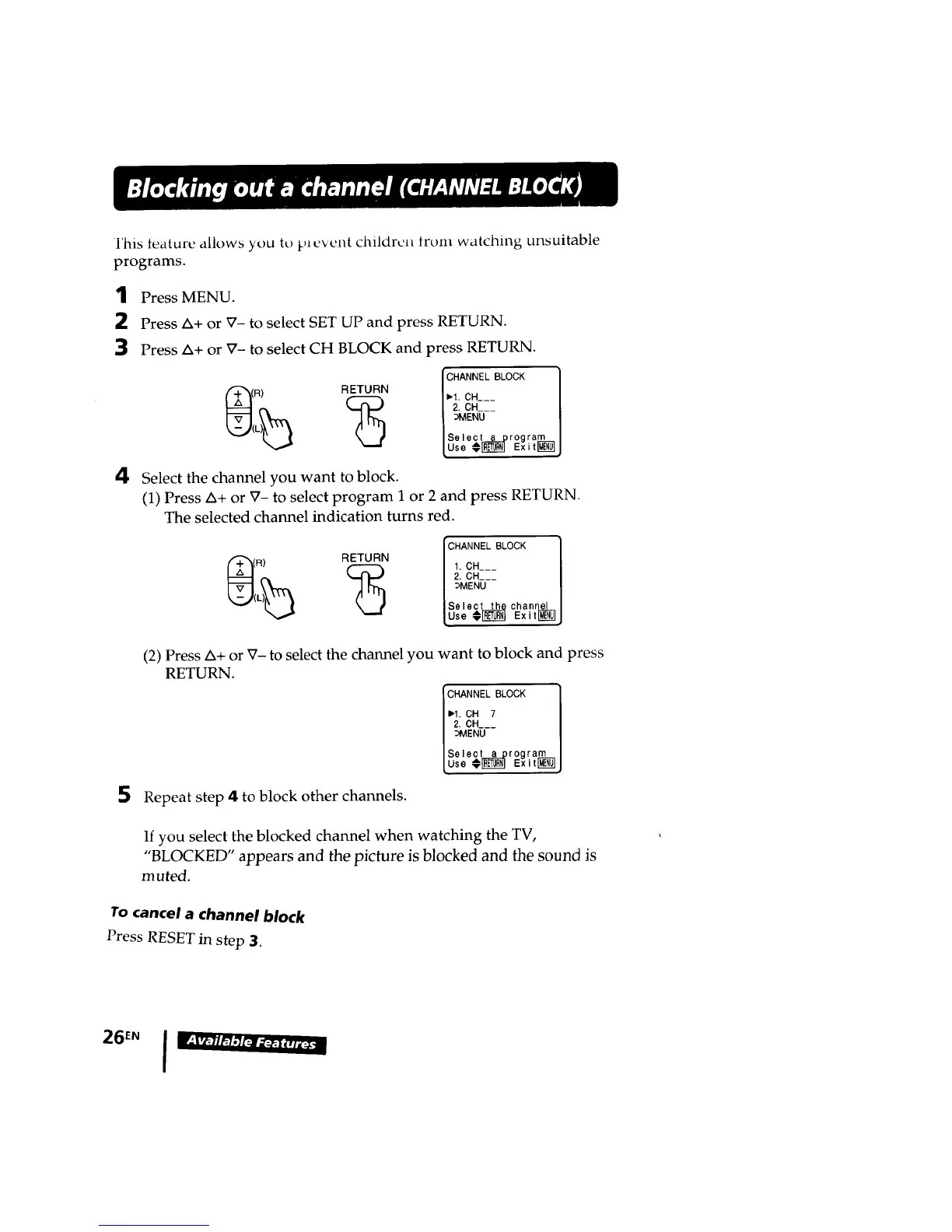
4 Select the channel you want to block.
(1) Press A+ or V- to select program 1 or 2 and press RETURN.
The selected channel indication turns red.
RETURN
(_ I 1.CH___
(R) [CHANNEL BLOCK| 2. CH___
[so,oc, p
(2) Press A+ or V- to select the channel you want to block and press
RETURN.
CHANNEL BLOCK
I_1. CH 7
2. CH___
:_VIENU
Select_rogram
Use @_ Exit MEI_
Repeat step 4 to block other channels.
If you select the blocked channel when watching the TV,
"BLOCKED" appears and the picture is blocked and the sound is
muted.
To cancel a channel block
Press RESET in step 3.
26EN I w'-_v_-nm'3t_"_:_-








 To Next Page