3
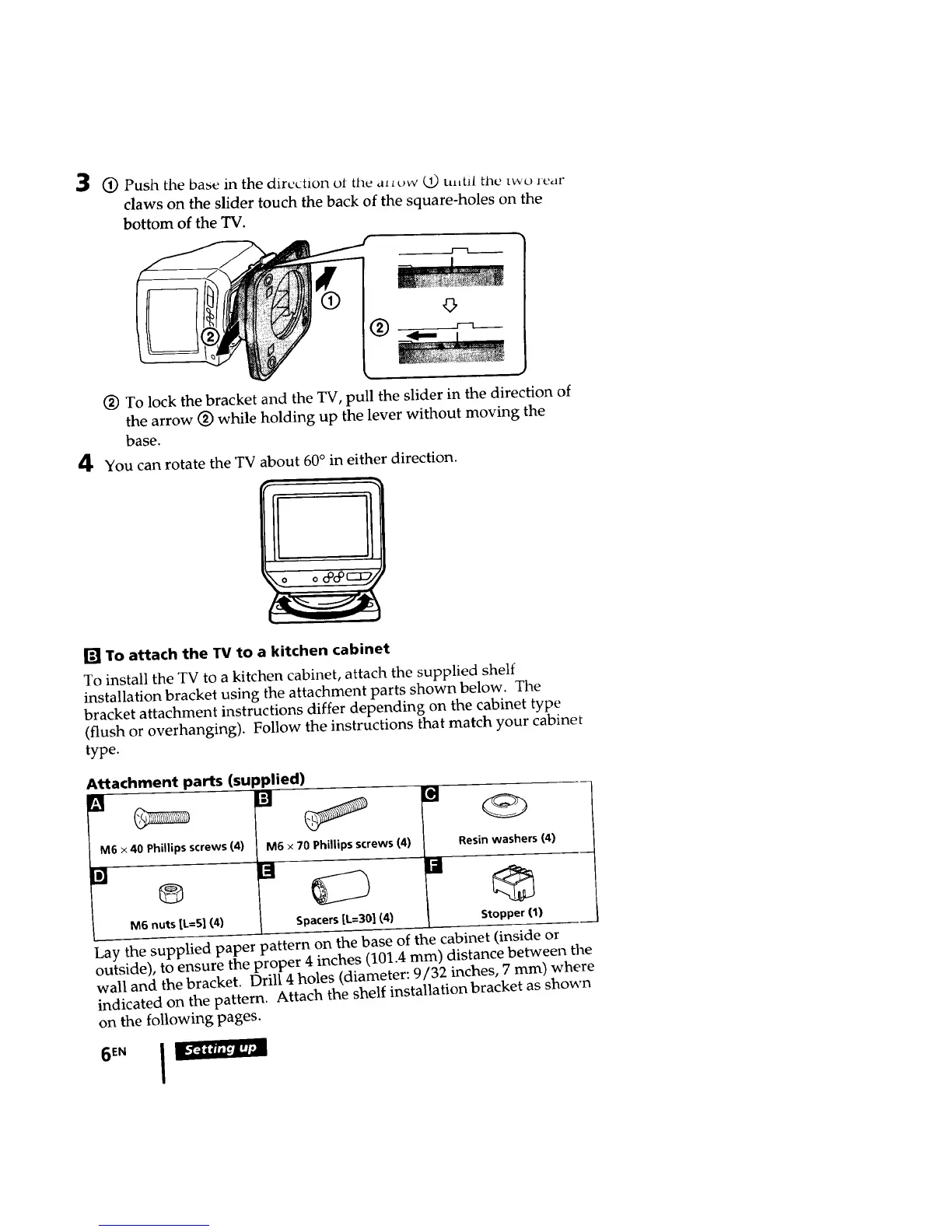
1_ Push the base in the direction ot the alL¢_w (2) ulttil tile two rear
claws on the slider touch the back of the square-holes on the
bottom of the TV.
r----i
4
(_) To lock the bracket and the TV, pull the slider in the direction of
the arrow (_) while holding up the lever without moving the
base.
You can rotate the TV about 60° in either direction.
!
[] To attach the TV to a kitchen cabinet
To install the TV to a kitchen cabinet, attach the supplied shelf
installation bracket using the attachment parts shown below. The
bracket attachment instructions differ depending on the cabinet type
(flush or overhanging). Follow the instructions that match your cabinet
type.
Attachment parts (SUl
[]
M6 x 40 Phillips screws (4)
[]
®
M6 nuts [k=S] (4)
3plied)
M6 x 70 Phillips screws (4)
Spacers[L.--301(4)
Resin washers (4)
[] G
Stopper (1)
Lay the supplied paper pattern on the base of the cabinet (inside or
outside), to ensure the proper 4 inches (101.4 mm) distance between the
wall and the bracket. Drill 4 holes (diameter: 9/32 inches, 7 mm) where
indicated on the pattern. Attach the shelf installation bracket as shown
on the following pages.
11111111:33








 To Next Page