– 31 –
KV-BM142M70
RM-W101
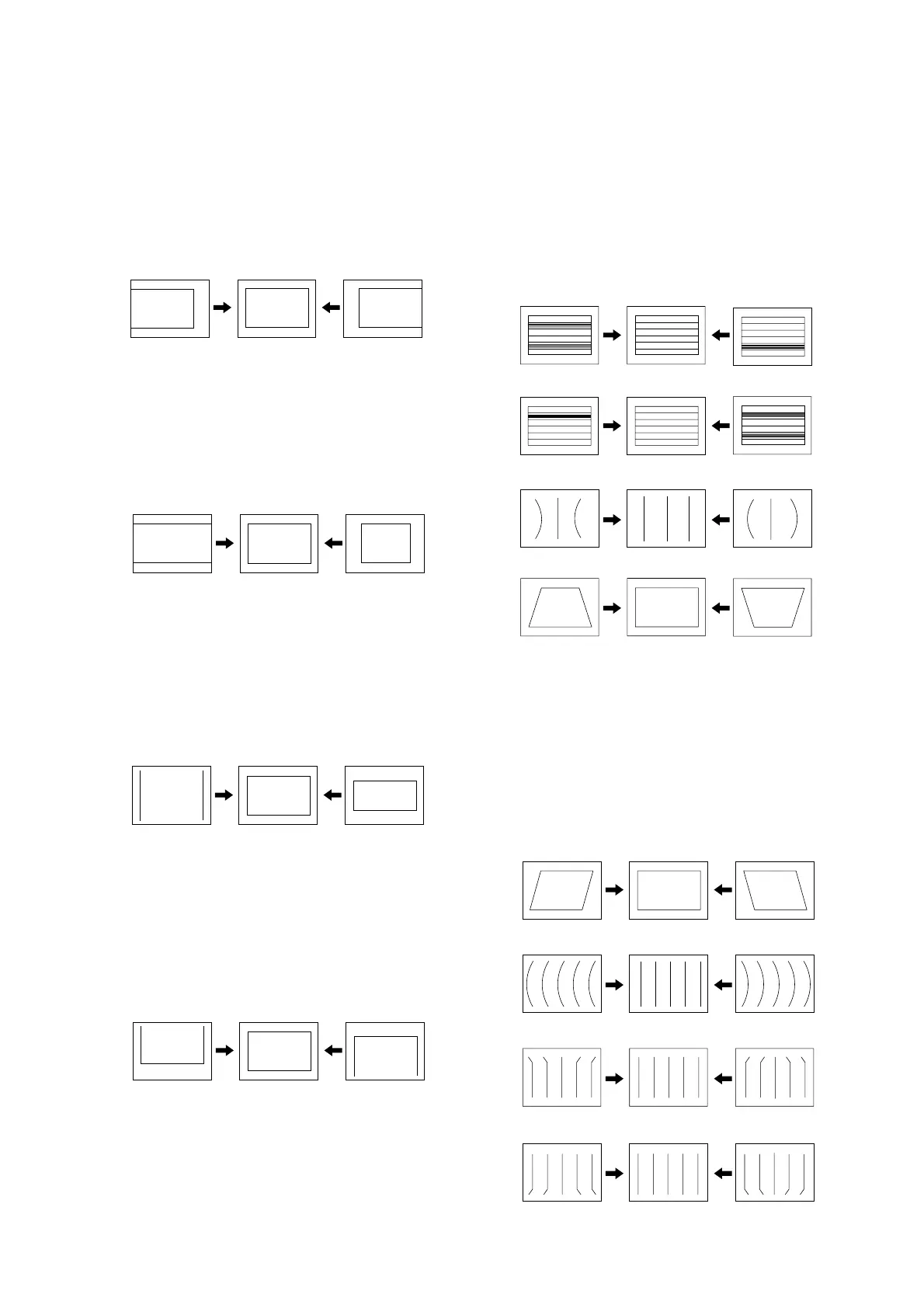
3-5. PICTURE DISTORTION ADJUSTMENT
H. CENTER ADJUSTMENT (HPOS)
1. Input Monoscope signal/NTSC Monoscope signal (for
NTSC model).
2. Activate the Service Adjustment Mode.
3. Select the HPOS item with
1 and 4.
4. Adjust the value of HPOS with
3 and 6 for the best
vertical center.
5. Press [MUTING] then
- to save into the memory.
H. SIZE ADJUSTMENT (HSIZ)
1. Input Monoscope signal/NTSC Monoscope signal (for
NTSC model).
2. Activate the Service Adjustment Mode.
3. Select HSIZ with
1 and 4.
4. Adjust with
3 and 6 for the best horizontal size.
5. Press [MUTING] then
- to save into the memory.
V. SIZE ADJUSTMENT (VSIZ)
1. Input Monoscope signal/NTSC Monoscope signal (for
NTSC model).
2. Activate the Service Adjustment Mode.
3. Select the VSIZ item with
1 and 4.
4. Adjust value of VPOS with
3 and 6 for the best
vertical center.
5. Press [MUTING] then
- to save into the memory.
V. CENTER ADJUSTMENT (VPOS)
1. Input Monoscope signal/NTSC Monoscope signal (for
NTSC model).
2. Activate the Service Adjustment Mode.
3. Select the VPOS item with
1 and 4.
4. Adjust value of VPOS with
3 and 6 for the best
vertical center.
5. Press [MUTING] then
- to save into the memory.
V. LINEARITY (VLIN), V. CORRECTION (SCOR), PIN
AMP (EWPW), AND HORIZONTAL TRAPEZOID
(EWTZ) ADJUSTMENTS
1. Input Monoscope signal/NTSC Monoscope signal (for
NTSC model).
2. Activate the Service Adjustment Mode.
3. Select VLIN, SCOR, EWPW, and EWTZ with
1 and
4.
4. Adjust with
3 and 6 for the best horizontal size.
5. Press [MUTING] then
- to save into the memory.
V. ANGLE (HPAR), H. BOW (HBOW), UPPER PIN
(UCOP) AND LOW PIN (LCOP) ADJUSTMENTS
1. Input Monoscope signal/NTSC Monoscope signal (for
NTSC model).
2. Activate the Service Adjustment Mode.
3. Select HPAR, HBOW, UCOP, and LCOP with
1 and
4.
4. Adjust with
3 and 6 for the best picture.
5. Press [MUTING] then
- to save into the memory.
EW Trapezium (EWTZ)
EW Parabola/Width (EWPW)
S-CORRECTION (SCOR)
V LINEARITY (VLIN)
EW Upper Corner Parabola (UCOP)
EW Lower Corner Parabola (LCOP)
Horizontal Parallelogram (HPAR)
Horizontal Bow (HBOW)





 To Next Page