5
Getting Started
-EN
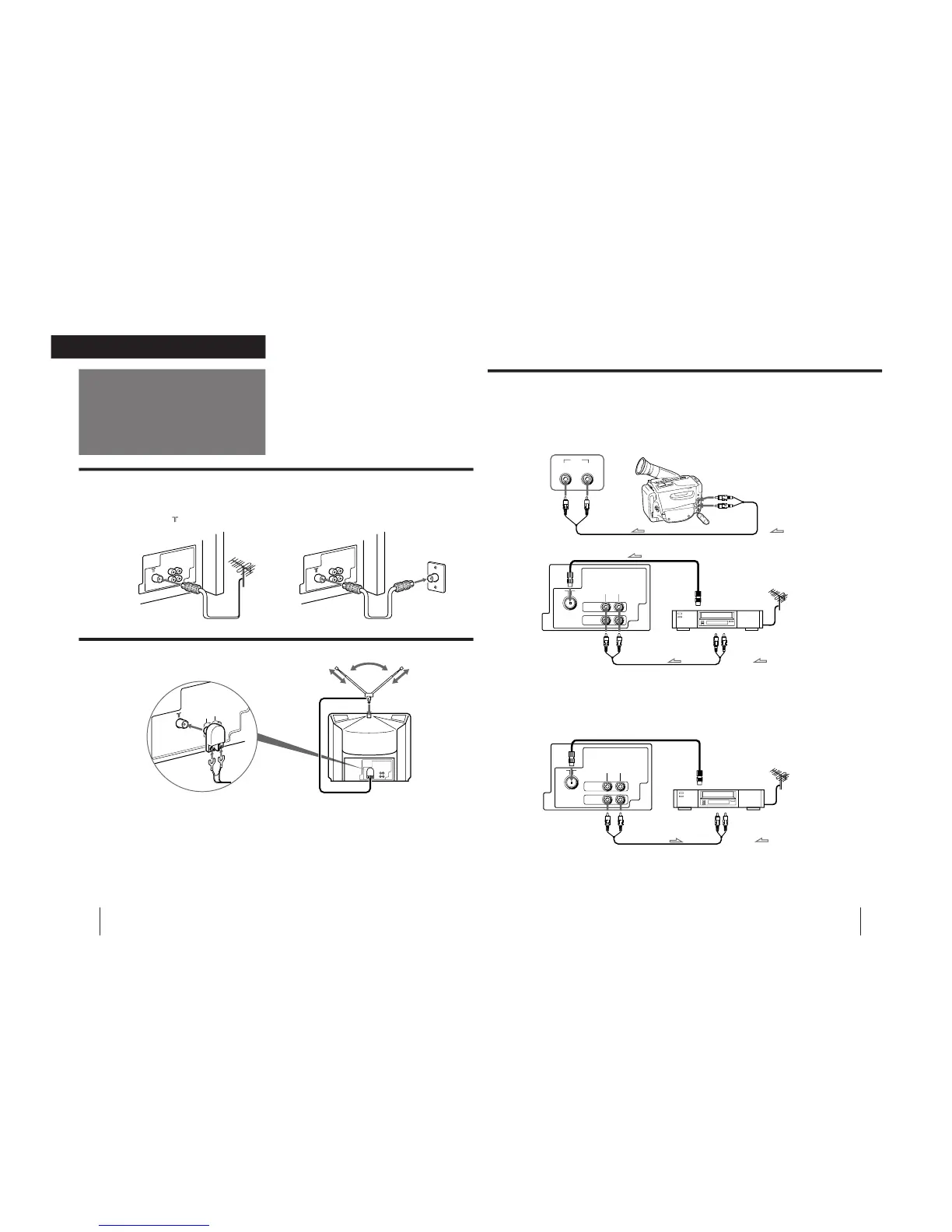
Connecting optional equipment
You can connect optional audio/video equipment to your TV such as a VCR, multi disc player, camcorder, or video
game.
Connecting video equipment using the
…
(video input) jack
When connecting video equipment to the
…
(video input) jack
Do not connect video equipment to the
…
(video input) jacks at the front and the rear of your TV simultaneously; otherwise the picture
will not be displayed properly on the screen.
Connecting audio/video equipment using the
Ú
(monitor output) jack
Rear of TV
to antenna socket
VCR
to antenna
output
to video and
audio outputs
: Signal flow
to
…
(video input)
D
(video) and
≥
(audio) inputs
to
Ú
(monitor output)
D
(video) and
≥
(audio) outputs
to
…
(video input)
D
(video) and
≥
(audio) inputs
When recording through the
Ú
(monitor output) jack
Do not change the channel or video input while recording with a VCR; otherwise the channel or video input you are recording also will be
changed.
Getting Started
4
-EN
Connecting a VHF antenna or a combination VHF/UHF antenna
— 75-ohm coaxial cable (round)
Attach an optional IEC antenna connector to the 75-ohm coaxial cable.
Plug the connector into the
(antenna) socket at the rear of the TV.
Connecting an indoor antenna
Connections
On a wall
or
Note
• You are advised to use an outdoor antenna for better reception.




 To Next Page