14 Menu Adjustment
Sony KV-HW21M83 Group A19 (GB)_4-098-348-11(1)
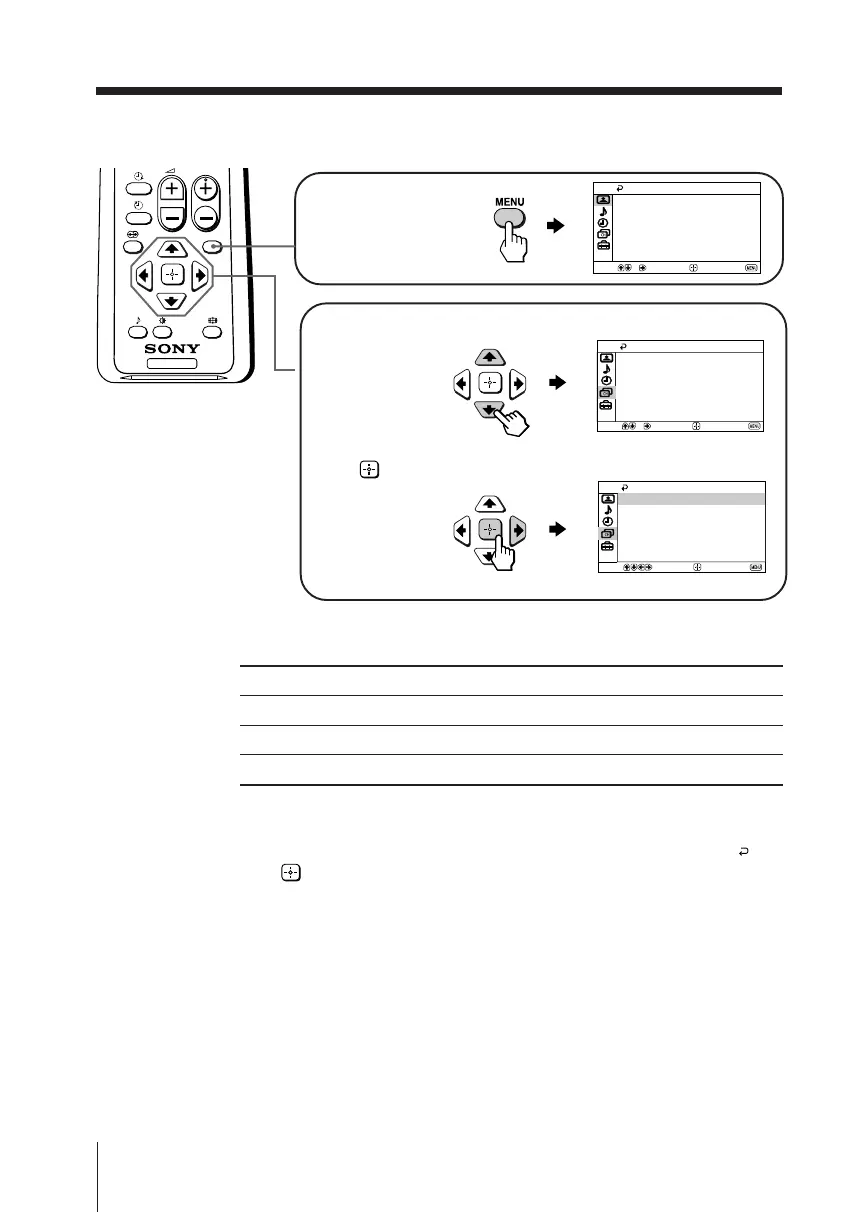
How to use the menu
Other menu operations
Tips
• If you want to exit from Menu level 2 to Menu level 1, press V or v until the return icon ( ) is
highlighted, then press .
• The MENU, t and 2 +/– buttons on the top control panel can also be used for the
operations above (see page 8).
To
Adjust the setting value
Move to the next/previous menu level
Cancel the menu
Press
V, v, B or b.
B or b.
MENU.
Press V or v to select
the desired item.
Press
(or b) to
confirm your
selection and
go to the next
level.
Press MENU to
display the menu.
TV
MENU
PROG
Select
Confirm
End
Picture
Color Temperature: Cool
Picture Adjustment
Mode: Dynamic
Intelligent Picture: On
Select
End
Channel Setup
Program Label
TV System:
Manual Program
Auto Program
Confirm
Program Block
B/G
Select
End
Channel Setup
Program Label
Manual Program
B/G
TV System:
Program Block
Confirm
Auto Program
01GB05AVD-MIX.p65 24/7/03, 3:17 PM14



 To Next Page