24 Additional Information
Sony KV-HW21M83 Group A19 (GB)_4-098-348-11(1)
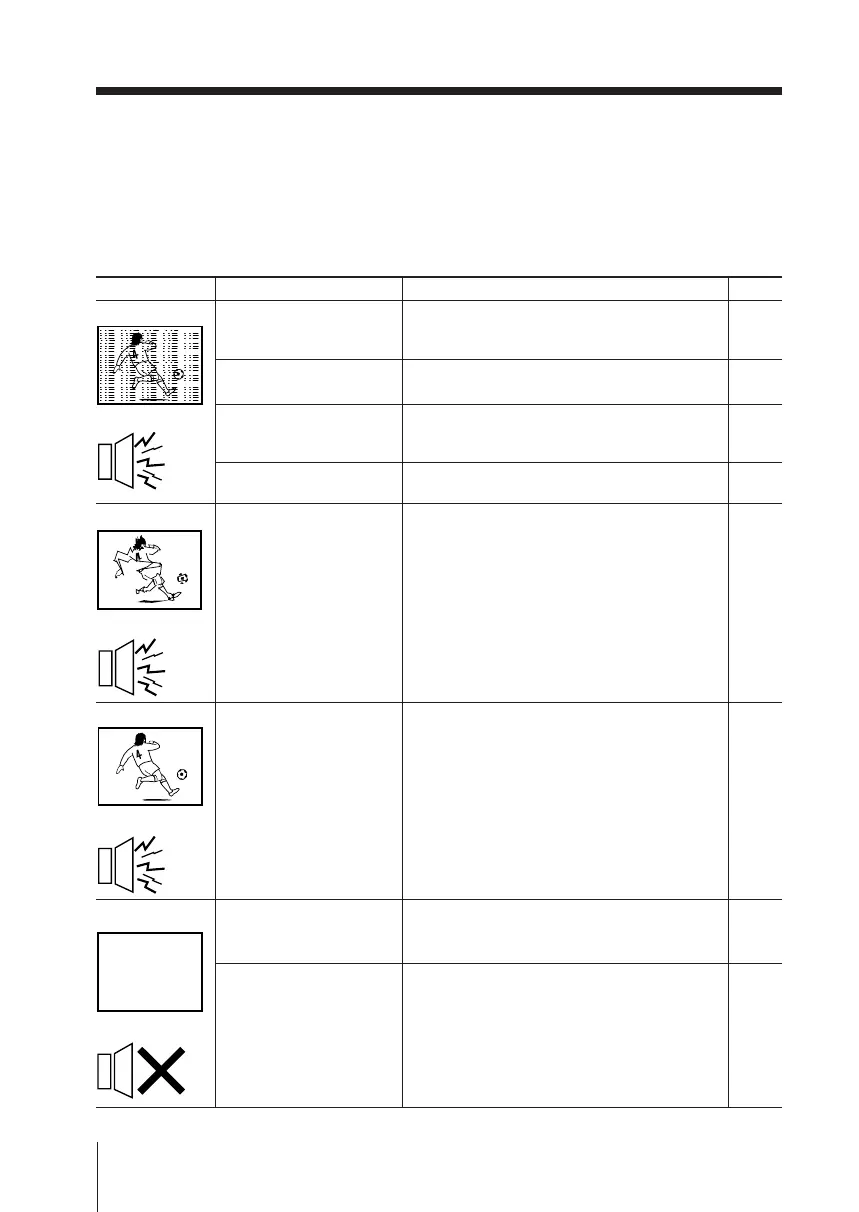
Snowy picture
Noisy sound
Distorted picture
Noisy sound
Good picture
Noisy sound
No picture
No sound
Possible cause
Symptom
Solutions
x Troubleshooting
If you find any problem while viewing your TV, please check the following
guide. If any problem persists, contact your Sony dealer.
Page
22
–
20
–
–
20
22
9
8
• Check the antenna cable and connection
on the TV, VCR and at the wall.
• Check the antenna setup.
Contact a Sony dealer for advice.
• Display the “Channel Setup” menu and
select “Manual Program” to preset the
channel again.
• Try using a booster.
• Turn off or disconnect the booster if it is in
use.
• Display the “Channel Setup” menu and
select the appropriate “TV System”.
• Check the power cord, antenna and VCR
connections.
• Press
?/1
(power).
• Press ! (main power) on the TV to turn
off the TV for about five seconds, then
turn it on again.
• The connection is loose
or the cable is
damaged.
• The antenna setup is
inappropriate.
• Channel presetting is
inappropriate or
incomplete.
• Signal transmission is
low.
• Broadcast signals are
too strong.
• The TV system setting
is inappropriate.
• The power cord,
antenna or VCR is not
connected.
• The TV is not turned
on.
Troubleshooting guide
01GB08ADV-MIX.p65 24/7/03, 3:18 PM24



 To Next Page