EasyManua.ls Logo

Sony TRINITRON KV-M2170A - Automatic Channel Presetting; TV Operation Guide; Basic TV Functions; Programme Selection and Input Viewing

Sony TRINITRON KV-M2170A
13 pages
Print Icon
To Next Page IconTo Next Page
To Previous Page IconTo Previous Page
Loading...
TV
Operation
}step4
TV
Operation
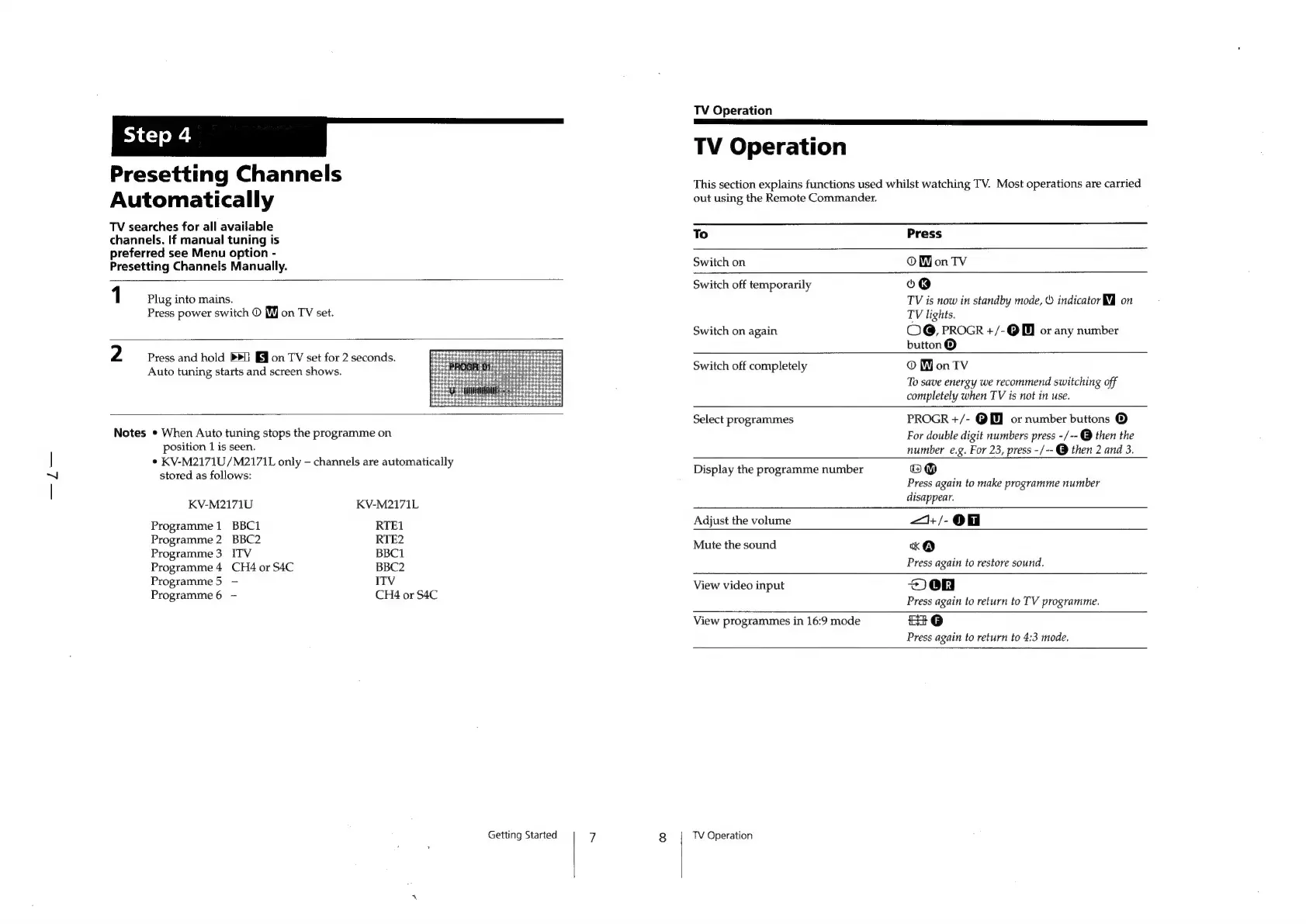
Presetting
Channels
Automatically
TV
searches
for
all
available
channels.
If
manual
tuning
is
preferred
see
Menu
option
-
Presetting
Channels
Manually.
This
section
explains
functions
used
whilst
watching
TV.
Most
operations
are
carried
out
using
the
Remote
Commander.
1
Plug
into
mains.
Press
power
switch
©
[ff]
on
TV
set.
2
Press
and
hold
»>U
FM
on
TV
set
for
2
seconds.
Auto
tuning
starts
and
screen
shows.
Notes
*
When
Auto
tuning
stops
the
programme
on
position
1
is
seen.
¢
KV-M2171U/M2171L
only
channels
are
automatically
stored
as
follows:
KV-M2171U
Programme
1
BBC1
Programme
2
BBC2
Programme
3
ITV
Programme
4
CH4
or
S4C
Programme
5
Programme
6
KV-M2171L
RTE1
RTE2
BBC1
BBC2
ITV
CH4
or
S4C
To
Press
Switch
on
OW
on
TV
Switch
off
temporarily
o®@
TV
is
now
in
standby
mode,
©
indicator
MJ
on
TV
lights.
Switch
on
again
OG,
PROGR
+/-@
0
or
any
number
button®
Switch
off
completely
©
WY
on
TV
To
save
energy
we
recommend
switching
off
completely
when
TV
is
not
in
use.
Select
programmes
PROGR
+/-
@
or
number
buttons
®
For
double
digit
numbers
press
-/--
@
then
the
number
e.g.
For
23,
press
-/--@
then
2
and
3.
Display
the
programme
number
(eK)
Press
again
to
make
programme
number
disappear.
Adjust
the
volume
—1+/-@
Mute
the
sound
Keo
Press
again
to
restore
sound.
View
video
input
2e0n
Press
again
to
return
to
TV
programme.
View
programmes
in
16:9
mode
82
@
Press
again
to
return
to
4:3
mode.
Getting
Started
7
8
TV
Operation

Other manuals for Sony TRINITRON KV-M2170A

Related product manuals