EasyManua.ls Logo

Sony TRINITRON KV-M2170E - Teletext Functions

Sony TRINITRON KV-M2170E
13 pages
Print Icon
To Next Page IconTo Next Page
To Previous Page IconTo Previous Page
Loading...
Teletext
Operation
(only
for
KV-M2171U/M2171L)
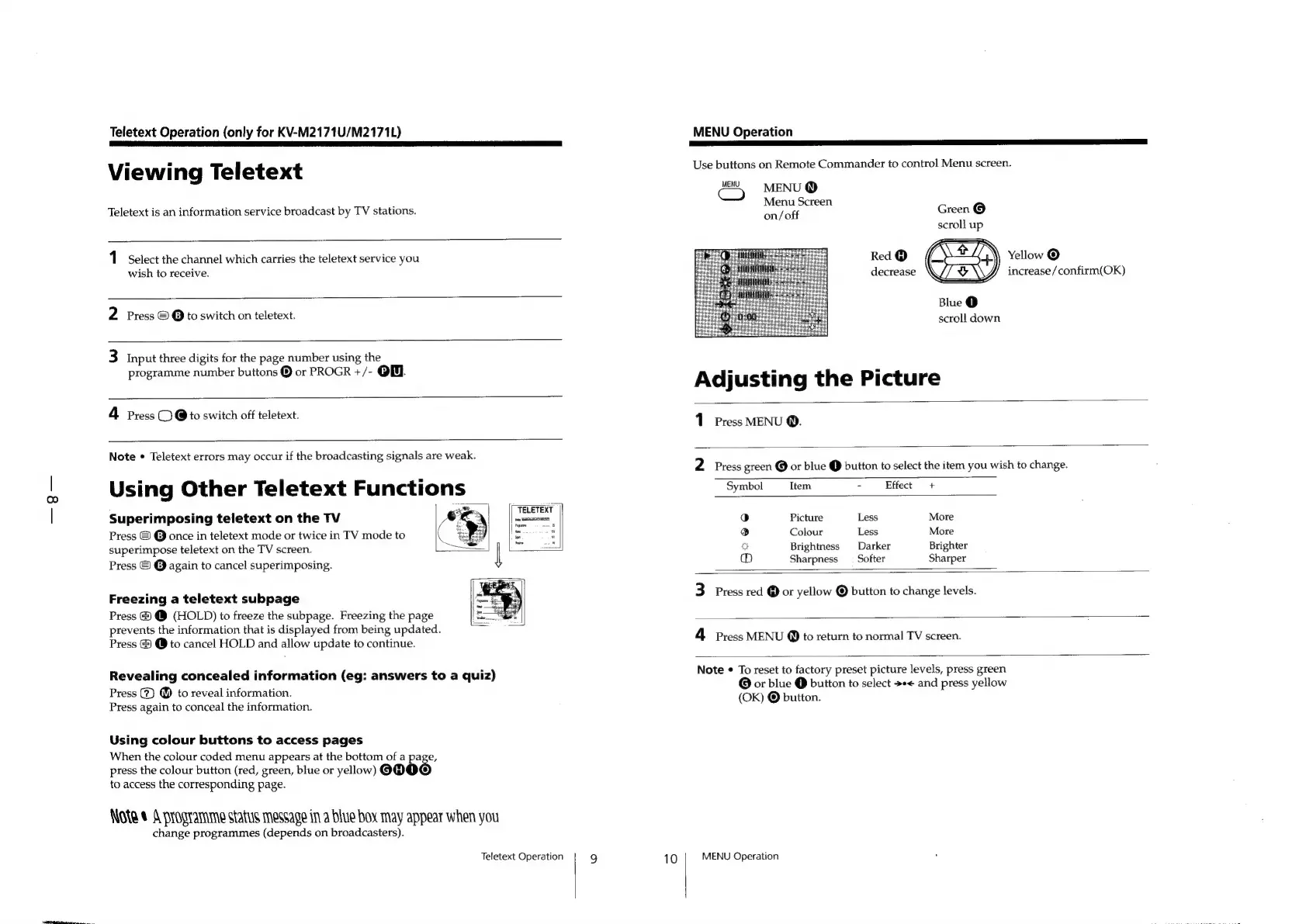
Viewing
Teletext
Teletext
is
an
information
service
broadcast
by
TV
stations.
1
Select
the
channel
which
carries
the
teletext
service
you
wish
to
receive.
2
Press
©
@
to
switch
on
teletext.
3
Input
three
digits
for
the
page
number
using
the
programme
number
buttons
®
or
PROGR
+/-
OW.
4
Press
CO
@
to
switch
off
teletext.
Note
¢
Teletext
errors
may
occur
if
the
broadcasting
signals
are
weak.
Using
Other
Teletext
Functions
_
Superimposing
teletext
on
the
TV
Press
©
@
once
in
teletext
mode
or
twice
in
TV
mode
to
superimpose
teletext
on
the
TV
screen.
Press
©
©
again
to
cancel
superimposing.
TELETEXT
|
a
Freezing
a
teletext
subpage
Press
@
@
(HOLD)
to
freeze
the
subpage.
Freezing
the
page
prevents
the
information
that
is
displayed
from
being
updated.
Press
&
@
to
cancel
HOLD
and
allow
update
to
continue.
Revealing
concealed
information
(eg:
answers
to
a
quiz)
Press
(7)
@
to
reveal
information.
Press
again
to
conceal
the
information.
Using
colour
buttons
to
access
pages
When
the
colour
coded
menu
appears
at
the
bottom
of
a
page,
press
the
colour
button
(red,
green,
blue
or
yellow)
@@@
to
access
the
corresponding
page.
Note
©
A
programme
status
message
in
a
blue
box
may
appear
when
you
change
programmes
(depends
on
broadcasters).
Teletext
Operation
9
10
MENU
Operation
Use
buttons
on
Remote
Commander
to
control
Menu
screen.
MENU
Cc)
MENU
@
Menu
Screen
on/otk
Green
©
scroll
up
Red
@
a.
Yellow
©
decrease
[7
e\\Bf
increase/confirm(OK)
Blue
@
scroll
down
Adjusting
the
Picture
1
Press
MENU
@.
2
Press
green
@
or
blue
@
button
to
select
the
item
you
wish
to
change.
Symbol
Item
-
Effect
+
0
Picture
Less
More
Q
Colour
Less
More
oO
Brightness
Darker
Brighter
(aa)
Sharpness
_
Softer
Sharper
3
Press
red
@
or
yellow
@
button
to
change
levels.
4
Press
MENU
@
to
return
to
normal
TV
screen.
Note
¢
To
reset
to
factory
preset
picture
levels,
press
green
@
or
blue
@
button
to
select
+-<
and
press
yellow
(OK)
©
button.
MENU
Operation

Other manuals for Sony TRINITRON KV-M2170E

Related product manuals