Presetting
channels
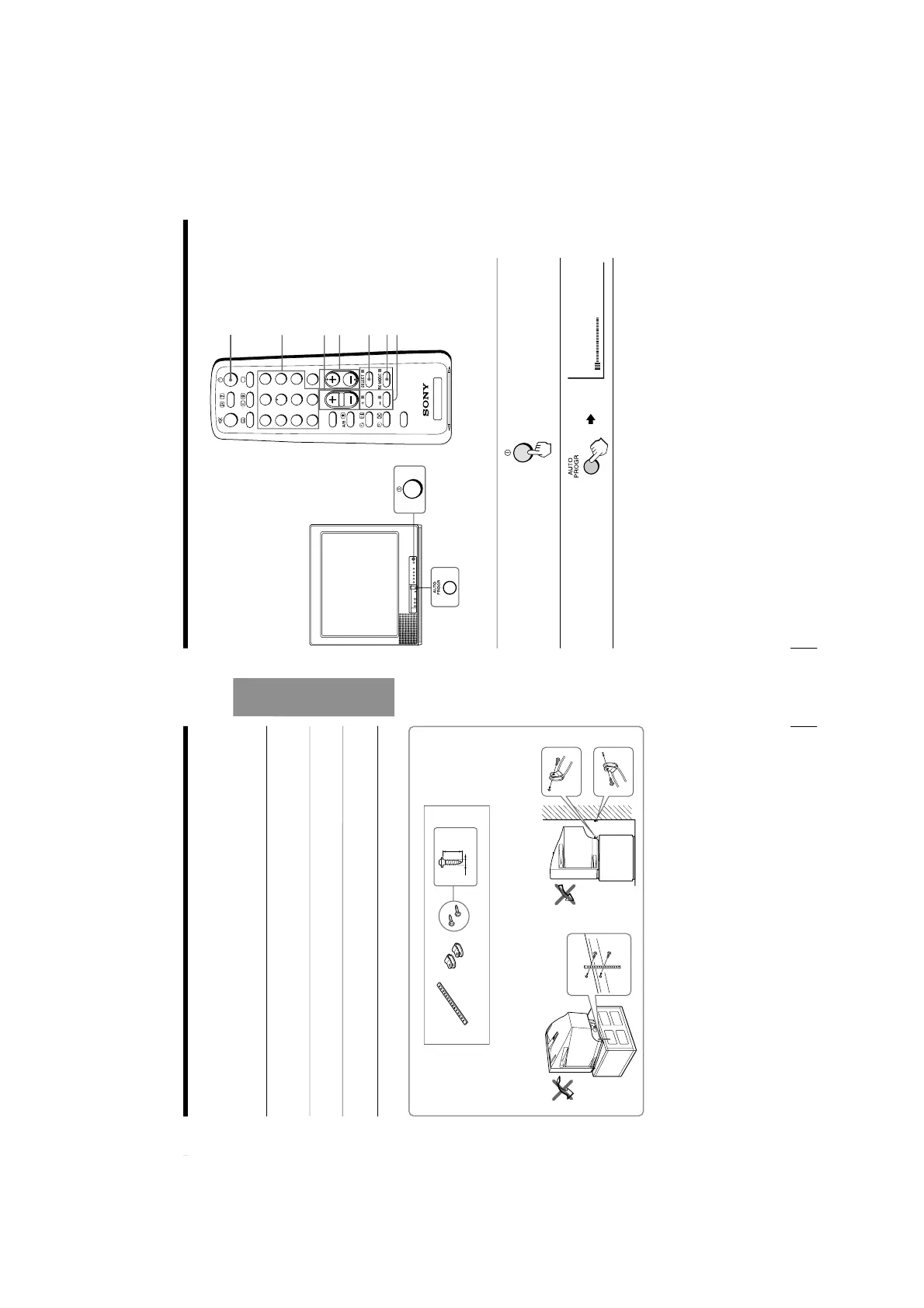
You can preset up to 100 TV channels in
numerical sequence from program
number 1 using the remote and the
buttons on your TV as well.
Presetting channels automatically
1
Press U to turn on the TV.
2
Press AUTO PROGR.
Note (KV-PF14DK7/PF14M40/PF14M70)
• During automatic channel presetting, your TV screen will indicate
“B/G”,
“I”, “D/K” or “M” for the TV system.
To preset channels automatically from a specified program number
(1) Press SELECT until
“AUT
O PROGRAM” appears.
(2) Press + or –.
The on-screen display will start flashing.
(3) Press PROGR +/– or the number buttons until the desir
ed program number
appears.
(4) Press + or –.
u
Number buttons
SELECT
. +/–
PROGR +/–
+ or –
PIC MODE
7
Using Your New TV
Using Your New TV
Securing the TV
To prevent the TV from falling, secure the TV using one of the following methods:
A
With the supplied screws, attach the band to the TV stand and to the rear of
the TV using the provided hole.
or
B
Put the cord or chain through the clamps to secure the TV against a wall or
pillar.
Note
• Use only the supplied screws. Use of other screws may damage the TV.
20
mm
A
B
3.8mm
or






 To Next Page