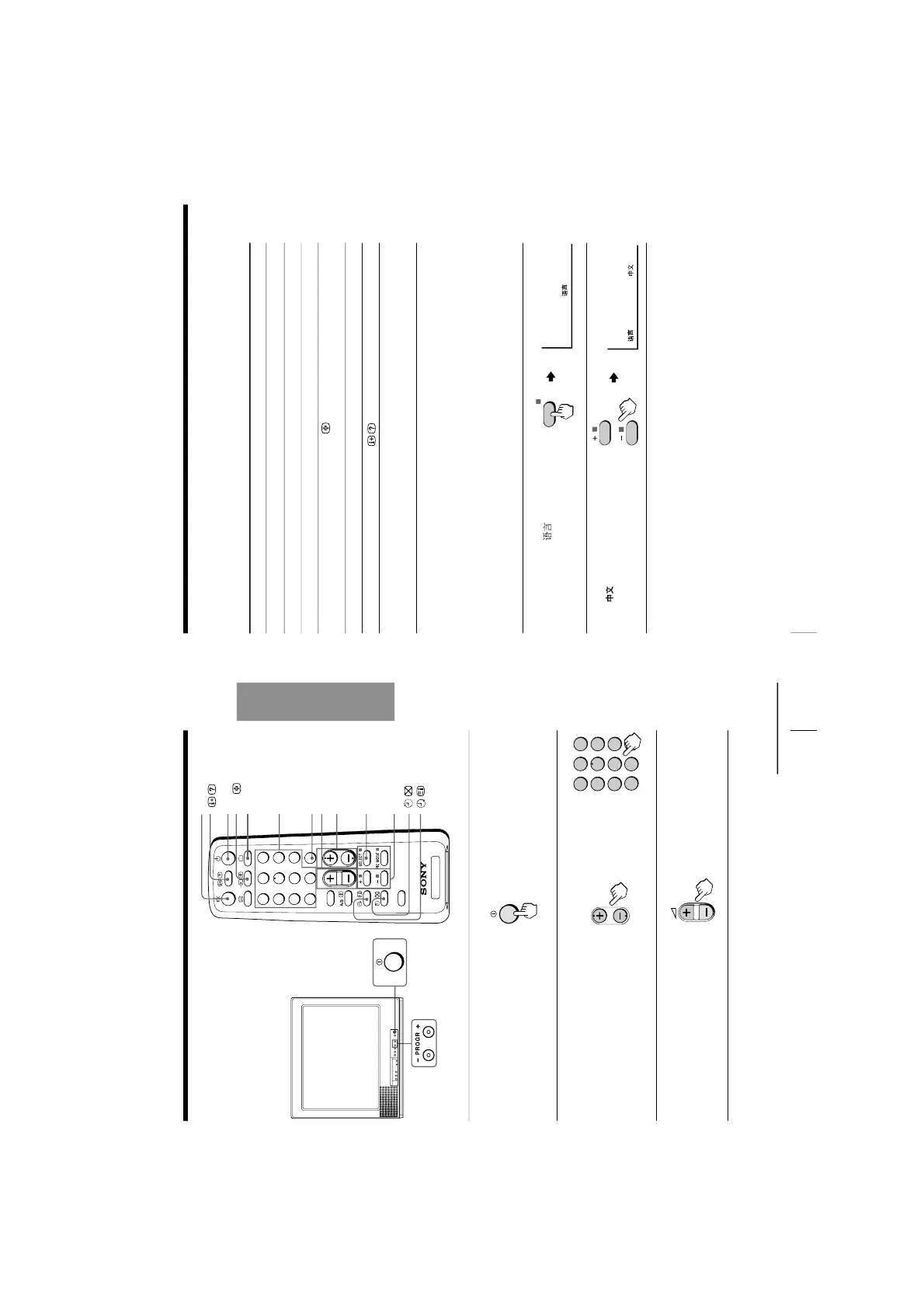
12
Using Your New TV
To
Turn off temporarily
Turn off completely
Mute the sound
Watch the video input
(VCR, camcorder, etc.)
Jump back to the previous channel
Display the on-screen information*
Adjust the volume of each TV
program automatically
Do this
Press u. The u indicator on the TV lights up red.
Press U on the TV.
Press ¤.
Press …
to select “VIDEO 1” or “VIDEO 2”.
To return to the TV program, press ;.
Press JUMP.
Press
.
Press SELECT repeatedly until
“INTELLIGENT VOL
”
appears, then press + or – to select “ON”.
To cancel, select “OFF”.
* The picture, sound, and either the program number or video mode are
displayed. The on-screen display for the picture and sound information
disappears after about 3 seconds.
Changing the on-screen display language
(except KV-PF14DK7/PF14L70/PF14M70(ME)/PF14Q70(ME))
1
Press SELECT until
“LANGUAGE /
:
ENGLISH”appears on the
screen.
2
Press + or – to select
“
“.
Tip
• You can also use SELECT and . +/– on the TV to select the on-screen
display language.
Additional tasks
Watching the TV (continued)
Watching the TV
This section explains functions used
while watching the TV. Most operations
can be done using the remote.
1
Press U to turn on the TV.
When the TV is in the
standby mode (the u
indicator on the TV is lit
red), press u on the remote
or PROGR +/– on the TV
.
2
Press PROGR +/
– or the
number buttons to select
the TV program.
For double digit numbers,
press ÷, then the number
(e.g., for 25, press ÷, then
2 and 5).
3
Press
. +/– to adjust the
volume.
¤
u
…
;
Number buttons
SELECT
. +/–
PROGR +/–
+ or –
JUMP
or
continued






 To Next Page