– 12 –
KV-PF21N70/PF51P40/PF21P70/PF21Q40
RM-915 RM-952 RM-952 RM-952
KV-PF21Q70/PF21M70/PF21DK7
RM-952 RM-952 RM-952
9
Using Your New TV
Using Your New TV
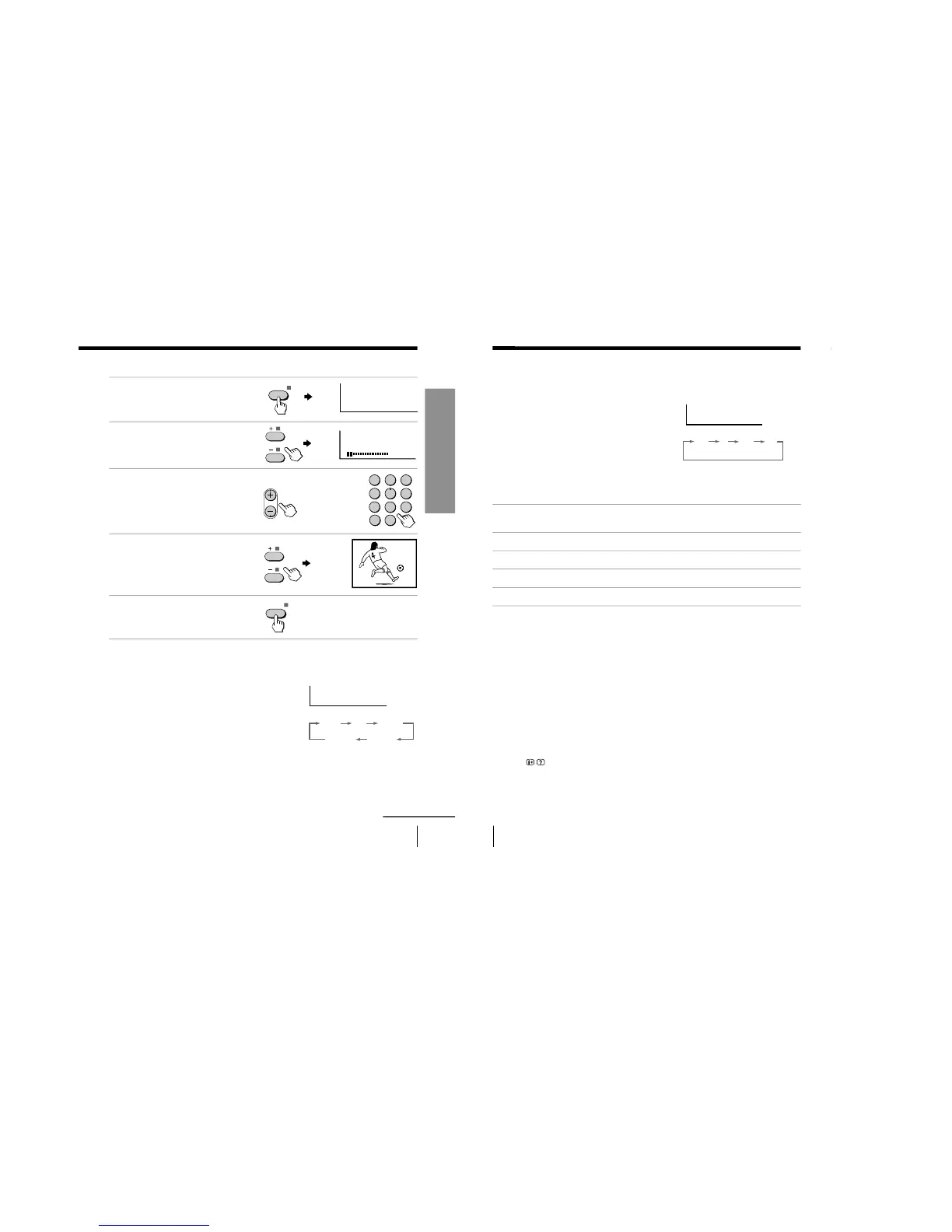
Presetting channels manually
1
Press SELECT until
“MANUAL PROGRAM”
appears.
2
Press + or –.
3
Press PROGR +/– or the
number buttons until the
desired program number
appears.
4
Press + or – until the
desired channel picture
appears.
5
Press SELECT.
To change the color system setting
If the color is abnormal when receiving programs through the
˘
(antenna) terminal
or the
…
(video input) jack
(1) Press SELECT until
“COL
SYS” appears.
(2) Press + or – to select the appropriate color
system until the color is optimal.
Tip
• Normally set “COL SYS” to “AUTO”.
Note
• The color system
“SECAM” is not available for KV
-PF21P70.
The color system
“NTSC3.58” is not available for KV
-PF21Q70 and
KV-PF21Q40.
continued
10
Using Your New TV
To change the TV system setting (KV-PF21M70/PF21DK7 only)
If the picture or sound is abnormal when receiving programs through the
˘
(antenna)
terminal
(1) Press SELECT until
“TV SYS” appears.
(2) Press + or – to select the appropriate
TV system until the picture or sound
quality is optimal.
*KV-PF21DK7 has B/G and D/K system only
Skipping program numbers
1
Press PROGR +/
– or the number buttons until the unused or unwanted
program number appears.
2
Press SELECT until
“MANUAL PROGRAM
” appears.
3
Press + or –.
4
Press PIC MODE.
5
Press SELECT.
To preset the skipped program number again
Preset the channel automatically or manually.
Tip
• You can also use SELECT and
¸
+/– on the TV to preset channels and
skip program numbers.
To use the fine tuning (FINE) function
The fine tuning (FINE) function may help to reduce the following problems: double
images and lines moving across the TV screen.
You can use the fine tuning function as below:
(1) Select the program number you want to adjust.
(2) Press SELECT until
“MANUAL
PROGRAM” appears on the screen.
(3) Press + or – on the remote control once.
(4) Press
to display “FINE” on the scr
een.
(5) Press + or – continuously until the above problems are minimized.
The + or – icon on the screen flashes while tuning.
(6) Press SELECT to return to normal screen.
Presetting channels (continued)





 To Next Page