22
Additional Information
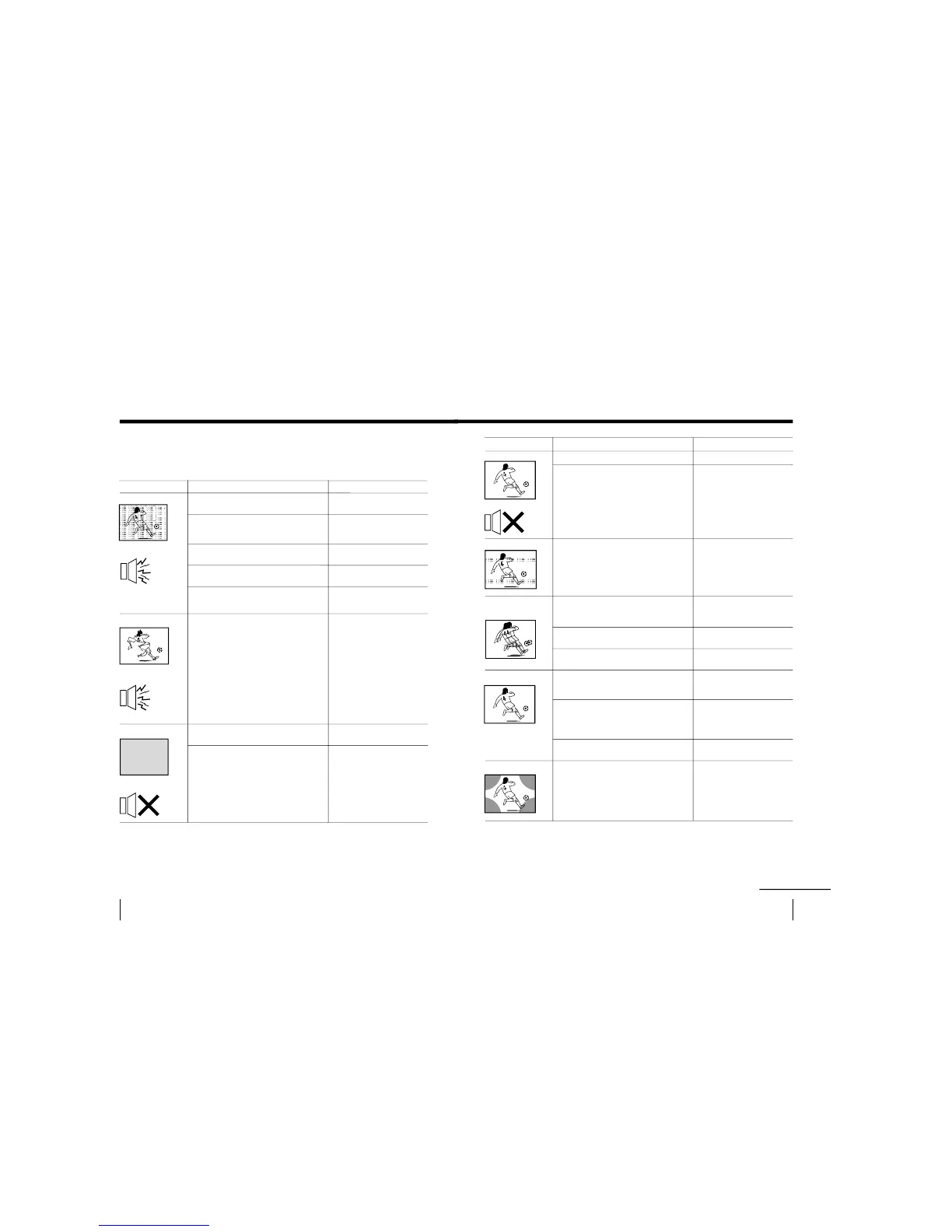
Snowy picture
Noisy sound
Distorted picture
Noisy sound
No picture
No sound
Troubleshooting (KV-PF51P40)
If you find any problem while viewing your TV, please check the following guide. If
any problem persists, contact your Sony dealer .
Possible cause
Symptom
Solutions
•
Check the antenna cable and connection
on the TV, VCR and on the wall. (page 4)
• Press SELECT until
“MANUAL
PROGRAM” appears on the screen then
preset the channel again. (page 9)
• Check the antenna type (VHF/UHF).
Contact a Sony dealer for advice.
• Adjust the antenna direction. Contact a
Sony dealer for advice.
• Try using a booster.
• Turn off or disconnect the booster if it is
in use.
• Check the power cord, antenna and the
VCR connections.
• Press u (power).
• Press U (main power) on the TV to turn
off the TV for about five seconds, then
turn it on again.
• Connection is loose or the
cable is damaged.
• Channel presetting is
inappropriate or
incomplete.
• The antenna type is
inappropriate.
• The antenna direction is
inappropriate.
• Signal transmission is low.
• Broadcast signals are too
strong.
• The power cord, antenna
or VCR is not connected.
• The TV is not turned on.
19
Additional Information
Possible causeSymptom
Solutions
continued
Good picture
No sound
Dotted lines or stripes
Double images or
“ghosts”
N
o
color
Abnormal color patches
• Press ¸ + to increase the volume level.
• Press ¤ to cancel the muting.
• Do not use a hair dryer or other
equipment near the TV.
• Adjust the antenna direction for
minimum interference. Contact a Sony
dealer for advice.
• Use a highly directional antenna.
• Use the fine tuning (FINE) function.
(page 10)
• Adjust the antenna direction. Contact a
Sony dealer for advice.
• Turn off or disconnect the booster if it is
in use.
• Press SELECT until
“COLOR” appears
on the screen, then press + or – to adjust
the color level. (page 15)
•
Press SELECT until
“COL
SYS ” appears
on the screen, then check the color
system setting (usually set this to
“AUTO”). (page 9).
• Adjust the antenna direction. Contact a
Sony dealer for advice.
• Keep external speakers or other
electrical equipment away from the TV.
Do not move the TV while the TV is
turned on. Press U (main power) on
the TV to turn off the TV for about five
minutes, then turn it on again.
•
The volume level is too low.
• The sound is muted.
• There is local interference
from cars, neon signs, hair
dryers, power generators,
etc.
• Broadcast signals are
reflected by nearby
mountains or buildings.
• The antenna direction is
inappropriate.
• Use of a booster is
inappropriate.
• The color level setting is
too low.
• The color system setting is
inappropriate.
• The antenna direction is
inappropriate.
• The magnetic disturbance
from external speakers or
other equipment, or the
direction of the earth
’s
magnetic field may affect
the TV.





 To Next Page