EasyManua.ls Logo

Sony TRINITRON KV-X2583E - Test Mode 2 Operations; Test Mode 2 Function Overview

Sony TRINITRON KV-X2583E
59 pages
Print Icon
To Next Page IconTo Next Page
To Previous Page IconTo Previous Page
Loading...
KV-X258
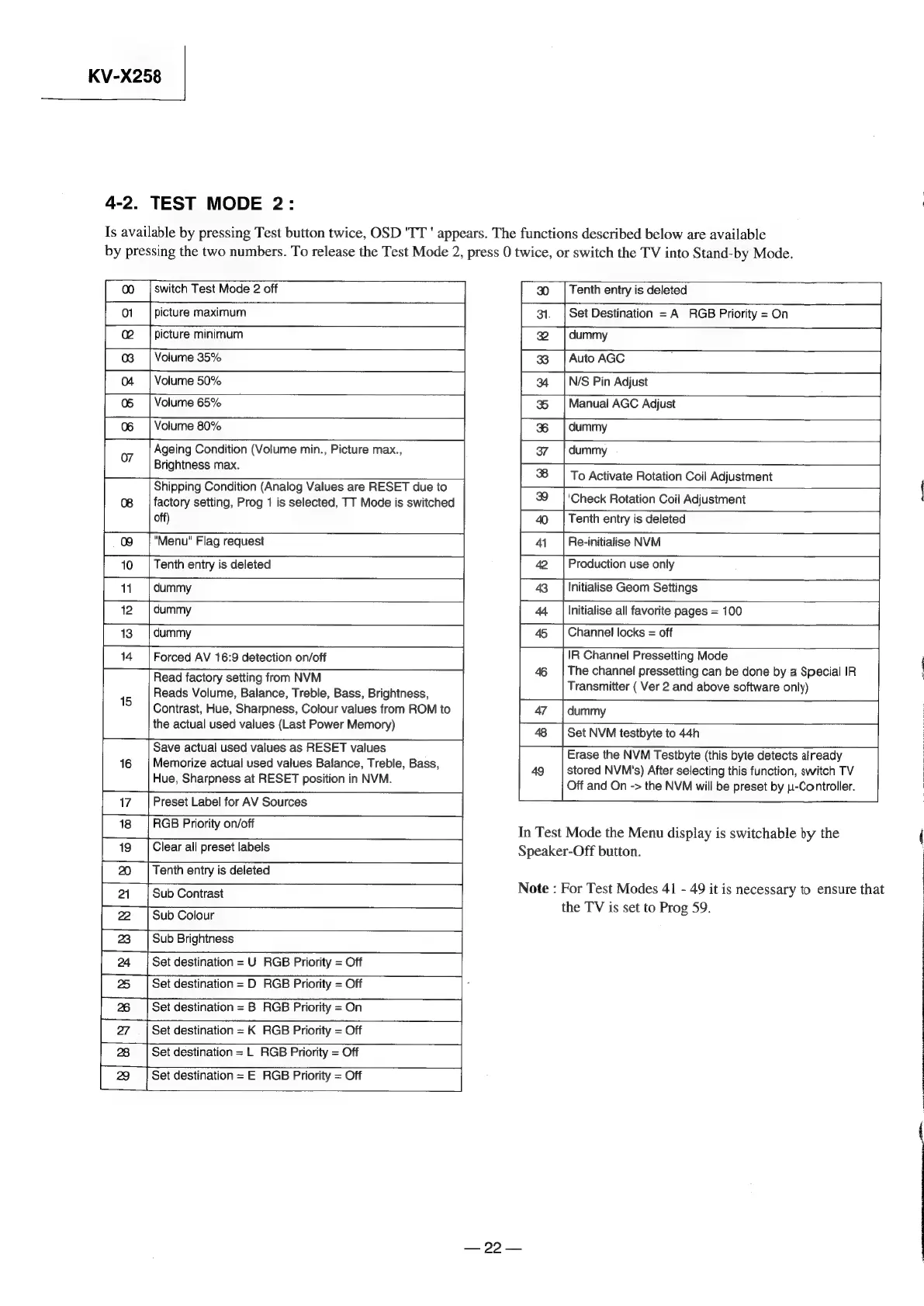
4-2.
TEST
MODE
2:
Is
available
by
pressing
Test
button
twice,
OSD
'TT
'
appears.
The
functions
described
below
are
available
by
pressing
the
two
numbers.
To
release
the
Test
Mode
2,
press
0
twice,
or
switch
the
TV
into
Stand-by
Mode.
00
|
switch
Test
Mode
2
off
01
picture
maximum
|
picture
minimum
038
|
Volume
35%
04
=|
Volume
50%
05
[Volume
65%
06
|
Volume
80%
07
Ageing
Condition
(Volume
min.,
Picture
max.,
Brightness
max.
Shipping
Condition
(Analog
Values
are
RESET
due
to
08
|
factory
setting,
Prog
1
is
selected,
TT
Mode
is
switched
off)
09
=|
"Menu"
Flag
request
10
|
Tenth
entry
is
deleted
11.
|
dummy
i
14
‘|
Forced
AV
16:9
detection
on/off
Read
factory
setting
from
NVM
15
Reads
Volume,
Balance,
Treble,
Bass,
Brightness,
Contrast,
Hue,
Sharpness,
Colour
values
from
ROM
to
the
actual
used
values
(Last
Power
Memory)
Save
actual
used
values
as
RESET
values
16
|
Memorize
actual
used
values
Balance,
Treble,
Bass,
Hue,
Sharpness
at
RESET
position
in
NVM.
17
|
Preset
Label
for
AV
Sources
18
|
RGB
Priority
on/off
Clear
all
preset
labels
=
Tenth
entry
is
deleted
21
‘|
Sub
Contrast
22
=|
Sub
Colour
23
‘|
Sub
Brightness
=
24
=|
Set
destination
=
U
RGB
Priority
=
Off
25
=|
Set
destination
=
D
RGB
Priority
=
Off
Set
destination
=
B
RGB
Priority
=
On
Set
destination
=
L
RGB
Priority
=
Off
Set
destination
=
E
RGB
Priority
=
Off
30
«(|
Tenth
entry
is
deleted
31.
|
Set
Destination
=A
RGB
Priority
=
On
dummy
Auto
AGC
AL
2
8
34
=|
N/S
Pin
Adjust
35
+|
Manual
AGC
Adjust
%
=|
dummy
37
dummy
To
Activate
Rotation
Coil
Adjustment
—|—
8
39
|
'Check
Rotation
Coil
Adjustment
40
|
Tenth
entry
is
deleted
a)
Re-initialise
NVM
Production
use
only
Initialise
Geom
Settings
Channel
locks
=
off
IR
Channel
Pressetting
Mode
The
channel
pressetting
can
be
done
by
a
Special
IR
Transmitter
(
Ver
2
and
above
software
only)
Set
NVM
testbyte
to
44h
Erase
the
NVM
Testbyte
(this
byte
detects
already
49
|
stored
NVM's)
After
selecting
this
function,
switch
TV
Off
and
On
->
the
NVM
will
be
preset
by
1-Controller.
In
Test
Mode
the
Menu
display
is
switchable
by
the
Speaker-Off
button.
Note
:
For
Test
Modes
41
-
49
it
is
necessary
to
ensure
that
the
TV
is
set
to
Prog
59.
—
99
eisai