EasyManua.ls Logo

Sony TRINITRON KV-X2583E - General

Sony TRINITRON KV-X2583E
59 pages
Print Icon
To Next Page IconTo Next Page
To Previous Page IconTo Previous Page
Loading...
SECTION
1
GENERAL
The
operating
instructions
mentioned
here
are
Partial
abstracts
from
the
Operating
Instruction
Manual.
The
page
numbers
of
the
Operating
instruction
Manual
remain
as
in
the
manual.
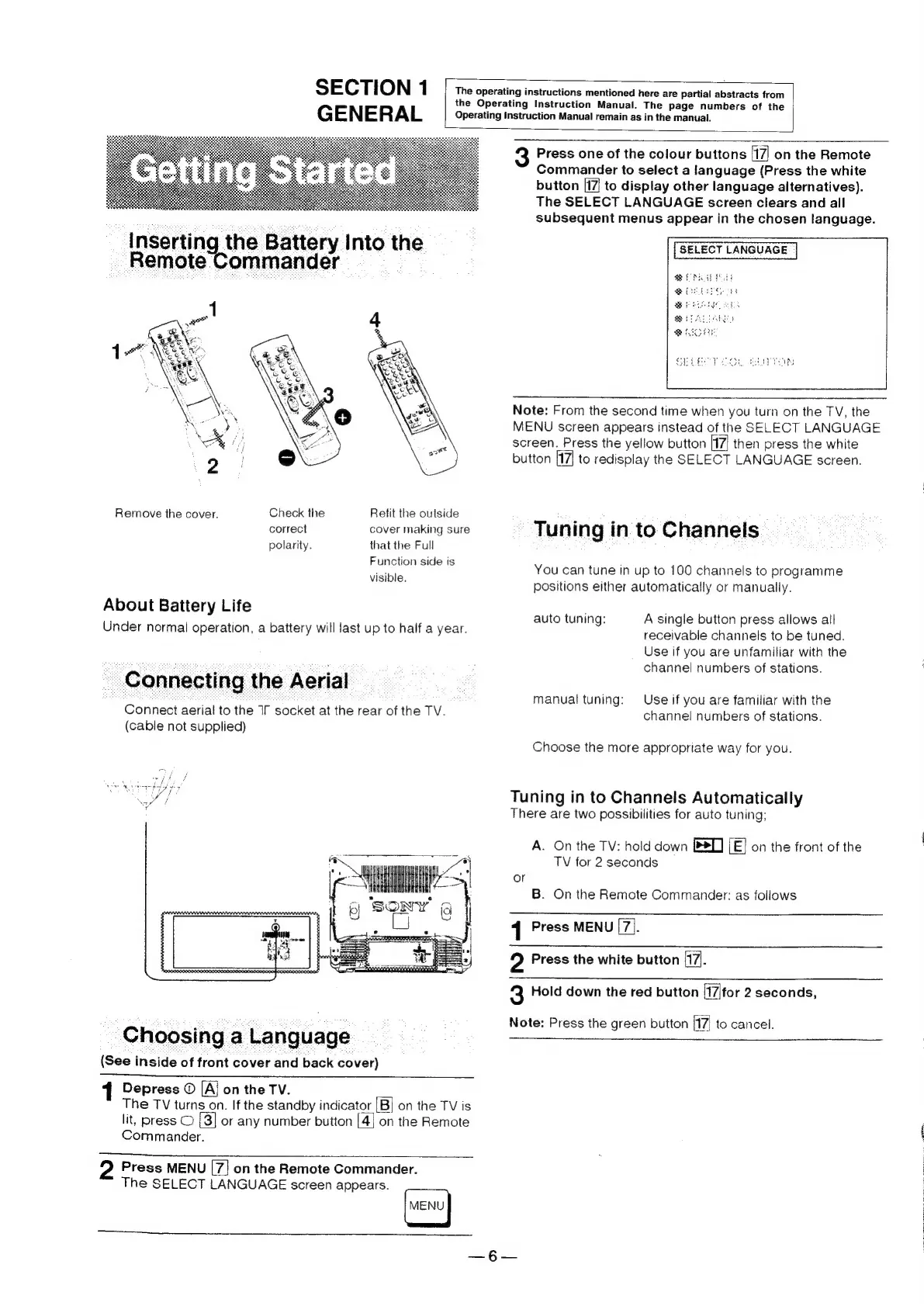
Inserting
the
Battery
Into
the
Remote
Commander
3
Remove
the
cover.
Check
the
Retit
the
outside
correct
cover
making
sure
polarity.
that
the
Full
Function
side
is
visible.
About
Battery
Life
Under
normal
operation,
a
battery
will
last
up
to
half
a
year.
Connecting
the
Aerial
Connect
aerial
to
the
IT
socket
at
the
rear
of
the
TV.
(cable
not
supplied)
Choosing
a
Language
(See
inside
of
front
cover
and
back
cover)
1
Depress
©
[Aj
on
the
TV.
The
TV
turns
on.
If
the
standby
indicator
|B]
on
the
TV
is
lit,
press
©
[3]
or
any
number
button
[4]
on
the
Remote
Commander.
2
Press
MENU
[7]
on
the
Remote
Commander.
The
SELECT
LANGUAGE
screen
appears.
3
Press
one
of
the
colour
buttons
47
on
the
Remote
Commander
to
select
a
language
(Press
the
white
button
[17
to
display
other
language
alternatives).
The
SELECT
LANGUAGE
screen
clears
and
all
subsequent
menus
appear
in
the
chosen
language.
SELECT
LANGUAGE
Note:
From
the
second
time
when
you
turn
on
the
TV,
the
MENU
screen
appears
instead
of
the
SELECT
LANGUAGE
screen.
Press
the
yellow
button
17
then
press
the
white
button
[17]
to
redisplay
the
SELECT
LANGUAGE
screen.
Tuning
in
to
Channels
You
can
tune
in
up
to
100
channels
to
programme
positions
either
automatically
or
manually.
A
single
button
press
allows
all
receivable
channels
to
be
tuned.
Use
if
you
are
unfamiliar
with
the
channel
numbers
of
stations.
auto
tuning:
Use
if
you
are
familiar
with
the
channel
numbers
of
stations.
manual
tuning:
Choose
the
more
appropriate
way
for
you.
Tuning
in
to
Channels
Automatically
There
are
two
possibilities
for
auto
tuning;
A.
On
the
TV:
hold
down
BD]
LE]
on
the
front
of
the
TV
for
2
seconds
or
B.
On
the
Remote
Commander:
as
follows
{
Press
MENU
[7].
2
Press
the
white
button
(17).
Q
Hold
down
the
red
button
t7|for
2
seconds,
Note:
Press
the
green
button
(t7|
to
cancel.