EasyManua.ls Logo

Sony TRINITRON KV-X2583E - Basic TV Operations; Powering TV On and Off

Sony TRINITRON KV-X2583E
59 pages
Print Icon
To Next Page IconTo Next Page
To Previous Page IconTo Previous Page
Loading...
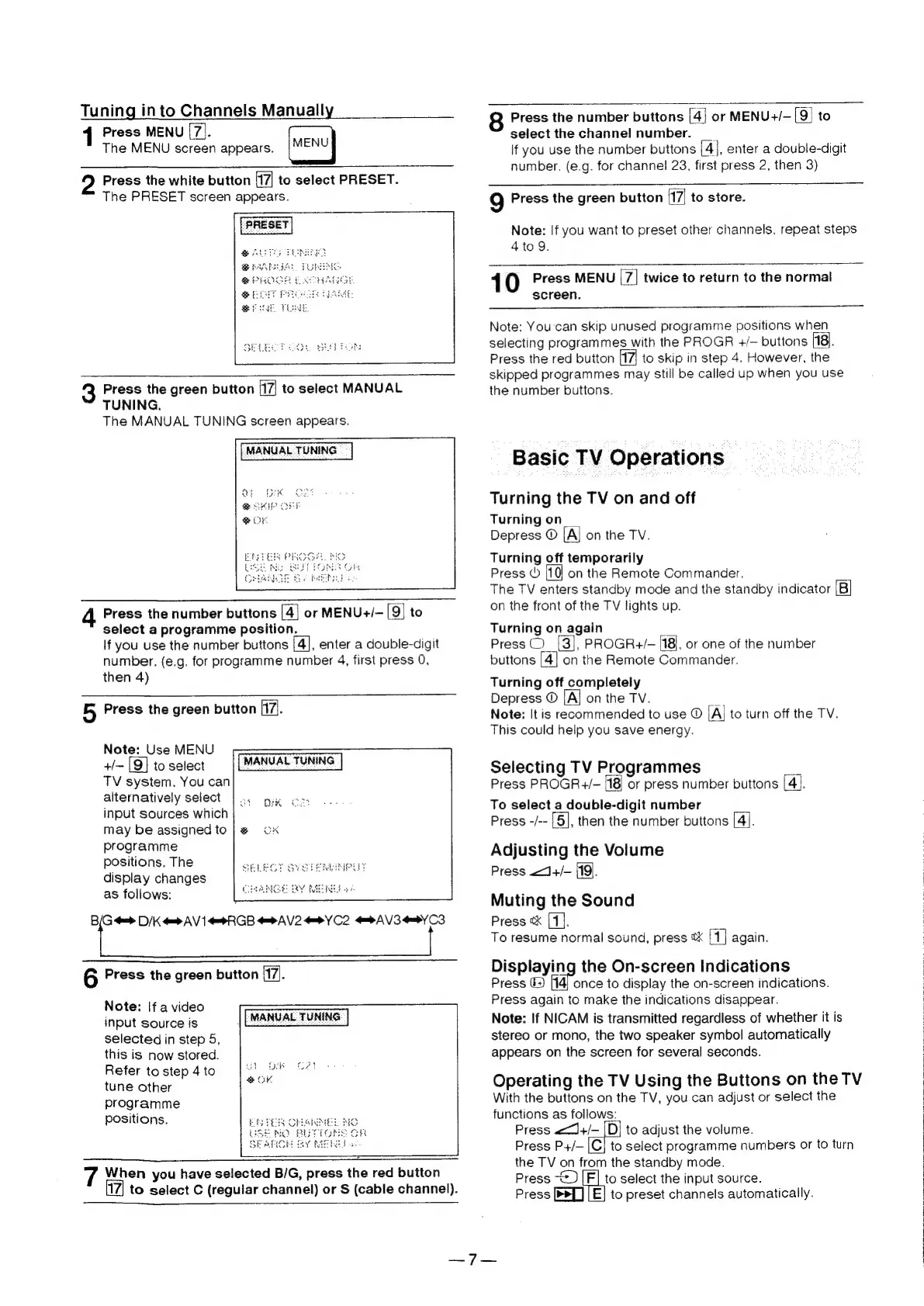
Tuning
into
Channels
Manually
Press
MENU
[7].
The
MENU
screen
appears.
Press
the
white
button
[17]
to
select
PRESET.
The
PRESET
screen
appears.
ed
SELECT
OO1,
ud
bats
3
Press
the
green
button
H7|
to
select
MANUAL
TUNING.
The
MANUAL
TUNING
screen
appears.
4
Press
the
number
buttons
[4}
or
MENU+/-
[9]
to
select
a
programme
position.
If
you
use
the
number
buttons
[4],
enter
a
double-digit
number.
(e.g.
for
programme
number
4,
first
press
0,
then
4)
B,
Press
the
green
button
(71.
Note:
Use
MENU
+/~
[9]
to
select
TV
system.
You
can
alternatively
select
input
sources
which
MANUAL
TUNING
programme
positions.
The
display
changes
as
follows:
1.
>
D/K
=> AV
1
RGB
PAV
2
9
YC2
AV3YCS
6
Press
the
green
button
[17].
Note:
If
a
video
input
source
is
selected
in
step
5,
this
is
now
stored.
Refer
to
step
4
to
tune
other
programme
positions.
|
[MANUAL
TUNING
7
When
you
have
selected
B/G,
press
the red
button
to
select
C
(regular
channel)
or
S
(cable
channel).
Press
the
number
buttons
[4]
or
MENU+/-
[9]
to
select
the
channel
number.
__
lf
you
use
the
number
buttons
[4],
enter
a
double-digit
number.
(e.g.
for
channel
23,
first
press
2,
then
3)
9
Press
the
green
button
(17|
to
store.
Note:
If
you
want
to
preset
other
channels,
repeat
steps
4to
9.
1
0
Press
MENU
[7]
twice
to
return
to
the
normal
screen.
Note:
You'can
skip
unused
programme
positions
when
selecting
programmes
with
the
PROGR
+/—
buttons
[18).
Press
the red
button
f7|
to
skip
in
step
4.
However,
the
skipped
programmes
may
still
be
called
up
when
you
use
the
number
buttons.
Basic
TV
Operations
Turning
the
TV
on
and
off
Turning
on
Depress
©
[A]
on
the
TV.
Turning
off
temporarily
Press
©
10
on
the
Remote
Commander.
The
TV
enters
standby
mode
and
the
standby
indicator
(B]
on
the
front
of
the
TV
lights
up.
Turning
on
again
=
Press
©
[3],
PROGR+/-
[18],
or
one
of
the
number
buttons
[4]
on
the
Remote
Commander.
Turning
off
completely
Depress
©
on
the
TV.
a
Note:
It
is
recommended
to
use
©
[Al
to
turn
off
the
TV.
This
could
help
you
save
energy.
Selecting
TV
Programmes
Press
PROGR+/—
or
press
number
buttons
[4].
To
select
a
double-digit
number
Press
-/--
[5],
then
the
number
buttons
[4].
Adjusting
the
Volume
Press
<<J+/-
(19).
Muting
the
Sound
Press
¢
{1}.
To
resume
normal
sound,
press
&
1}
again.
Displaying
the
On-screen
Indications
Press
©
|14)
once
to
display
the
on-screen
indications.
Press
again
to
make
the
indications
disappear.
Note:
If
NICAM
is
transmitted
regardless
of
whether
it
is
stereo
or
mono,
the
two
speaker
symbol
automatically
appears
on
the
screen
for
several
seconds.
Operating
the
TV
Using
the
Buttons
on
the
TV
With
the
buttons
on
the
TV,
you
can
adjust
or
select
the
functions
as
follows:
|
Press
<<J+/—
|D,
to
adjust
the
volume.
Press
P+/—
[|C}
to
select
programme
numbers
or
to
turn
the
TV
on
from
the
standby
mode.
Press
~_)
[F]
to
select
the
input
source.
Press
[PL]
[E]
to
preset
channels
automatically.

Related product manuals