EasyManua.ls Logo

Sony TRINITRON KV-X2583E - Advanced TV Operations; Operating the Menu System; Picture and Sound Settings

Sony TRINITRON KV-X2583E
59 pages
Print Icon
To Next Page IconTo Next Page
To Previous Page IconTo Previous Page
Loading...
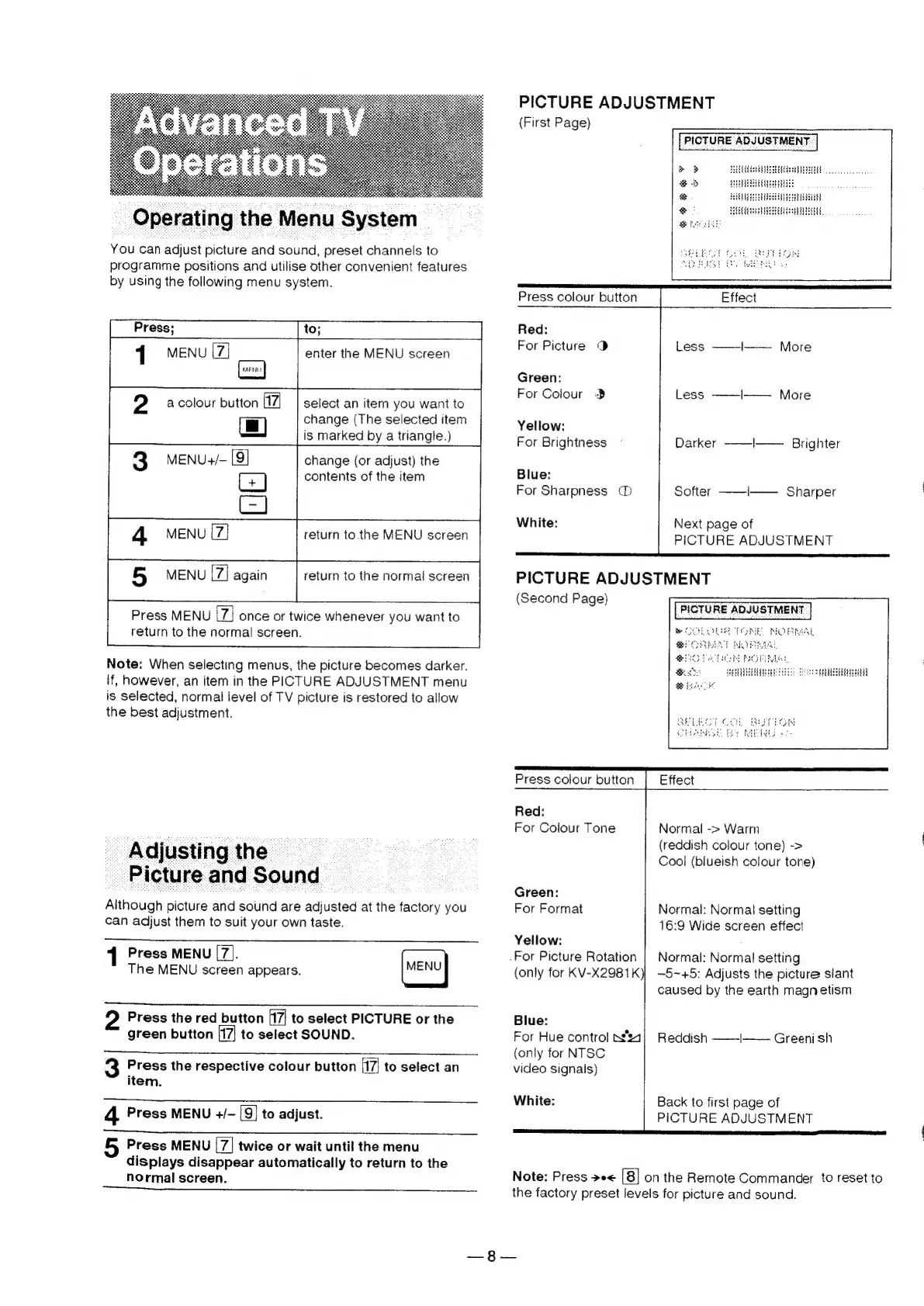
You
can
adjust
picture
and
sound,
preset
channels
to
programme
positions
and
utilise
other
convenient
features
by
using
the
following
menu
system.
enter
the
MENU
screen
HAENUD
2
a
colour
button
f17]
select
an
item
you
want
to
=
change
(The
selected
item
is
marked
by
a
triangle.)
3
MENU+/-
[9]
change
(or
adjust)
the
GG)
contents
of
the
item
os
return
to
the
MENU
screen
return
to
the
normal
screen
Press
MENU
once
or
twice
whenever
you
want
to
return
to
the
normal
screen.
Note:
When
selecting
menus,
the
picture
becomes
darker.
If,
however,
an
item
in
the
PICTURE
ADJUSTMENT
menu
is
selected,
normal
level
of
TV
picture
is
restored
to
allow
the
best
adjustment.
Adjusting
the
|
_
Elgture
and
Sound
-
Although
picture
and
sound
are
adjusted
at
the
factory
you
can
adjust
them
to
suit
your
own
taste.
MENU
Press
the
red
button
to
select
PICTURE
or
the
green
button
to
select
SOUND.
1
Press
MENU
[7].
The
MENU
screen
appears.
3
Press
the
respective
colour
button
(17
to
select
an
item.
4
Press
MENU
+/—
9}
to
adjust.
Press
MENU
twice
or
wait
until
the
menu
displays
disappear
automatically
to
return
to
the
normal
screen.
.For
Picture
Rotation
PICTURE
ADJUSTMENT
(First
Page)
]
>
»
HUES
Seu,
&
eB
Se
Y
Press
colour
button
Effect
Red:
For
Picture
®
Less
——l——
More
Green:
For
Colour
3
Less
——I——.
More
Yellow:
For
Brightness
Darker
——-|——
Brighter
Blue:
For
Sharpness
@
Softer
——-I——._
Sharper
White:
Next
page
of
PICTURE
ADJUSTMENT
pe
rR
eC
ARE
PICTURE
ADJUSTMENT
(Second
Page)
PICTURE
ADJUSTMENT
Se
SUES
SHER
Press
colour
button
Effect
Red:
For
Colour
Tone
Normal
->
Warm
(reddish
colour
tone)
->
Cool
(blueish
colour
tone)
Green:
For
Format
Normal:
Normal
setting
16:9
Wide
screen
effect
Yellow:
Normal:
Normal
setting
~5~+5:
Adjusts
the
picture
siant
caused
by
the
earth
magnetism
(only
for
KV-X2981
kK)
Blue:
For
Hue
control
n4}
Reddish
——I——
Greenish
(only
for
NTSC
video
signals)
White:
Back
to
first
page
of
PICTURE
ADJUSTMENT
Note:
Press
>e<
[8]
on
the
Remote
Commander
to
reset
to
the
factory
preset
levels
for
picture
and
sound.