EasyManua.ls Logo

Sony TRINITRON KV-X2583E - Detailed Sound Adjustments; Special TV Features

Sony TRINITRON KV-X2583E
59 pages
Print Icon
To Next Page IconTo Next Page
To Previous Page IconTo Previous Page
Loading...
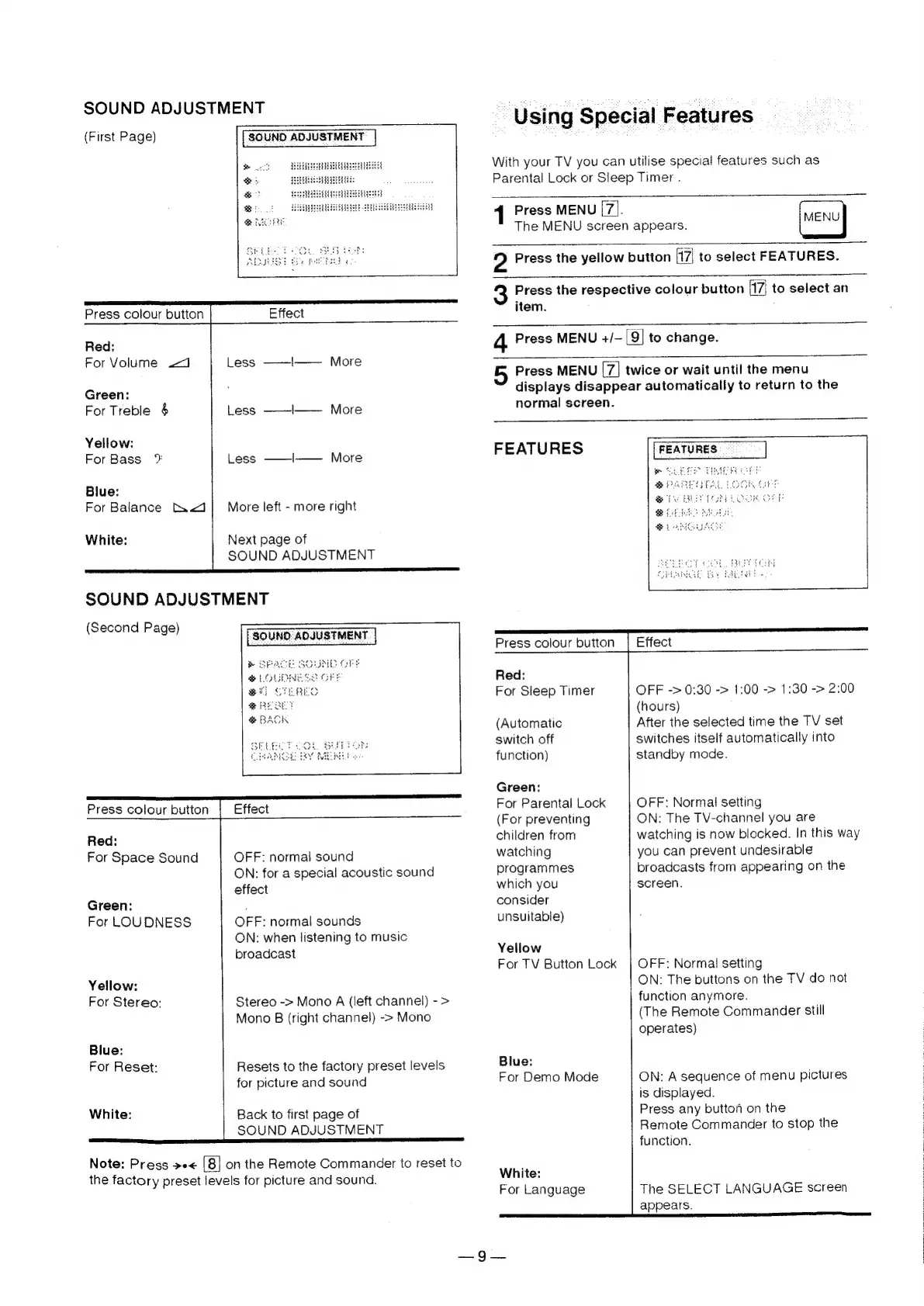
SOUND
ADJUSTMENT
(First
Page)
2
oe
&
Y
Press
colour
button
Effect
Red:
For
Volume
.<J
Less
——|——
More
Green:
For
Treble
§
Less
——I——
More
Yellow:
For
Bass
*%
Less
——I——
More
Blue:
For
Balance
ti.<J|
More
left
-
more
right
White:
Next
page
of
SOUND
ADJUSTMENT
maaan
a
SOUND
ADJUSTMENT
(Second
Page)
Press
colour
button
Red:
For
Space
Sound
OFF:
normal
sound
ON:
for
a
special
acoustic
sound
effect
Green:
:
For
LOUDNESS
OFF:
normal
sounds
ON:
when
listening
to
music
broadcast
Yellow:
For
Stereo:
Stereo
->
Mono
A
(left
channel)
-
>
Mono
B
(right
channel)
->
Mono
Blue:
For
Reset:
Resets
to
the
factory
preset
levels
for
picture
and
sound
White:
Back
to
first
page
of
SOUND
ADJUSTMENT
Note:
Press
»e«
|8)
on
the
Remote
Commander
to
reset
to
the
factory
preset
levels
for
picture
and
sound.
~
Using
Special
Features
With
your
TV
you
can
utilise
special
features
such
as
Parental
Lock
or
Sleep
Timer
.
{
Press
MENU
ap
The
MENU
screen
appears.
MENU
2
Press
the
yellow
button
[17|
to
select
FEATURES.
3
Press
the
respective
colour
button
7]
to
select
an
item.
4
Press
MENU
+/—
9}
to
change.
5
Press
MENU
twice
or
wait
until
the
menu
displays
disappear
automatically
to
return
to
the
normal
screen.
—
FEATURES
————S—
ee
ee
Press
colour
button
|
Effect
Red:
For
Sleep
Timer
OFF
->
0:30
->
1:00
->
1:30
->
2:00
(hours)
(Automatic
After
the
selected
time
the
TV
set
switch
off
switches
itself
automatically
into
function)
standby
mode.
Green:
For
Parental
Lock
(For
preventing
children
from
watching
programmes
which
you
consider
unsuitable)
Yellow
For
TV
Button
Lock
Blue:
For
Demo
Mode
White:
For
Language
OFF:
Normal
setting
ON:
The
TV-channel
you
are
watching
is
now
blocked.
In
this
way
you
can
prevent
undesirable
broadcasts
from
appearing
on
the
screen.
OFF:
Normal
setting
ON:
The
buttons
on
the
TV
do
not
|
function
anymore.
(The
Remote
Commander
still
operates)
ON:
A
sequence
of
menu
pictures
is
displayed.
Press
any
button
on
the
Remote
Commander
to
stop
the
function.
The
SELECT
LANGUAGE
screen
appears.
|
1