10
Using Your New TV
Watching the TV (continued)
To
Turn off temporarily
Turn off completely
Adjust the volume
Mute the sound
Watch the video input
(VCR, camcorder, etc.)
Jump back to the previous program
number
Display the on-screen information*
Press
?/1. The 1 indicator on the TV lights up red.
! on the TV.
2 +/–.
%.
t
to select “VIDEO 1”, “VIDEO 2” , “VIDEO 3”or
“DVD”.
To return to the TV program, press
a
.
JUMP.
.
Additional tasks
ENTER
ENTER ENTER
ENTER ENTER
P I CTURE++MO C
PICTURE
INTELLIGENT PIC:ON
WI DE MODE : OF F
DE : DYNAM I
E
COLOR SYS : AUTO
SETUP
PROGRAM SETUP
PIC ROT A T I ON
NGL I SH
LANGUAGE :
* The picture, sound, and either the program number or video input are
displayed. The on-screen display for the picture and sound information
disappears after about three seconds.
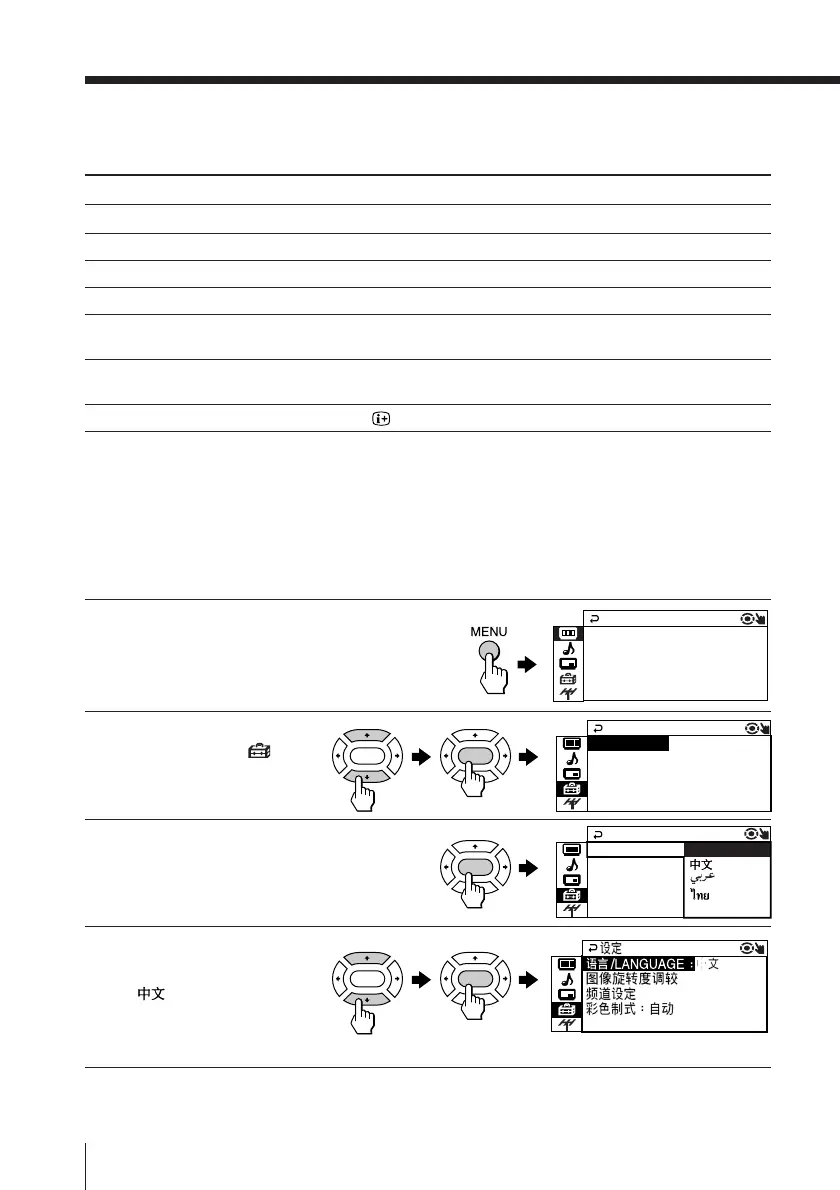
Changing the menu language
You can change the menu language as well as the on-screen language.
For details on how to use the menu, see Introducing the menu system on page 19.
1
Press MENU.
2
Press V or v to select the
“SETUP” icon (
),
then press ENTER.
3
Make sure “LANGUAGE”
is selected, then press
ENTER.
4
Press V or v to select the
desired language (e.g.,
“
”), then press
ENTER.
The selected menu language appears.
To return to the normal screen
Press MENU.
LANGUAGE :
COLOR SYS :
SETUP
PROGRAM SE
PIC ROT A T I
ENGL I SH







 To Next Page