26
Adjusting Your Setup (MENU)
PIP
SWA P
PIP:OFF
POS I T I ON :
0
-/--
FAVORITE
SOUND
MODE
SURROUND
PIP PROGR
PIP PROGR
ENTER
MENU
Changing the
“PIP” setting
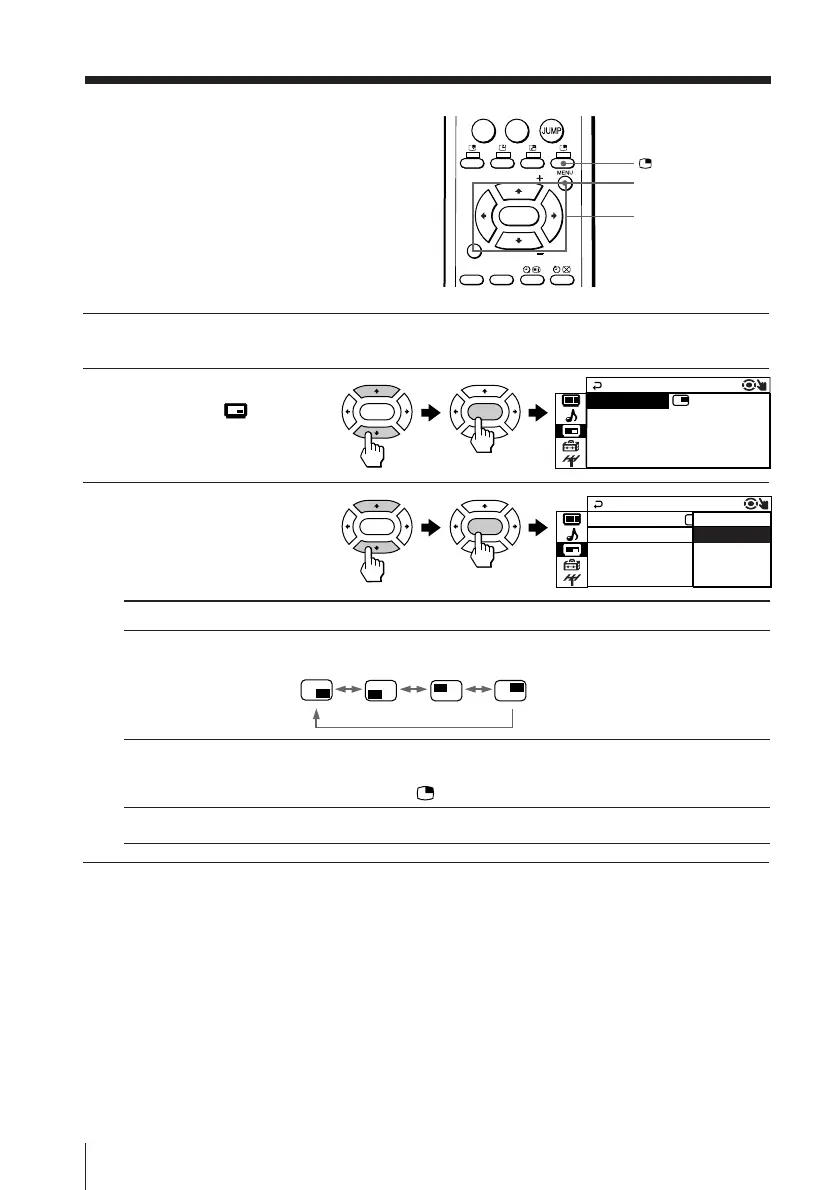
The “PIP” menu allows you to display a
sub screen, change the sub screen
position and exchange pictures between
the main and sub screens.
1
Press MENU.
2
Press V or v to select the
“PIP” icon (
), then
press ENTER.
3
Press V or v to select the
desired item (e.g., “PIP”),
then press ENTER.
V/b/v/B/ENTER
ENTER ENTER
ENTER ENTER
ON
OFF
PIP
SWA P
PIP:
POSI T I ON :
Select To
“POSITION” change the position of the sub screen.
Press V or v to select the desired position, then press ENTER.
“PIP” display a sub screen within the main picture.
Press V or v to select “ON”, then press ENTER.
To cancel, press or select “PIP : OFF”, then press ENTER.
“SWAP” exchange pictures between main screen and sub screen.
To return to the normal screen
Press MENU.
Tip
• For details on the menu system and how to use the menu, refer to
Introducing the menu system on page 19.







 To Next Page