22
Adjusting Your Setup (MENU)
INTELLIGEN
PER
PICTURE
SONA L
WI DE
SOFT
PICTUR
E
MOD E
MOD E
:
S TANDARD
ADJUST
C
DYNAM I
FAVORITE
PIP PROGR
PIP PROGR
ENTER
MENU
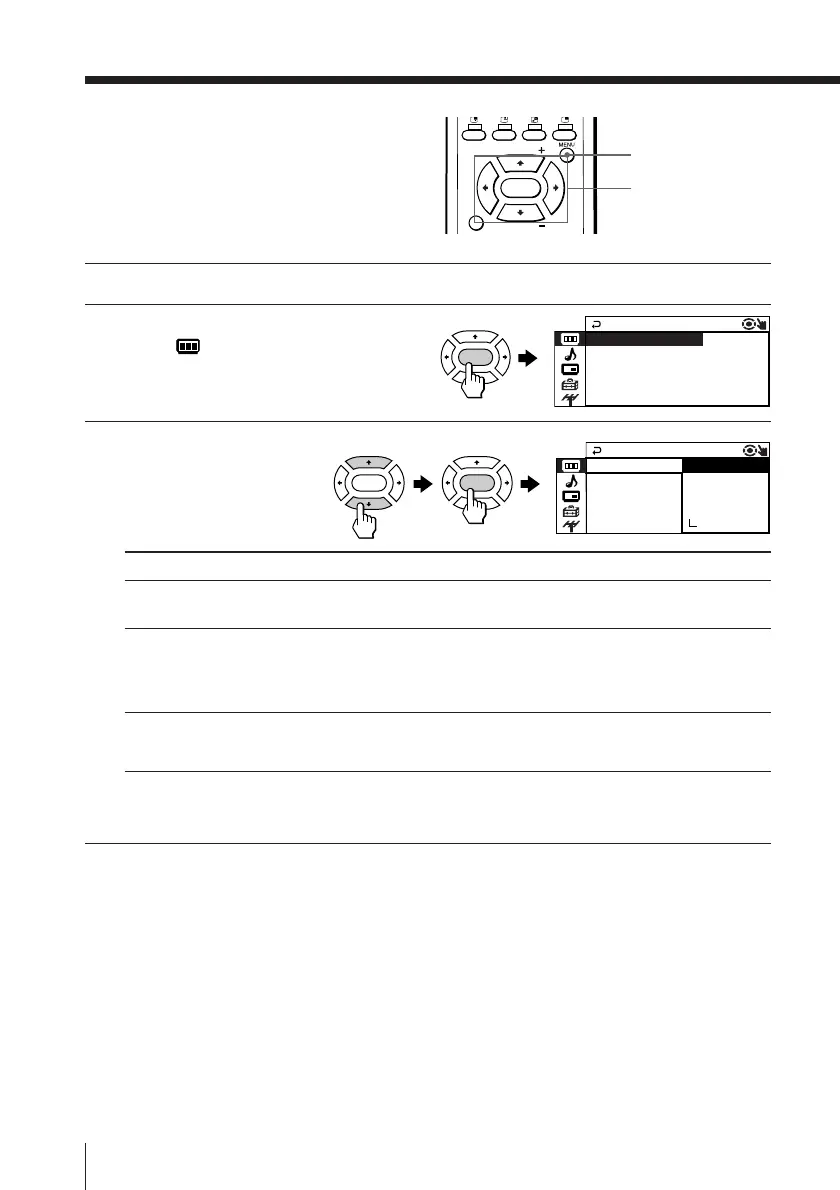
Changing the
“PICTURE” setting
The “PICTURE” menu allows you to
change the picture settings.
1
Press MENU.
2
Make sure the “PICTURE”
icon (
) is selected,
then press ENTER.
3
Press V or v to select the
desired item (e.g.,
“PICTURE MODE” ),
then press ENTER.
Select To
“PICTURE MODE” choose either “DYNAMIC”, “STANDARD”, “SOFT”,
“PERSONAL”*, or “ADJUST”.
“WIDE MODE” change the picture size when receiving wide-mode (16:9)
picture signal.
Press V or v to select “ON”, then press ENTER.
To cancel, select “OFF”, then press ENTER.
“INTELLIGENT PIC” optimize picture quality.
Press V or v to select “ON”, then press ENTER.
To cancel, select “OFF”, then press ENTER.
* When the “PERSONAL” mode is selected, you can receive the last
adjusted picture settings from the “ADJUST” option (see page 23).
Note
• For details on the options under “PICTURE MODE”, see page 12.
To return to the normal screen
Press MENU.
ENTER
ENTER ENTER
V/b/v/B/ENTER
P I CTURE MO C
PICTURE
INTELLIGENT PIC:ON
WI DE MODE : OFF
DE : DYNAM I







 To Next Page