4
Using Your New TV
123
R L Y C
B
C
R
VIDEO
VIDEO IN
VIDEO OUT
AUDIO
R L
Getting Started
CAUTION
• Do not plug in the power cord until you have completed making all other
connections; otherwise a minimum leakage current might flow through
the antenna and other terminals to ground.
• To avoid battery leakage and damage to the remote, remove the batteries
from the remote if you are not going to use it for several days. If any
liquid that leaks from the batteries touches you, immediately wash it
away with water.
Step 1
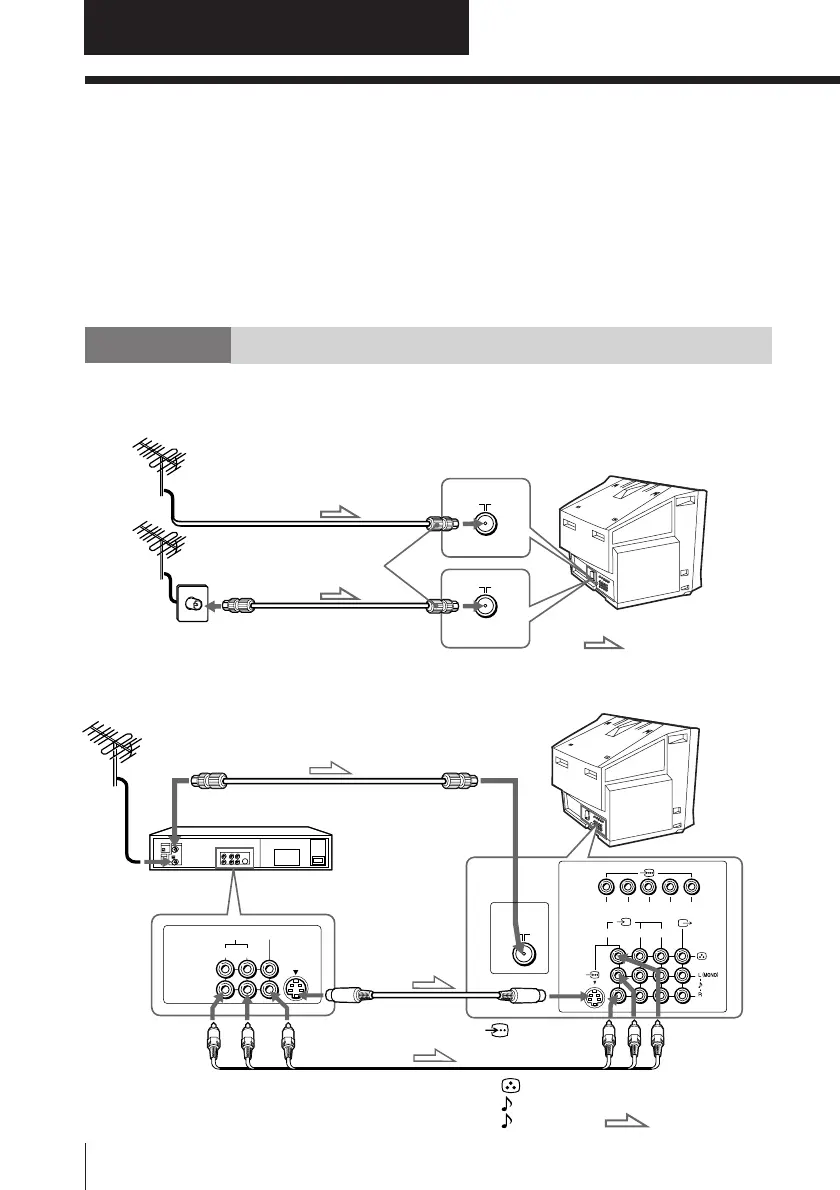
Connect the antenna
If you wish4Ho connect a VCR, see the Connecting a VCR diagram below.
Connecting a VCR
To watch the video input, press t (see page 10).
IEC connector
(not supplied)
To video and
audio outputs
VCR
(yellow)
-L (MONO) (white)
-R (red)
To S video
output
Antenna cable (not supplied)
To t 1, 2 or 3
(video input)
Audio/Video cable
(not supplied)
S video cable
(not supplied)
: Signal flow
To
(S video input)
To antenna
output
To 8
(antenna)
or
: Signal flow
Antenna cable (not supplied)
Antenna cable (not supplied)
Rear of TV
Rear of TV
Using Your New TV







 To Next Page