31Adjusting Your Setup (MENU)
4
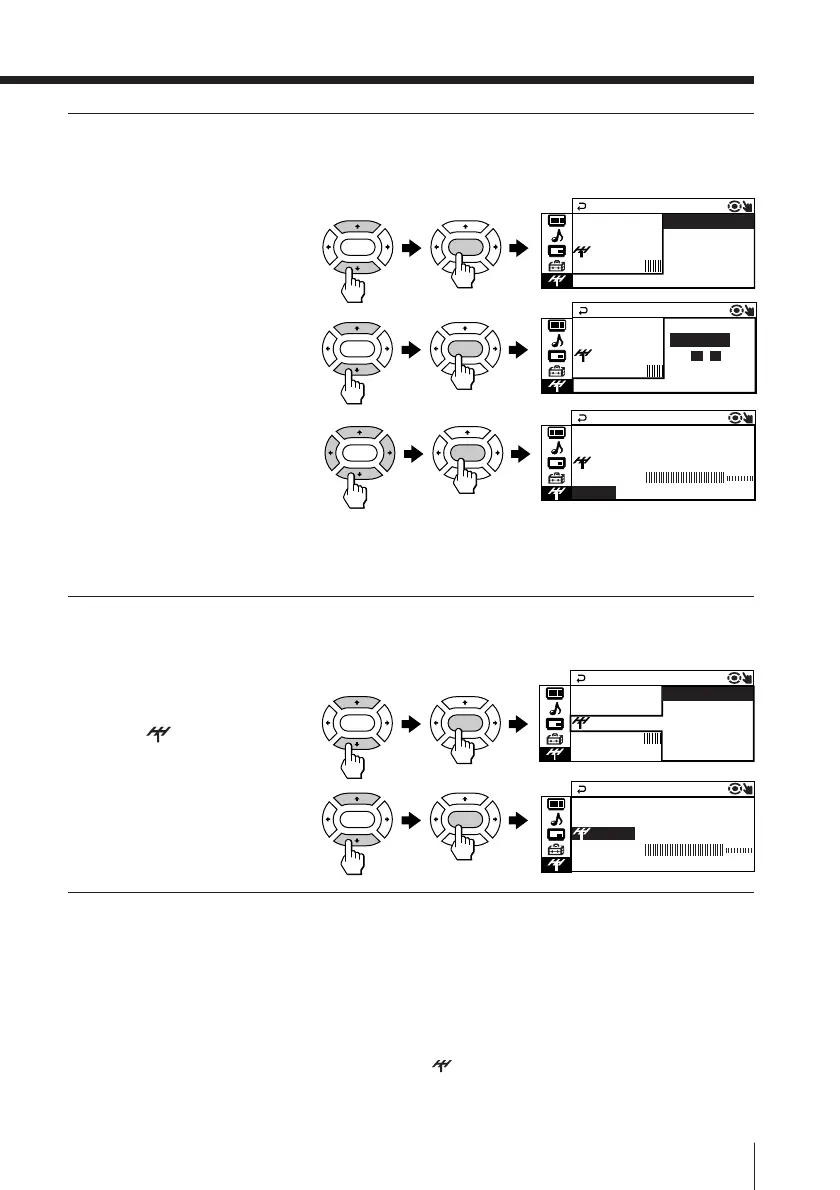
If you are not satisfied with
the picture and sound
quality, you may improve
them by using fine tuning.
(1)
Press V or v to select
“FINE”, then press
ENTER
.
(2)
Press V or v to select
“MANUAL”, then press
ENTER.
(3) Press V, b, v or B until
the picture and sound
quality are optimal,
then press ENTER.
The + or – icon on the
menu flashes while
tuning.
5
If the TV signal is too strong
and the picture is distorted,
you may reduce the TV
receiving sensitivity.
(1) Press V or v to select
“
SENS”, then
press ENTER.
(2) Press V or v to select
“LOW”, then press
ENTER.
To return to the normal screen
Press MENU.
Notes
• If you preset a locked program number (“CHILD LOCK”), that particular
program number will be unlocked automatically (see page 28).
• The TV system (“TV SYS”), “ SENS” and the fine tuning (“FINE”)
settings are memorized for each program number.
PR
10:
RAM
VHF
MANUA LPROG
SENS : LOW
TV SYS : M
F I NE : MANUAL
LOW
PR
10:
RAM
VHF
MANUA LPROG
SENS :
TV SYS : M LOW
HIGH
F I NE : MANUA
LOW
PR
10:
RAM
VHF
MANUA LPROG
SENS : H I GH
TV SYS : M
FINE:MANUA L
LOW
PR
10:
RAM
VHF
MANUA LPROG
SENS : H I G –+
TV SYS : M MANUA L
AUTO
FINE:
LOW
PR
10:
RAM
VHF
MANUA LPROG
SENS : H I G
TV SYS : M MANUAL
AUTO
FINE:
LOW
ENTER ENTER
ENTER ENTER
ENTER ENTER
ENTER ENTER
ENTER ENTER







 To Next Page