EasyManua.ls Logo

Sony TRINITRON KV1380R - Page 4

Sony TRINITRON KV1380R
16 pages
Print Icon
To Next Page IconTo Next Page
To Previous Page IconTo Previous Page
Loading...
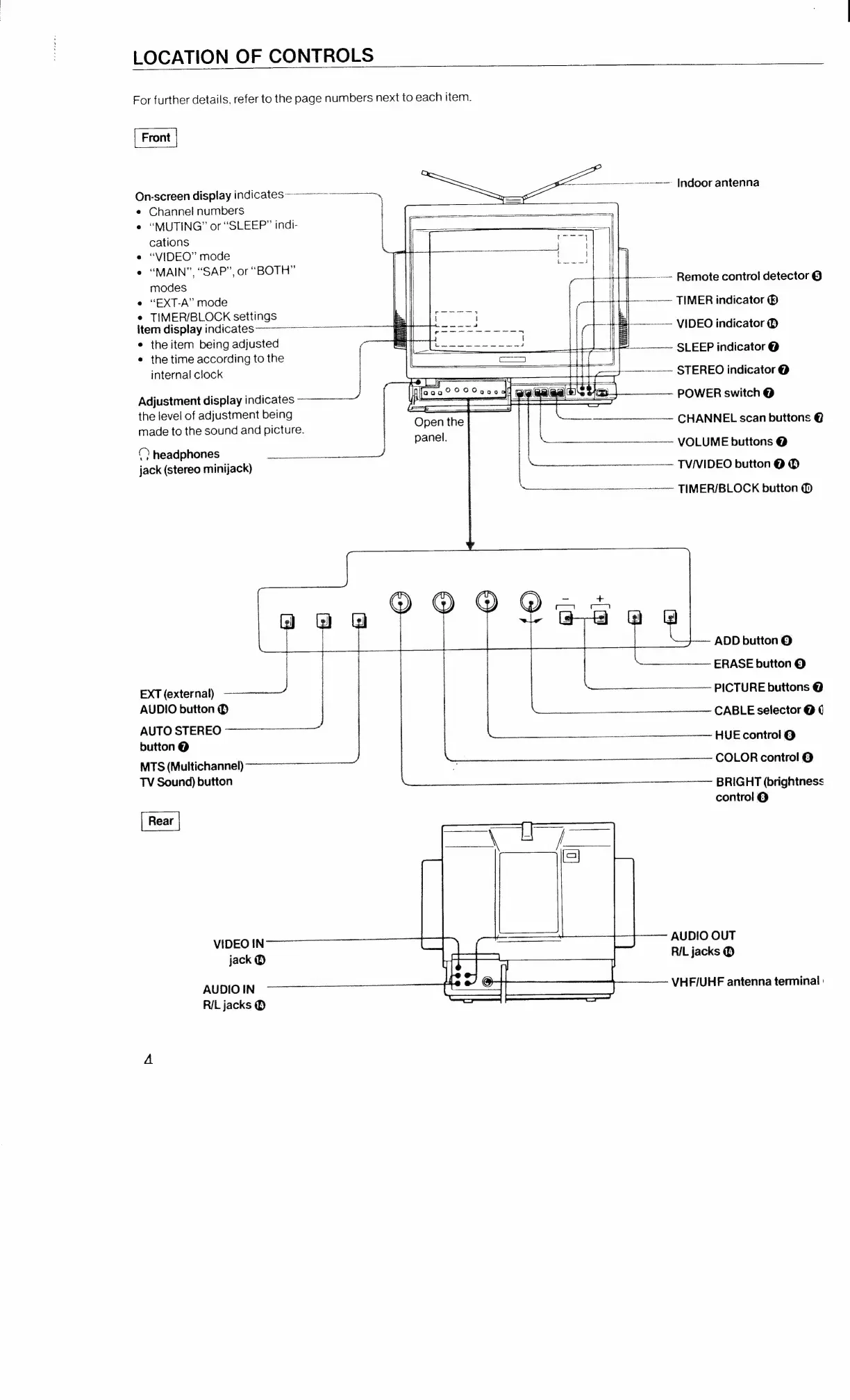
LOCATION
OF
CONTROLS
For
further
details,
refer
to
the
page
numbers
next
to
each
item.
On-screen
display
indicates
=
ee
¢
Channel
numbers
e
“MUTING”
or
“SLEEP”
indi-
cations
e
“VIDEO”
mode
e
“MAIN”,
“SAP”,
or
“BOTH”
modes
e
“EXT-A”
mode
e
TIMER/BLOCK
settings
item
display
indicates
a
e
theitem
being
adjusted
ae
¢
the
time
according
to
the
~~~
SLEEP
indicator
@
internal
clock
---—<-
STEREO
indicator
@
fF
Het
Adjustment
display
indicates
-—
j
——_
Eis
(eco
eT
02°
3;
G@
aged
=a
-
POWER
switch
@
the
level
of
adjustment
being
~-—<-
Indoor
antenna
|.»
Remote
control
detector
©
~~
TIMER
indicator
®
-------
VIDEO
indicator
©
|
made
to
the
sound
and
picture.
“Open
pen
the
|
“=
CHANNEL
scan
buttons
@
panel.
-
©
headphones
=
|
~~
VOLUME
buttons
@
jack
(stereo
minijack)
|
ier
firmer
=
_
TVNIDEO
button
@
©
=
—--
TIMER/BLOCK
button
©
1
0
0
@®@®
@O
@i4e
—~
@
@
@
G
|
ADD
button
©
|
-_~
ERASE
button
©
EXT
(external)
PICTURE
buttons
@
AUDIO
butt
Obutton®
CABLE
selector
@
¢
AUTO
STEREO
button
@
HUE
control
@
MTS
(Multichannel)
COLOR
control
@
ace
eas
BRIGHT
(brightness
control
@
VIDEO
IN
AUDIO
OUT
jack
®
RIL
jacks
@
AUDIO
IN
VHF/UHF
antenna
terminal
:
R/L
jacks
@

Related product manuals