EasyManua.ls Logo

Sony TRINITRON KV1380R - A Cian Eieanab Trainee; Rrp Mts

Sony TRINITRON KV1380R
16 pages
Print Icon
To Next Page IconTo Next Page
To Previous Page IconTo Previous Page
Loading...
PRESETTING
CHANNELS
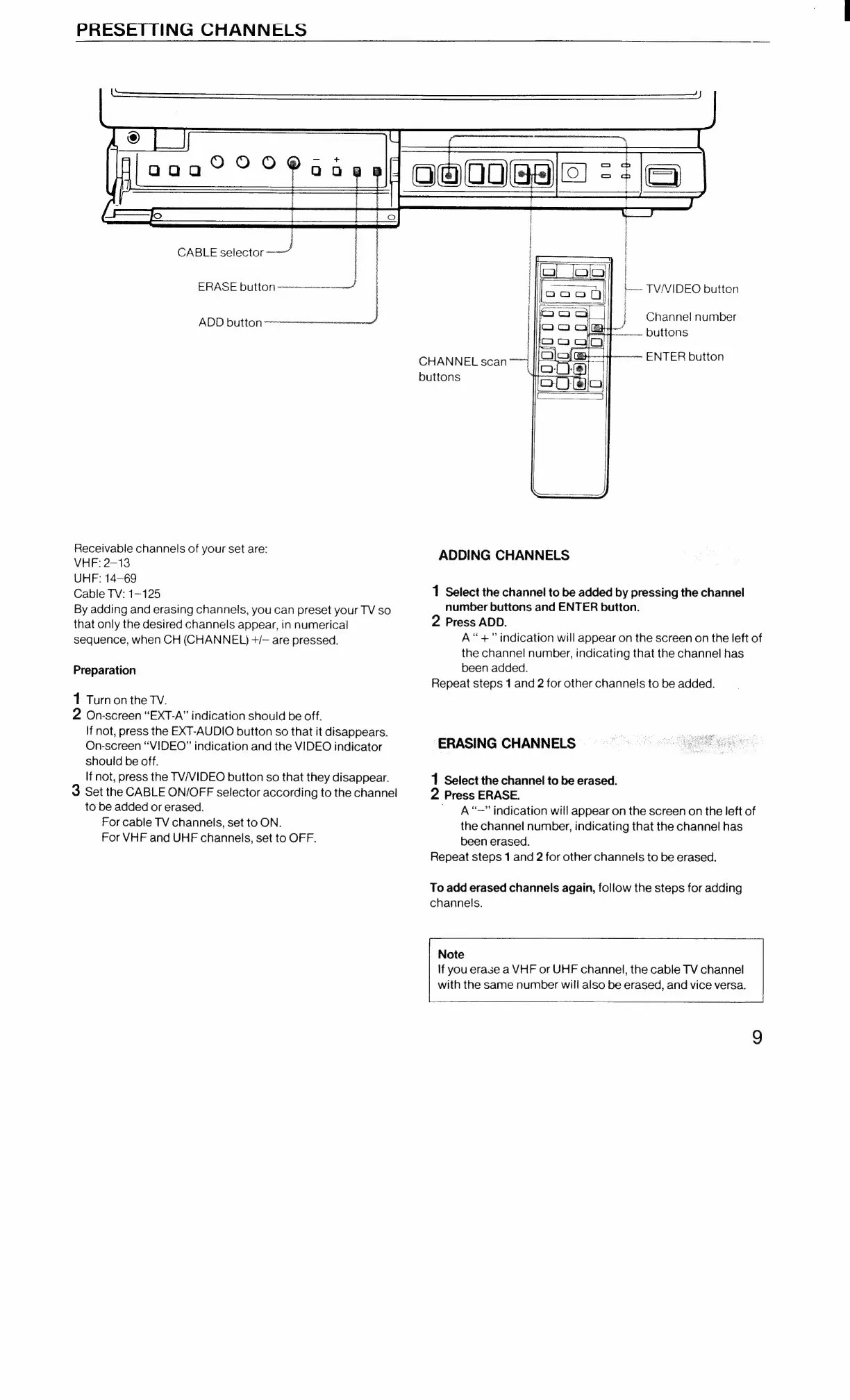
CABLE
selector
J
LL
ERASE
button
-—~-—-~~-—
ADD
button
et
Receivable
channels
of
your
set
are:
VHF:
2-13
UHF:
14-69
Cable
TV:
1-125
By
adding
and
erasing
channels,
you
can
preset
your
TV
so
that
only
the
desired
channels
appear,
in
numerical
sequence,
when
CH
(CHANNEL)
+/—
are
pressed.
Preparation
1
Turn
on
the
TV.
2
On-screen
“EXT-A”
indication
should
be
off.
If
not,
press
the
EXT-AUDIO
button
so
that
it
disappears.
On-screen
“VIDEO”
indication
and
the
VIDEO
indicator
should
be
off.
If
not,
press
the
TV/VIDEO
button
so
that
they
disappear.
3
Set
the
CABLE
ON/OFF
selector
according
to
the
channel
to
be
added
or
erased.
For
cable
TV
channels,
set
to
ON.
For
VHF
and
UHF
channels,
set
to
OFF.
|
|
aa
TV/NVIDEO
button
'
Channel
number
:
}
fo
DUTTONS
CHANNEL
scan
~
ENTER
button
buttons
ADDING
CHANNELS
1
Select
the
channel
to
be
added
by
pressing
the
channel
number
buttons
and
ENTER
button.
2
Press
ADD.
A“+”
indication
will
appear
on
the
screen
on
the
left
of
the
channel
number,
indicating
that
the
channel
has
been
added.
Repeat
steps
1
and
2
for
other
channels
to
be
added.
ERASING
CHANNELS
1
Select
the
channel
to
be
erased.
2
Press
ERASE.
“—”
indication
will
appear
on
the
screen
on
the
left
of
the
channel
number,
indicating
that
the
channel
has
been
erased.
Repeat
steps
1
and
2
for
other
channels
to
be
erased.
To
add
erased
channels
again,
follow
the
steps
for
adding
channels.
Note
If
you
erase
a
VHF
or
UHF
channel,
the
cable
TV
channel
with
the
same
number
will
also
be
erased,
and
vice
versa.