Location and Function of Parts and Controls
I Front panel I PVM-1340
I"-
----
~
~
.
DI
~
i) I) I)
D 1D l
~
-
'
-
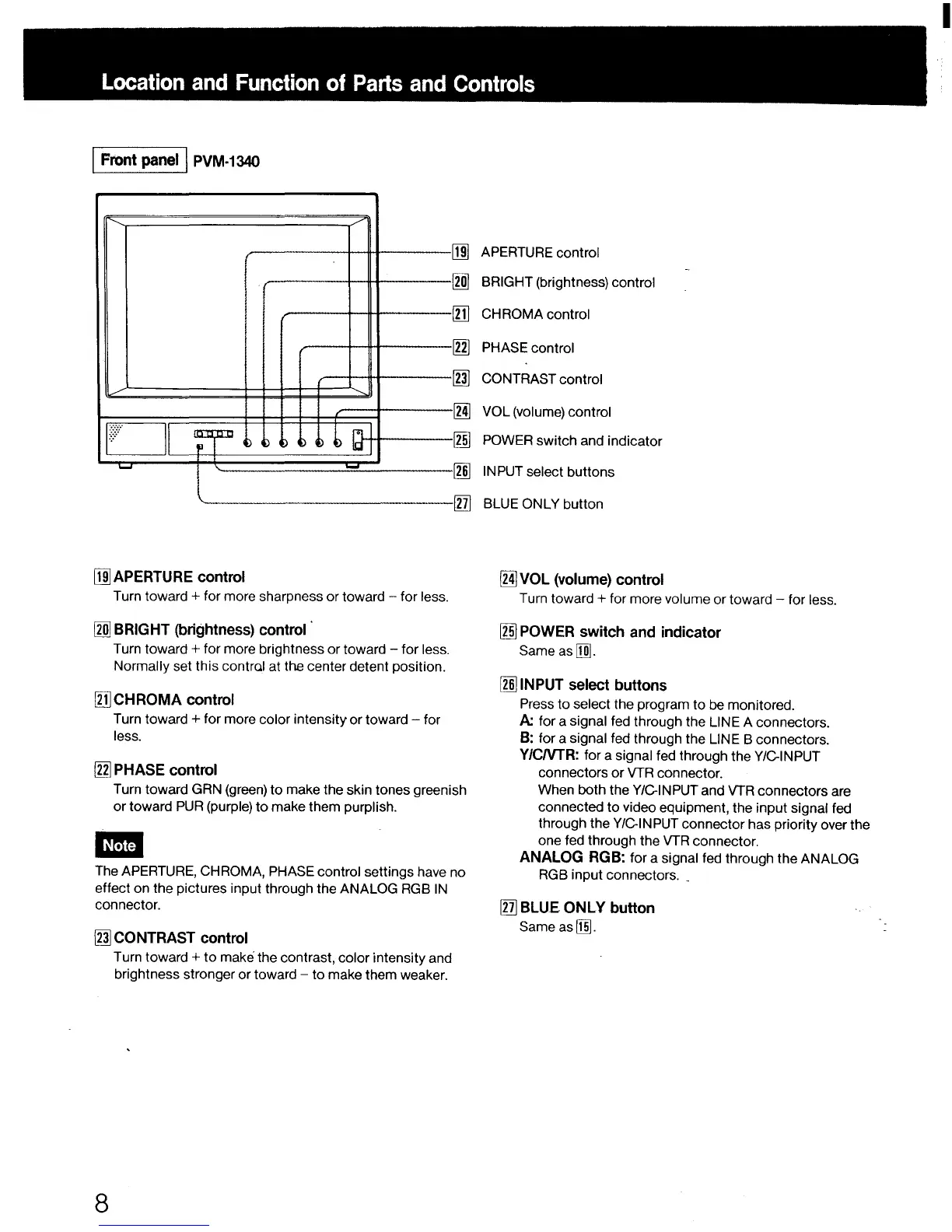
[ru APERTURE control
Turn toward + for more sharpness or toward - for less.
[lID BRIGHT (brightness) control
Turn toward + for more brightness or toward - for less.
Normally set this contra! at the center detent position.
[Il)CHROMA control
Turn toward + for more color intensity or toward - for
less.
In] PHASE control
[ru APERTURE control
[lID BRIGHT (brightness) control
[Ill CHROMA control
In] PHASE control
~
CONTRAST control
[Ml VOL (volume) control
[1ID POWER switch and indicator
~
IN PUT select buttons
[llj BLUE ONLY button
[Ml VOL (volume) control
Turn toward+ for more volume or toward - for less.
[1ID POWER switch and indicator
Sameas[m].
~INPUT select buttons
Press to select the program to be monitored.
A:. for a signal fed through the LINE A connectors.
B: for a signal fed through the LINE B connectors.
Y/CNTR: for a signal fed through the VIC-INPUT
connectors or VTR connector.
Turn toward GRN (green) to make the skin tones greenish
or toward PUR (purple) to make them purplish.
When both the VIC-INPUT and VTR connectors are
connected to video equipment, the input signal fed
through the VIC-INPUT connector has priority over the
one fed through the VTR connector.
-
The APERTURE, CHROMA, PHASE control settings have no
effect on the pictures input through the ANALOG RGB IN
connector.
~
CONTRAST control
8
Turn toward + to make the contrast, color intensity and
brightness stronger or toward - to make them weaker.
ANALOG RGB: for a signal fed through the ANALOG
RGB input connectors. _
[ll] BLUE ONLY button
Same as[Ifil.
I










 To Next Page