EasyManua.ls Logo

Sony Trinitron PVM-20M4E - Operating On-Screen Menus; Menu Navigation Buttons; Menu Navigation Steps

Sony Trinitron PVM-20M4E
19 pages
Print Icon
To Next Page IconTo Next Page
To Previous Page IconTo Previous Page
Loading...
Menu
operation
buttons
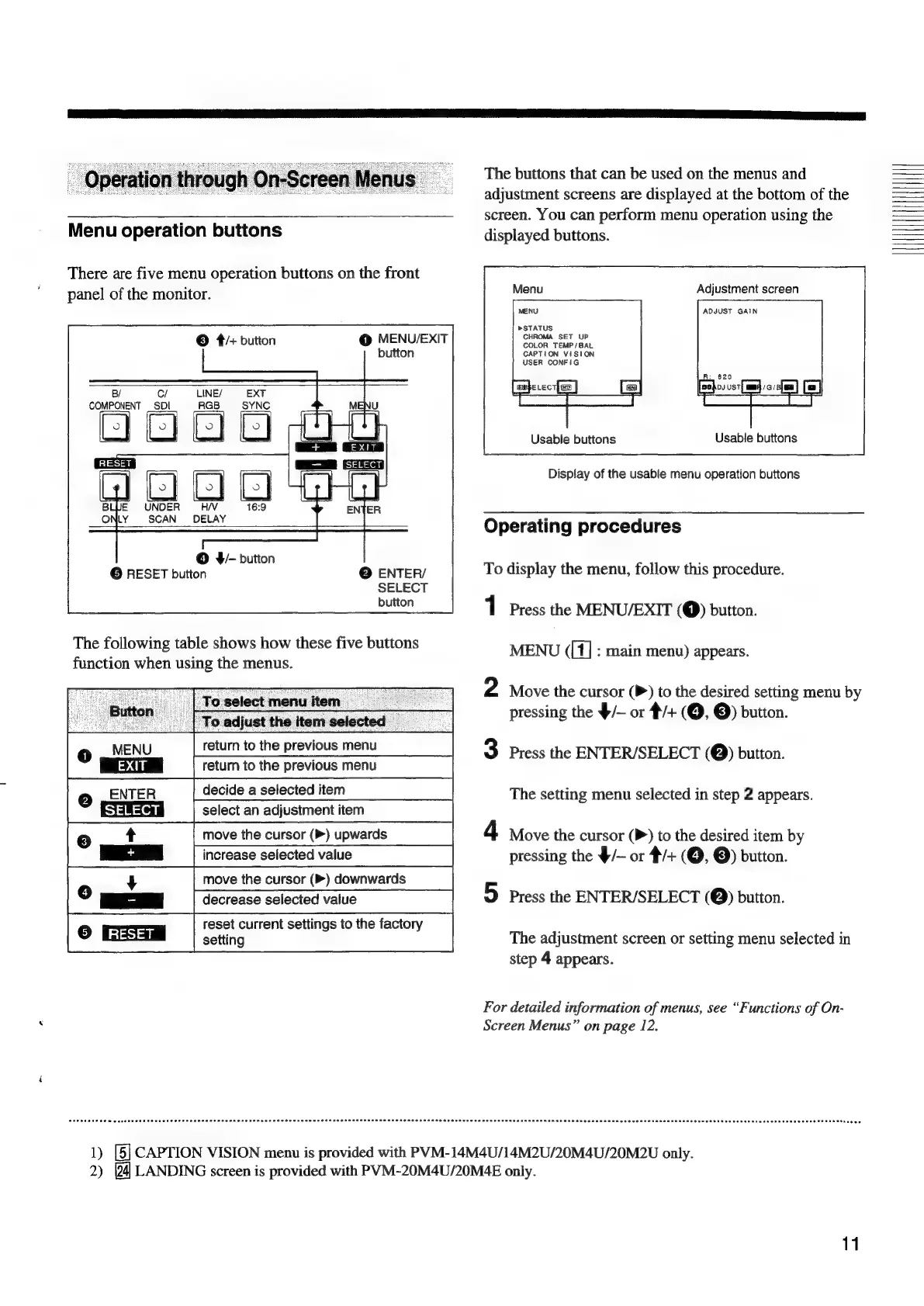
There
are
five
menu
operation
buttons
on
the
front
panel
of
the
monitor.
@
MENV/EXIT
button
©
4/+
button
B/
C/
LINE/
EXT
COMPONENT
_
SDI
RGB
SYNC
=
=e
J
UNDER
16:9
SCAN
BELAY
©
F-
button
©
RESET
button
@
ENTER/
SELECT
button
The
following
table
shows
how
these
five
buttons
function
when
using
the
menus.
:
‘Toselectmenuitem
|
To
adjust
the
item
selected
o
fe
MENU
return
to
the
previous
menu
|
EXIT
|
retum
to
the
previous
menu
e
riaa
decide
a
selected
item
|
SELECT
|
select
an
adjustment
item
move
the
cursor
(>)
upwards
increase
selected
value
move
the
cursor
(P)
downwards
decrease
selected
value
reset
current
settings
to
the
factory
°
Gam
1
The
buttons
that
can
be
used
on
the
menus
and
adjustment
screens
are
displayed
at
the
bottom
of
the
screen.
You
can
perform
menu
operation
using
the
displayed
buttons.
Adjustment
screen
ADJUST
GAIN
»>STATUS
CHROMA
SET
UP
COLOR
TEMP/
BAL
CAPTION
VISION
USER
CONFIG
Usable
buttons
Usable
buttons
Display
of
the
usable
menu
operation
buttons
Operating
procedures
To
display
the
menu,
follow
this
procedure.
Press
the
MENU/EXIT
(Q)
button.
MENU
([1]
:
main
menu)
appears.
2
Move
the
cursor
(P)
to
the
desired
setting
menu
by
pressing
the
9/—
or
#/+
(©,
©)
button.
3
Press
the
ENTER/SELECT
(@)
button.
The
setting
menu
selected
in
step
2
appears.
4
Move
the
cursor
(P)
to
the
desired
item
by
pressing
the
$/—
or
#/+
(©,
©)
button.
5
press
the
ENTER/SELECT
(@)
button.
The
adjustment
screen
or
setting
menu
selected
in
step
4
appears.
For
detailed
information
of
menus,
see
“Functions
of
On-
Screen
Menus”
on
page
12.
1)
[5]
CAPTION
VISION
menu
is
provided
with
PVM-14M4U/14M2U/20M4U/20M2U
only.
2)
LANDING
screen
is
provided
with
PVM-20M4U/20M4E
only.
11
UH
It

Related product manuals