EasyManua.ls Logo

Sony Trinitron PVM-9044QM - Rear Panel Connectors (PVM-9044 QM;9041 QM); LINE A and LINE B Connectors; Other Rear Connectors

Sony Trinitron PVM-9044QM
10 pages
Print Icon
To Next Page IconTo Next Page
To Previous Page IconTo Previous Page
Loading...
|
Location
and
Function
of
Parts
and
Controls
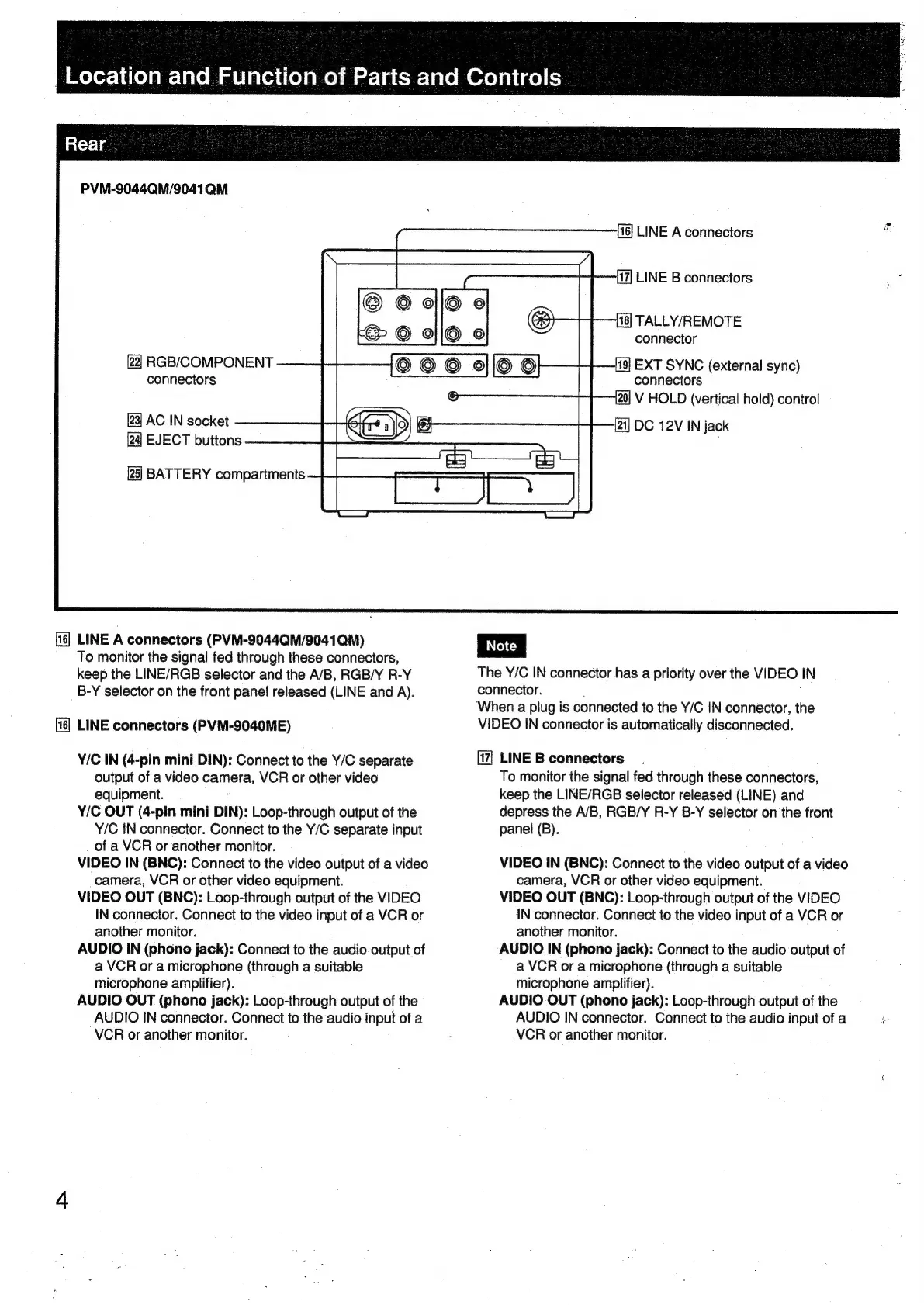
PVM-9044QM/9041QM
LINE
A
connectors
LINE
B
connectors
[18]
TALLY/REMOTE
connector
[22]
RGB/COMPONENT
connectors
[23]
AC
IN
socket
EJECT
buttons
EXT
SYNC
(external
sync)
connectors
[20]
V
HOLD
(vertical
hold)
control
i]
DC
12V
IN
jack
[25]
BATTERY
compartments
LINE
A
connectors
(PVM-9044QM/9041
QM)
|
Note
|
To
monitor
the
signal
fed
through
these
connectors,
keep
the
LINE/RGB
selector
and
the
A/B,
RGB/Y
R-Y
B-Y
selector
on
the
front
panel
released
(LINE
and
A).
connector.
When
a
plug
is
connected
to
the
Y/C
IN
connector,
the
VIDEO
IN
connector
is
automatically
disconnected.
The
Y/C
IN
connector
has
a
priority
over
the
VIDEO
IN
LINE
connectors
(PVM-9040ME)
Y/C
IN
(4-pin
mini
DIN):
Connect
to
the
Y/C
separate
LINE
B
connectors
output
of
a
video
camera,
VCR
or
other
video
equipment.
Y/C
OUT
(4-pin
mini
DIN):
Loop-through
output
of
the
Y/C
iN
connector.
Connect
to
the
Y/C
separate
input
of
a
VCR
or
another
monitor.
VIDEO
IN
(BNC):
Connect
to
the
video
output
of
a
video
camera,
VCR
or
other video
equipment.
VIDEO
OUT
(BNC):
Loop-through
output
of
the
VIDEO
IN
connector.
Connect
to
the
video
input
of
a
VCR
or
another
monitor.
AUDIO
IN
(phono
jack):
Connect
to
the
audio.
output
of
a
VCR
or
a
microphone
(through
a
suitable
microphone
amplifier).
AUDIO
OUT
(phono
jack):
Loop-through
output
of
the
-
AUDIO
IN
connector.
Connect
to
the
audio
input
of
a
VCR
or
another
monitor.
To
monitor
the
signal
fed
through
these
connectors,
keep
the
LINE/RGB
selector
released
(LINE)
and
depress
the
A/B,
RGB/Y
R-Y
B-Y
selector
on
the
front
panel
(B).
VIDEO
IN
(BNC):
Connect
to
the
video
output
of
a
video
camera,
VCR
or
other
video
equipment.
VIDEO
OUT
(BNC):
Loop-through
output
of
the
VIDEO
IN
connector.
Connect
to
the
video
input
of
a
VCR
or
another
monitor.
AUDIO
IN
(phono
jack):
Connect
to
the
audio
output
of
a
VCR
or
a
microphone
(through
a
suitable
microphone
amplifier).
AUDIO
OUT
(phono
jack):
Loop-through
output
of
the
AUDIO
IN
connector.
Connect
to
the
audio
input
of
a
VCR
or
another
monitor.

Related product manuals