EasyManua.ls Logo

Sony UP-890MD - Page 44

Sony UP-890MD
72 pages
Print Icon
To Next Page IconTo Next Page
To Previous Page IconTo Previous Page
Loading...
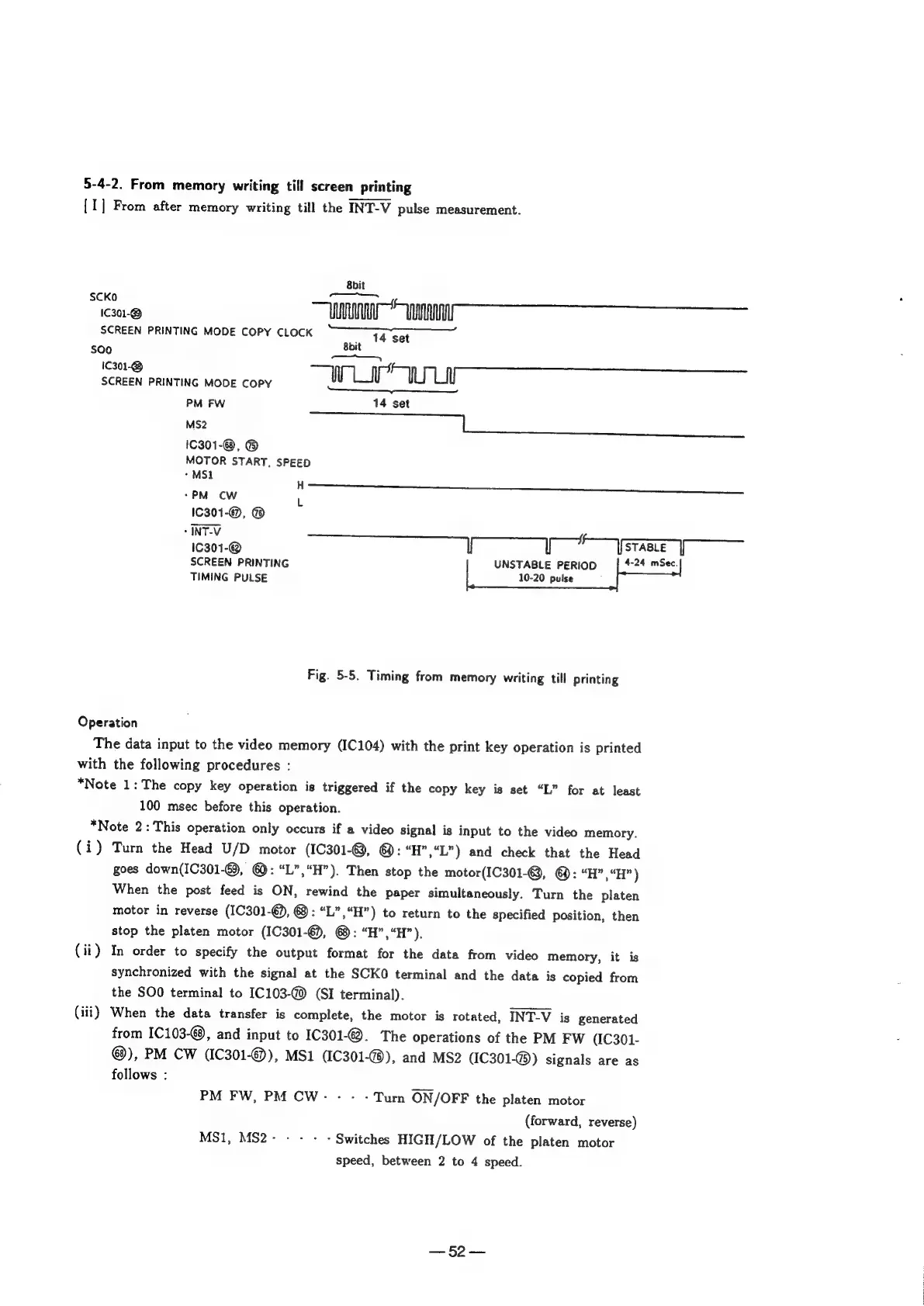
5-4-2.
From
memory
writing
till
screen
printing
[1]
From
after
memory
writing
till
the
INT-V
pulse
measurement.
8bit
SCKO
eu
A
yy
SCREEN
PRINTING
MODE
COPY
CLOCK
bit
14
set
S00
8bi
ay
Wi
the
SCREEN
PRINTING
MODE
COPY
PM
FW
14
set
MS2
ag
Se
eee
eee
ee
eee
ae
1C301-@,
@
MOTOR
START,
SPEED
-MS1
H
*PM
CW
L
1C301-@,
®
-
INT-V
1C301-@
lf
If
:
I
STABLE
I
SCREEN
PRINTING
UNSTABLE
PERIOD
4-24
mSec.
TIMING
PULSE
10-20
pulse
Fig.
5-5.
Timing
from
memory
writing
till
printing
Operation
The
data
input
to
the
video
memory
(IC104)
with
the
print
key
operation
is
printed
with
the
following
procedures
:
*Note
1:
The
copy
key
operation
is
triggered
if
the
copy
key
is
set
“L”
for
at
least
100
msec
before
this
operation.
*Note
2:
This
operation
only
occurs
if
a
video
signal
is
input
to
the
video
memory.
(i)
Turn
the
Head
U/D
motor
(IC301-©,
@:
“H”,“L")
and
check
that
the
Head
goes
down(IC301-€),
@:
“L”,“H”).
Then
stop
the
motor(IC301-@,
@:
“H”,“H”)
When
the
post
feed
is
ON,
rewind
the
paper
simultaneously.
Turn
the
platen
motor
in
reverse
(IC301-€),
@:
“L”,“H”)
to
return
to
the
specified
position,
then
stop
the
platen
motor
(IC301-€),
@:
“H”,“H”).
(ii)
In
order
to
specify
the
output
format
for
the
data
from
video
memory,
it
is
synchronized
with
the
signal
at
the
SCKO
terminal
and
the
data
is
copied
from
the
SOO
terminal
to
IC103-@)
(SI
terminal).
(iii)
When
the
data
transfer
is
complete,
the
motor
is
rotated,
INT-V
is
generated
from
1C103-@,
and
input
to
IC301-©.
The
operations
of
the
PM
FW
(IC301-
@),
PM
CW
(1C301-@),
MS1
(1C301-@),
and
MS2
(IC301-@))
signals
are
as
follows
:
PM
FW,
PM
CW:
-
-
-
Turn
ON/OFF
the
platen
motor
(forward,
reverse)
MS1,
MS2----:-
Switches
HIGH/LOW
of
the
platen
motor
speed,
between
2
to
4
speed.
es.)
ao

Other manuals for Sony UP-890MD

Related product manuals