EasyManua.ls Logo

Sony UP-890MD - Page 46

Sony UP-890MD
72 pages
Print Icon
To Next Page IconTo Next Page
To Previous Page IconTo Previous Page
Loading...
[WM]
To
the
end
of
screen
printing
and
stopping
pation
i
ee
a
1c301-@
STB
ae
eee
eee
'
1C301-©
COPYING
1C301-@
COPY-STOP
|
1C301-@
I
1pSec
1C301-@
Ms2
—-
1C301-@
|
APPROX.
lIsec
PM
FW
1C301-@
ea
a
ee
ee
ee
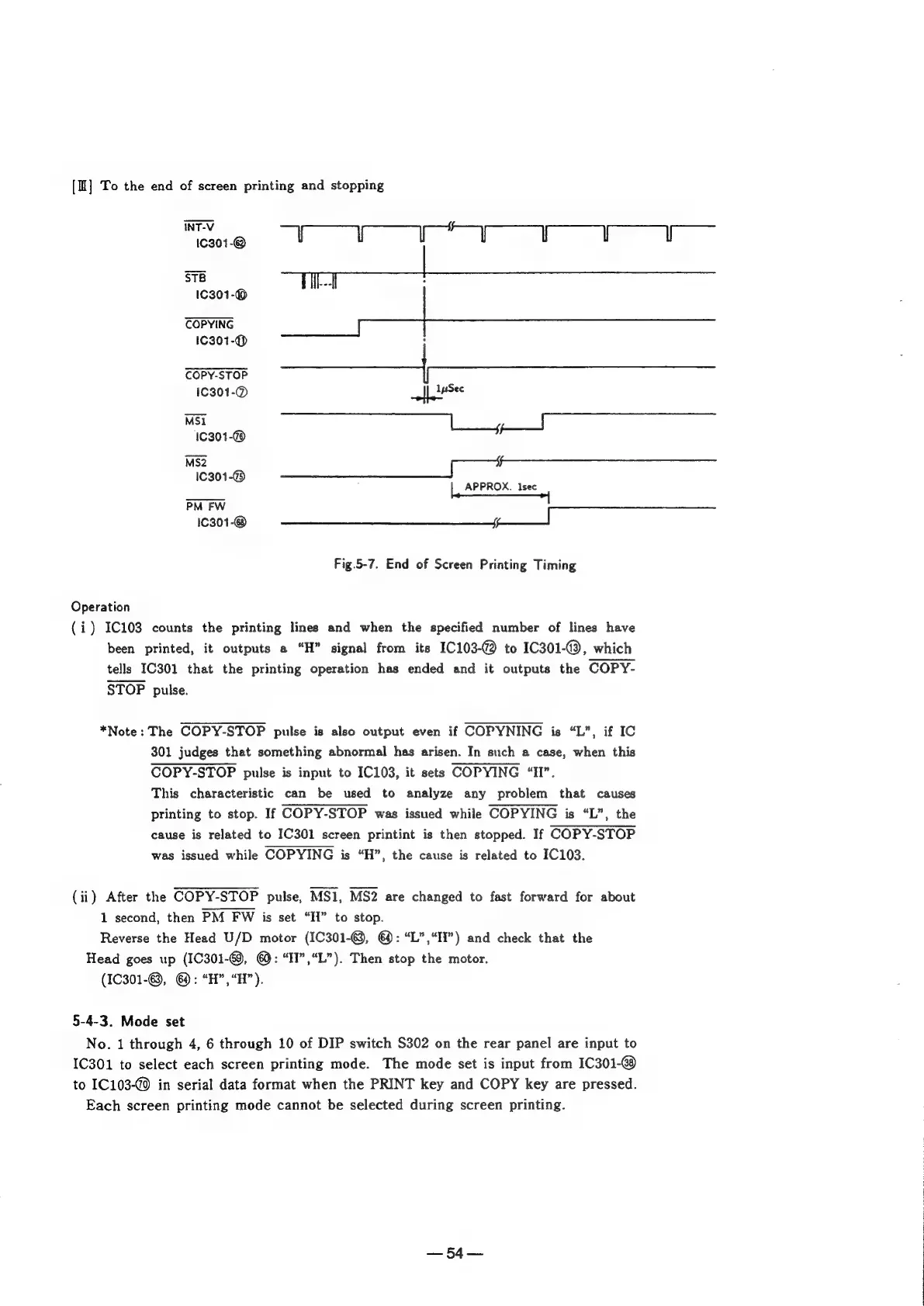
Fig.5-7.
End
of
Screen
Printing
Timing
Operation
(i)
IC103
counts
the
printing
lines
and
when
the
specified
number
of
lines
have
been
printed,
it
outputs
a
“H”
signal
from
its
1C103-@
to
IC301-@,
which
tells
IC301
that
the
printing
operation
has
ended
and
it
outputs
the
COPY-
STOP
pulse.
*Note:
The
COPY-STOP
pulse
is
also
output
even
if
COPYNING
is
“L”,
if
IC
301
judges
that
something
abnormal
has
arisen.
In
such
a
case,
when
this
COPY-STOP
pulse
is
input
to
IC103,
it
sets
COPYING
“II”.
This
characteristic
can
be
used
to
analyze
any
problem
that
causes
printing
to
stop.
If
COPY-STOP
was
issued
while
COPYING
is
“L”,
the
cause
is
related
to
IC301
screen
printint
is
then
stopped.
If
COPY-STOP
was
issued
while
COPYING
is
“H”,
the
cause
is
related
to
IC103.
(ii)
After
the
COPY-STOP
pulse,
MS1,
MS2
are
changed
to
fast
forward
for
about
1
second,
then
PM
FW
is
set
“H”
to
stop.
Reverse
the
Head
U/D
motor
(IC301-©,
@:
“L”,“If”)
and
check
that
the
Head
goes
up
(1C301-69,
@:
“II”,“L”).
Then
stop
the
motor.
(1C301-@,
@:
“H”,“H”).
5-4-3.
Mode
set
No.
1
through
4,
6
through
10
of
DIP
switch
S302
on
the
rear
panel
are
input
to
1C301
to
select
each
screen
printing
mode.
The
mode
set
is
input
from
1C301-@
to
IC103-@0
in
serial
data
format
when
the
PRINT
key
and
COPY
key
are
pressed.
Each
screen
printing
mode
cannot
be
selected
during
screen
printing.
—54—

Other manuals for Sony UP-890MD

Related product manuals