EasyManua.ls Logo

Sony UP-890MD - Page 5

Sony UP-890MD
72 pages
Print Icon
To Next Page IconTo Next Page
To Previous Page IconTo Previous Page
Loading...
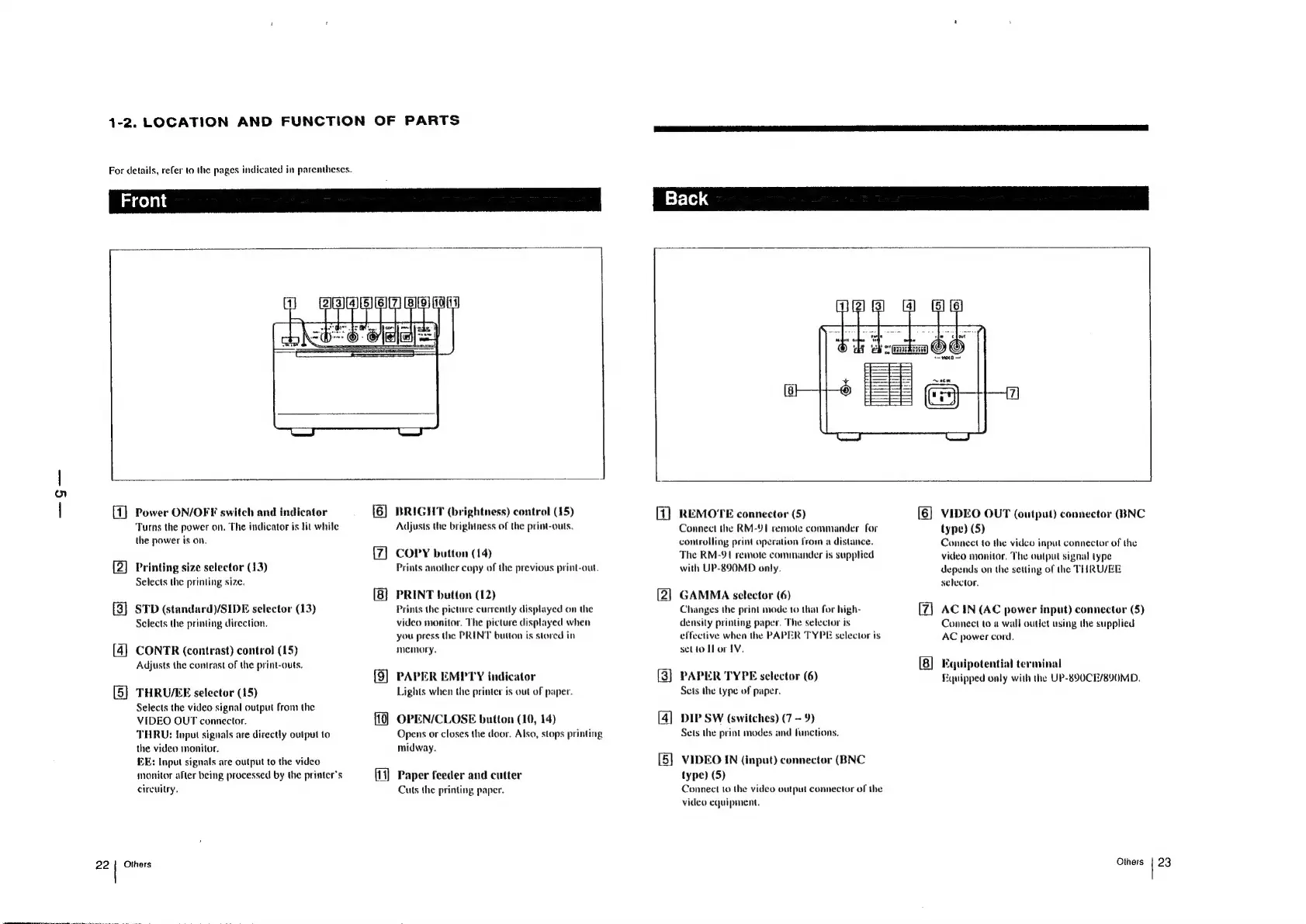
1-2.
LOCATION
AND
FUNCTION
OF
PARTS
For
details,
refer
to
the
pages
indicated
in
parentheses.
{1]
Power
ON/OFF
switch
and
indicator
Turns
the
power
on.
The
indicator
is
tit
while
the
power
is
on.
CS)
Printing
size
selector
(13)
Selects
the
printing
size.
STD
(standard)/SIDE
selector
(13)
Selects
the
printing
direction.
&e
CONTR
(contrast)
control
(15)
Adjusts
the
contrast
of
the
print-outs.
@
THRU/EE
selector
(15)
Selects
the
video
signal
output
from
the
VIDEO
OUT
connector.
THRU:
Input
signals
are
directly
output
to
the
video
monitor.
FE:
Input
signals
are
output
to
the
video
monitor
after
being
processed
by
the
printer's
circuitry.
Others
[6]
BRIGHT
(brightness)
control
(15)
Adjusts
the
brightness
of
the
print-outs.
COPY
button
(14)
Prints
another
copy
of
the
previous
print-out.
PRINT
button
(12)
Prints
the
picture
currently
displayed
on
the
video
monitor.
The
picture
displayed
when
you
press
the
PRINT
button
is
stored
in
memory.
(9)
PAPER
EMPTY
indicator
Lights
when
the
printer
is
out
of
paper.
OPEN/CLOSE
button
(10,
14)
Opens
or
closes
the
door.
Also,
stops
printing
midway.
iy)
Paper
feeder
and
cutter
Cuts
the
printing
paper.
REMOTE
connector
(5)
Connect
the
RM-¥91
remote
commander
for
controlling
print
operation
from
a
distance.
The
RM-91
remote
commander
is
supplied
with
UP-890MD
only.
GAMMA
selector
(6)
Changes
the
print
mode
to
that
for
high-
density
printing
paper.
The
selector
is
effective
when
the
PAPER
TYPE
selector
is
set
to
Tlor1V.
{os}
PAPER
TYPE
selector
(6)
Sets
the
type
of
paper.
[4]
DIP
SW
(switches)
(7
-
9)
Sets
the
print
modes
and
functions.
VIDEO
IN
(input)
connector
(BNC
type)
(5)
Connect
to
the
video
output
connector
of
the
video
equipment.
[6]
VIDEO
OUT
(output)
connector
(BNC
type)
(5)
Connect
to
the
video
input
connector
of
the
video
monitor.
The
output
signal
type
depends
on
the
setting
of
the
THRU/EE
selector.
AC
IN
(AC
power
input)
connector
(5)
Connect
to
a
wall
outict
using
the
supplied
AC
power
cord.
Equipotential
terminal
Fquipped
only
with
the
UP-890CE/890MD.
Others
|
23

Other manuals for Sony UP-890MD

Related product manuals