Part Names and Functions
4
Getting Started
Part Names and
Functions
For more details, see the referenced pages numbers
enclosed in parentheses ( ).
A
AA
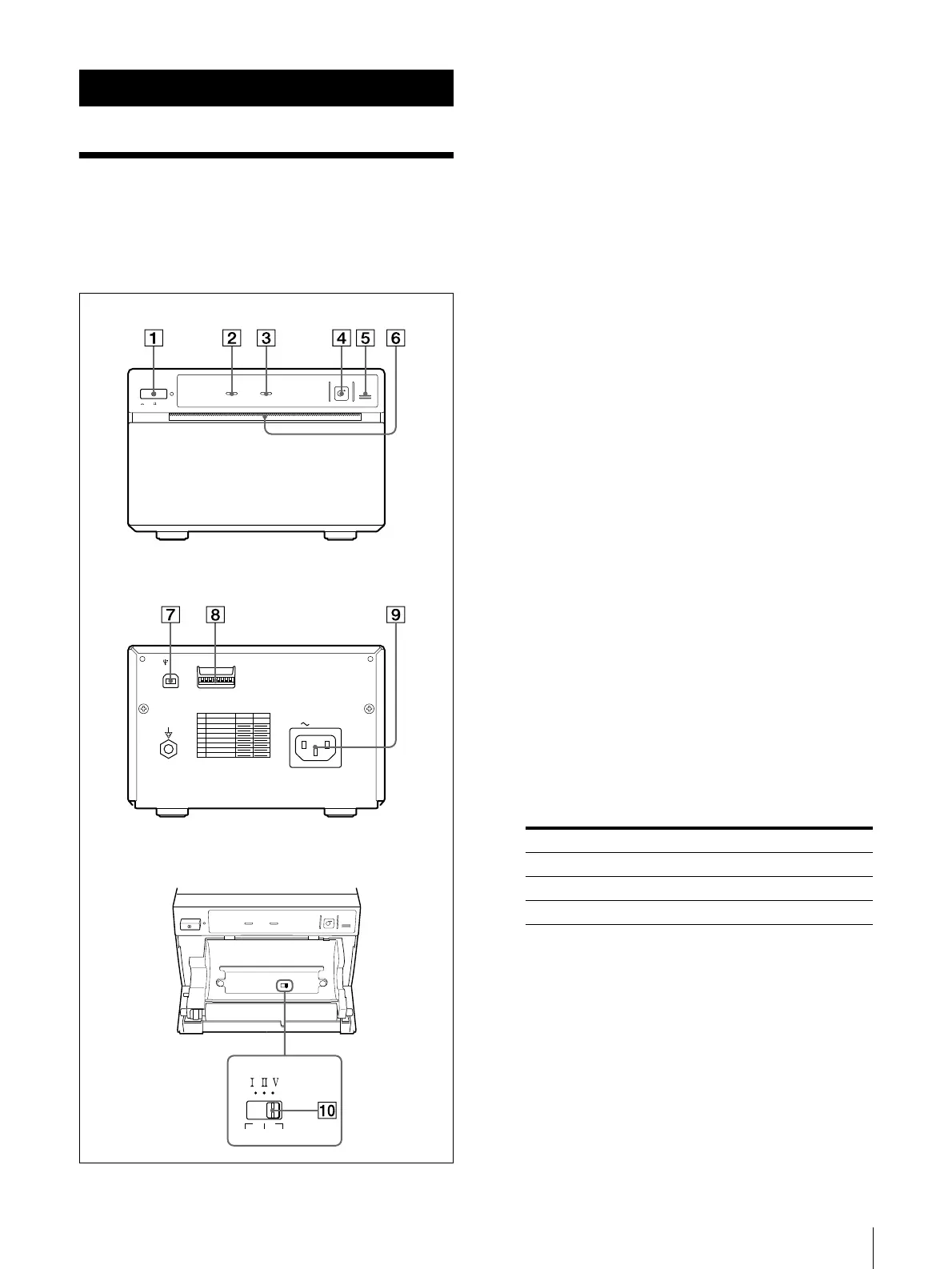
A Power ON/OFF Switch, Power Lamp (7, 9,
10)
Switch to ON to power and light the POWER lamp.
B
BB
B RECEIVING lamp
Lights while the printer is receiving print data from
the computer.
C
CC
C EMPTY lamp (9)
Lights when the printer runs out of paper. Flashes
while the temperature control circuits are heating
the thermal head.
D
DD
D FEED button (8, 11)
Hold down to feed paper. While a print job is in
progress, press to cancel the print job.
E
EE
E OPEN button (7, 9, 10)
Press to open the paper door. While a print job is in
progress, press to cancel the print job.
F
FF
F Paper cutter
Cuts the paper as each image is printed.
G
GG
G USB connector (5)
Connects to a computer or another USB peripheral
device with a USB cable.
H
HH
H DIP SW (6)
Select the image mode.
I
II
I AC IN connector
Connects the AC power cord provided with the
printer.
J
JJ
J PAPER TYPE switch
Selects the printer paper.
Select the paper type according to the type of paper
that you are going to use.
ON/ OFF
FEED
EMPTY
OPEN
RECEIVING
AC IN
DIP SW
USB
OFF
ON
DIP SW FUNCTION TABLE
NO FUNCTION
SW-ON SW-OFF
1
2
3
4
5
6
7
8
RESERVED
RESERVED
RESERVED
RESERVED
POST FEED
RESERVED
RESERVED
RESERVED
OFF
ON
PAPER TYPE
HD HGS
Front
Rear
Slide switch inside the paper tray
Paper Type Switch Postion
UPP-110S I (Normal)
UPP-110HD II (High Density)
UPP-110HG V (High Glossy)



 To Next Page