11
Setting an available channel automatically
(AUTO SET)
Automatically search for and set an available channel,
and start infrared transmission to the transmitter.
For details, see “Searching for available channels and
configuring the channel settings via infrared
communication (AUTO SET)” (page 8).
Selecting the frequency band (BAND)
Select the receive frequency band.
This menu is not available on Japanese and Korean
models. On these models, the frequency band cannot be
selected.
For details about the groups and channels in each frequency
band, refer to the “Frequency List” on the CD-ROM.
Searching for and selecting available
channels (CLR SCAN)
Search for available channels.
For details, see “Searching for Available Channels
within a Group (Clear Channel Scan)” (page 6).
Using infrared transmission (SYNC)
Transfer the frequency and compander mode set on the
unit to a transmitter using an infrared transmitter.
For details, see “Configuring the group/channel
manually and configuring the channel settings via
infrared communication (SYNC)” (page 8).
Setting the compander mode
(COMPANDER)
Set the operating mode of the compander.
For details, see “Setting the Compander Mode” (page 6).
Setting the frequency to an active channel
(ACT SCAN)
Search for channels already in use. This is useful when
using more than one receiver in combination with a single
transmitter.
For details, see “Searching for Active Channels within a
Group (Active Channel Scan)” (page 6).
Setting the squelch function (SQUELCH)
Enable the squelch function to suppress unwanted signals
and noise while waiting for transmissions.
For details, see “Using the Squelch Function” (page 7).
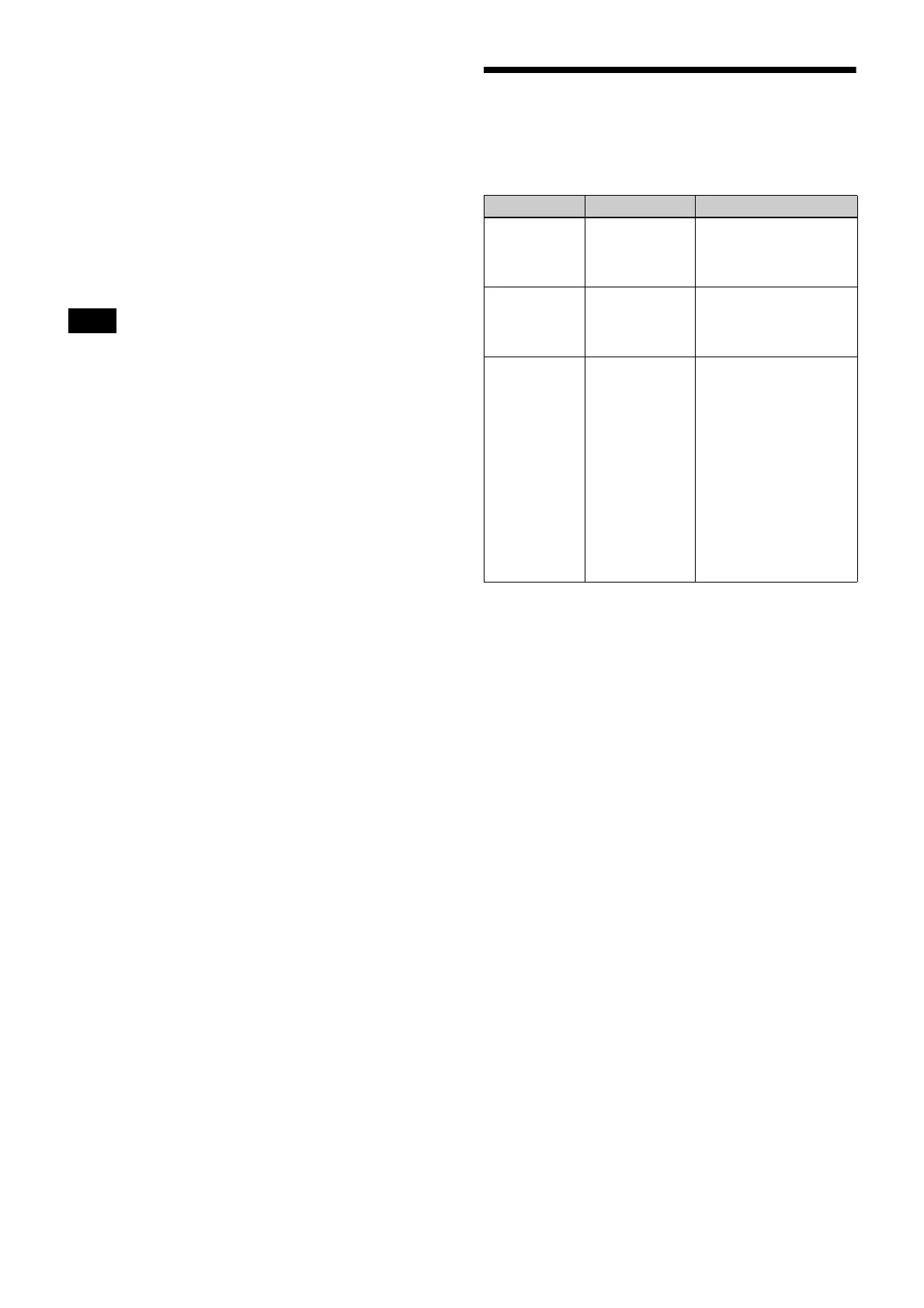
Error Messages
When a problem occurs, one of the following error
messages may appear on the display.
Note
Message Meaning Solution
EEP ERROR An error has
occurred in the
backup memory
data.
Contact your Sony
service representative.
PLL ERROR An error
occurred in the
PLL synthesizer
circuit.
Restart the unit. If the
message persists,
contact your Sony
service representative.
NO TONE Audio signal
output has been
muted, because
a tone signal
different from
the compander
mode
configured on
the unit was
received.
Configure the
appropriate compander
mode based on the
transmitters you are
using “Setting the
Compander Mode”
(page 6).
When operating in
conjunction with UWP-D
series transmitters
(UTX-B03, UTX-M03,
etc.), set the unit and the
transmitters to the same
compander mode.


 To Next Page