Power Supply
15
Hand-held microphone (UTX-M03)
1
Press and hold the POWER/MUTING button to turn
the power off.
2
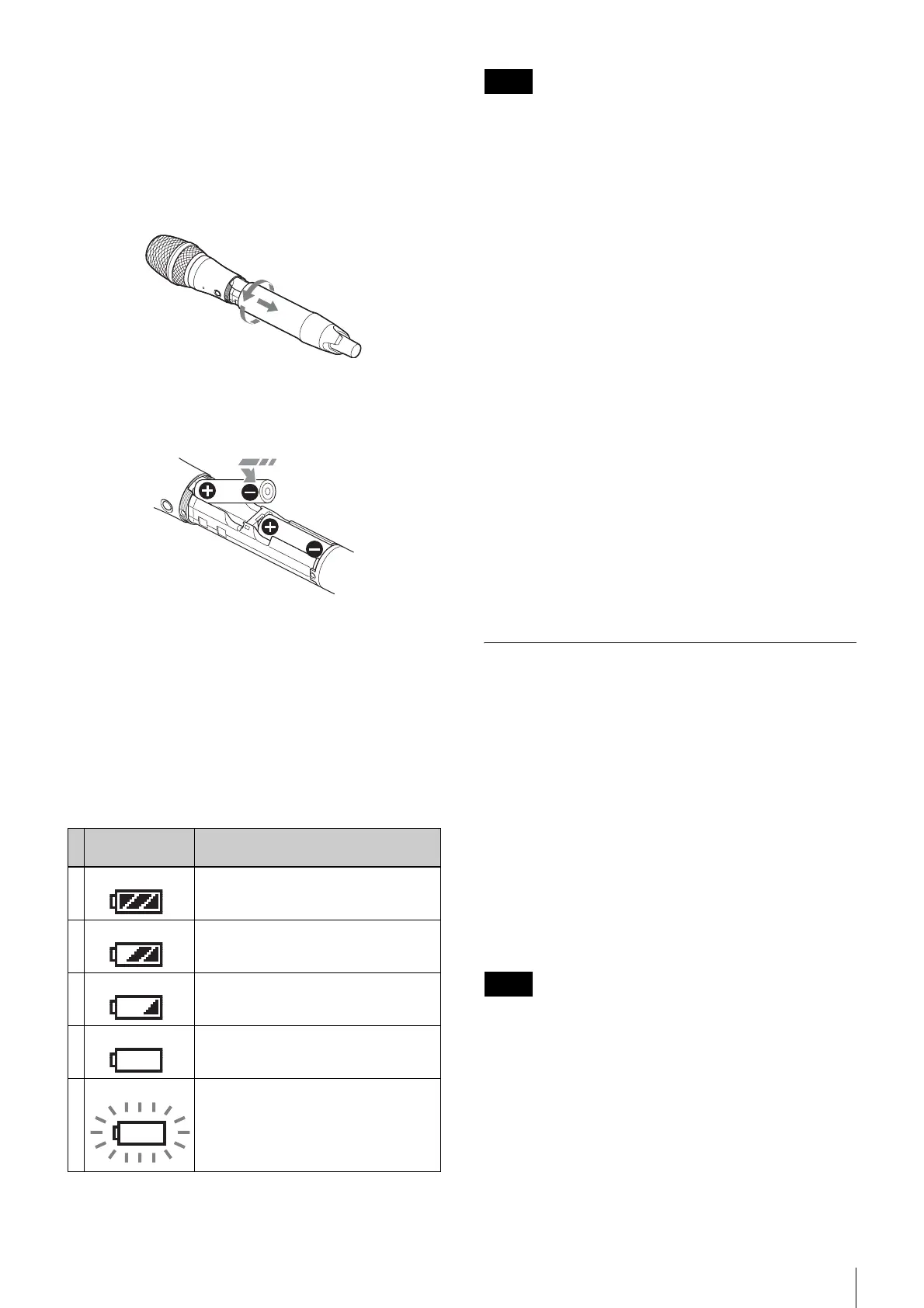
Turn the grip in the direction of the arrow, and pull
the grip down until the battery compartment is
visible.
3
Insert two new AA batteries into the battery
compartment with 3 and # polarities in the correct
orientation.
4
Close the grip, turning it in the reverse direction of
step 2.
Battery level indicator
Press and hold the POWER button for 1 second or longer
to display the battery level on the display.
Immediately replace both batteries with new batteries if
the indicator starts flashing (indication 5 below). If using
new alkaline batteries, use after checking the
recommended time limits.
• When BATTERY is set to TYPE1, the battery level is
indicated based on the use of new LR6 (size AA) Sony
alkaline batteries. The battery level may not be
displayed correctly when different kinds of batteries,
different brand of batteries, or old batteries are used. If
using batteries other than size AA alkaline batteries,
select the battery type using the BATTERY function.
• If you plan to use the transmitter continuously for a long
period of time, it is recommended that you replace the
batteries with brand new ones.
For details on the BATTERY function setting, see “Setting
the battery type (BATTERY)” (page 24).
Battery precautions
Batteries may leak or explode if mistreated. Be sure to
follow these instructions.
• Insert batteries in the correct 3 and # polarity
orientation.
• Always replace the two batteries together with new
ones.
• Do not use different types of batteries or old and new
ones together.
• Dry cells are not rechargeable.
• When not using the device for a long period of time,
remove the batteries. If the batteries leak for any reason,
consult your Sony service representative.
Supplying power from a USB
connector
The transmitter (UTX-B03/P03) and tuner (URX-P03)
can operate from a commercially available USB-output
type AC adapter or portable power supply connected to
the USB connector.
When supplying power using a USB-output type AC
adapter or portable power supply, use a unit that satisfies
the following conditions.
• Output connector: USB micro B type
• Rated voltage: 5 V
• Output current: 200 mA or higher
Displays “EXT” when power is supplied from the USB
connector.
The UTX-M03 hand-held microphone cannot be supplied
using a USB connector.
Battery level
indicator
Battery status
1Lights Good
2 Lights Less than 70% charge remaining
3 Lights Less than 40% charge remaining
4 Lights Less than 20% charge remaining
5 Flashes Almost empty
Notes
Note


 To Next Page