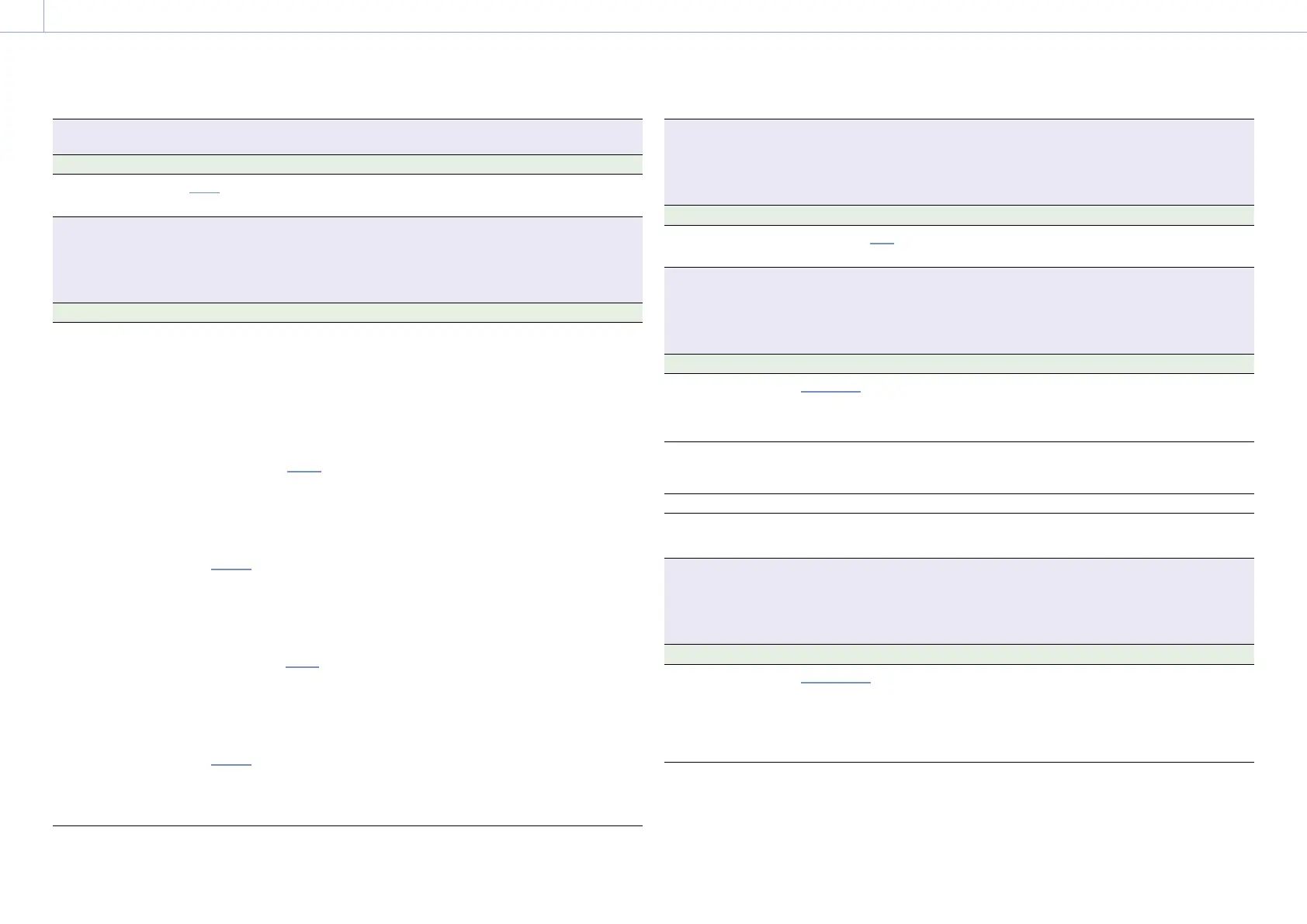
3. Camera Operations: Shooting Menu
66
Shooting > ND
Sets the ND filter position.
Menu item Setting Description
ND Position
Clear/0.3/0.6/0.9/1.2/1.5/1.8/
2.1/2.4
Selects the density of the ND filter.
Shooting > Exposure Index
Sets the EI value.
[Note]
Exposure Index is grayed out and the setting cannot be changed when Technical > Special Configuration > RM/RCP
Paint Control (page 91) is set to On in the full menu.
Menu item Setting Description
EI Select
The settings change as follows
depending on the Project >
Basic Setting > Base ISO
(page 72) setting in the full
menu.
MPC-3628
Base ISO 800:
200EI/250EI/320EI/400EI/
500EI/640EI/800EI/
1000EI/1250EI/1600EI/
2000EI/2500EI/3200EI
Base ISO 3200:
800EI/1000EI/1250EI/
1600EI/2000EI/2500EI/
3200EI/4000EI/5000EI/
6400EI/8000EI/10000EI/
12800EI
MPC-3626
ISO 500:
125EI/160EI/200EI/250EI/
320EI/400EI/500EI/640EI/
800EI/1000EI/1250EI/
1600EI/2000EI
ISO 2500:
640EI/800EI/1000EI/
1250EI/1600EI/2000EI/
2500EI/3200EI/4000EI/
5000EI/6400EI/8000EI/
10000EI
Selects the EI value.
[Note]
The settings are fixed to the following values when
Technical > Special Configuration > RM/RCP Paint
Control (page 91) is set to On in the full menu.
When Base ISO is set to ISO500: 500EI
When Base ISO is set to ISO2500: 2500EI
When Base ISO is set to ISO800: 800EI
When Base ISO is set to ISO3200: 3200EI
Shooting > Gain
Makes settings related to the gain.
[Note]
Gain setting cannot be changed when an RM-B170 or other remote control unit is connected or Technical > Special
Configuration > RM/RCP Paint Control (page 91) is set to Off in the full menu.
Menu item Setting Description
Gain Select
–6dB/–3dB/0dB/3dB/6dB/
9dB/12dB/15dB/18dB
Sets the base sensitivity.
Shooting > White Balance
Makes settings related to white balance.
[Note]
White Balance is grayed out and cannot be operated when an RM-B170 or other remote control unit is connected
and Technical > Special Configuration > RM/RCP Paint Control (page 91) is set to On in the full menu.
Menu item Setting Description
Color Temp. Select
3200K+00/4300K+00/
5500K+00
+ other added options (up to
16)
Displays and selects the color temperature/
color tone of the white balance.
Add/Change Step Adds or edits a selection option by changing
the color temperature and tint value of white
balance.
Delete Step Deletes an added selection option.
Auto White Balance Run/Cancel Executes auto white balance (execute by
selecting Run).
Shooting > Look
Makes settings related to Preset Look.
[Note]
Look is grayed out and the setting cannot be changed when Technical > Special Configuration > RM/RCP Paint
Control (page 91) is set to On in the full menu.
Menu item Setting Description
Category
Preset Look/User 3D LUT/
ART/ACEScct with User 3D/
ACESproxy with User 3D/ACES
with ART
Selects the LUT category.
[Note]
ACEScct with User 3D/ACESproxy with User 3D/ACES
with ART can be selected only when Project > Basic
Setting > Input Color Space (page 72) is set to
ACEScct in the full menu.














 To Next Page