3. Camera Operations: Monitoring Menu
81
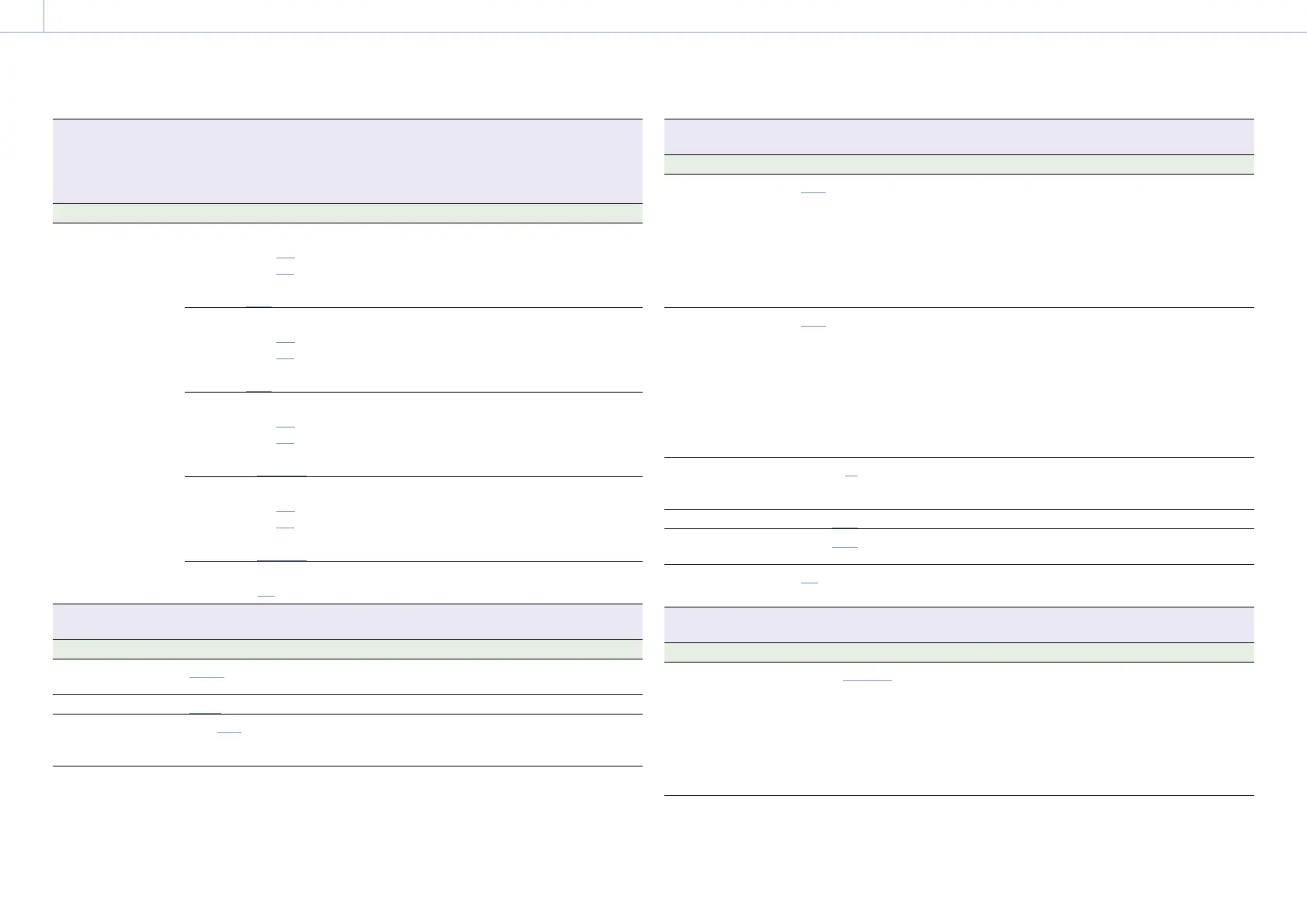
Monitoring > Overlays/Frame Line
Makes settings related to information and frame lines superimposed on each output signal.
On/Off setting is selected using a checkbox (excluding Frame Line on Playback).
On: Checkbox selected
Off: Checkbox cleared
Menu item Setting Description
Safety Zone
Line A (On/Off)
Line B (On/Off)
Option
(80%/90%/92.5%/95%)
Selects whether to display the safety zone in
the output information set for Frame Line A
and Frame Line B.
Selects the range (80%/90%/92.5%/95%) of
the safety zone.
Aspect Safety Zone
Line A (On/Off)
Line B (On/Off)
Option
(80%/90%/92.5%/95%)
Selects whether to display the aspect safety
zone in the output information set for Frame
Line A and Frame Line B.
Selects the size (percentage of the entire
screen) of the aspect safety zone marker.
User Frame Line 1
Line A (On/Off)
Line B (On/Off)
Option
(Preset/Variable)
Selects whether to display user frame line 1 in
the output information set for Frame Line A
and Frame Line B.
Selects whether to display user frame line 1 or
fixed aspect ratio.
User Frame Line 2
Line A (On/Off)
Line B (On/Off)
Option
(Preset/Variable)
Selects whether to display user frame line 2 in
the output information set for Frame Line A
and Frame Line B.
Selects whether to display user frame line 2 or
fixed aspect ratio.
Frame Line on Playback
Option (On/Off)
Turns the function to superimpose frame lines
during playback on/off.
Monitoring > Frame Line Setup
Makes settings related to lines and markers displayed on the output image.
Menu item Setting Description
Color
White/Yellow/Cyan/Green/
Magenta/Red/Blue
Selects the display color of frame lines.
Center Marker
Cross/Open Cross/Dot Selects the display form of the center marker.
Aspect Ratio
17:9/16:9/15:9/14:9/13:9/
9:16/4:3/1:1/1.43:1/1.66:1/
1.85:1/2:1/2.35:1/2.39:1
Selects the mode when displaying the aspect
ratio marker.
Monitoring > Frame Line Setup
Makes settings related to lines and markers displayed on the output image.
Menu item Setting Description
Aspect Ratio Type
Line/Mask/Line&Mask Selects the display form of the aspect ratio
marker.
Line: Displays lines with color set by Color.
Mask: Displays a lower video signal level for
areas outside the marker area.
Line&Mask: Displays lines with color set by
Color and a lower video signal level for
areas outside the marker area.
Surround View Type
Line/Mask/Line&Mask Selects the display form of the Surround View
marker.
Line: Displays the recording area using lines.
Mask: Displays the recording area by masking
(reducing) the video signal level outside
the recording area.
Line&Mask: Displays the recording area using
lines and by masking (reducing) the video
signal level outside the recording area.
Mask Level
0 to 15 (12) Selects the brightness of the image outside
the marker when Aspect Ratio Type or
Surround View Type is set to Mask.
Safety Zone
80%/90%/92.5%/95% Selects the safety zone range.
Aspect Safety Zone
80%/90%/92.5%/95% Selects the size (percentage of the entire
screen) of the aspect safety zone marker.
Frame Line on
Playback
On/Off Turns the function to superimpose frame lines
during playback on/off.
Monitoring > User Frame Line 1
Makes settings related to user frame line 1.
Menu item Setting Description
Select
Preset/Variable Selects whether to display user frame line 1 or
fixed aspect ratio.
Preset: Displays the aspect ratio set by Preset
Aspect Ratio, Scaling, and Preset Aspect
Ratio Type.
Variable: Displays an arbitrary rectangular
frame set by Width, Height, H Position, V
Position, and Variable Aspect Type.


 To Next Page
 Loading...










