53
nN
Using Your VAIO Computer >
Using the Internet
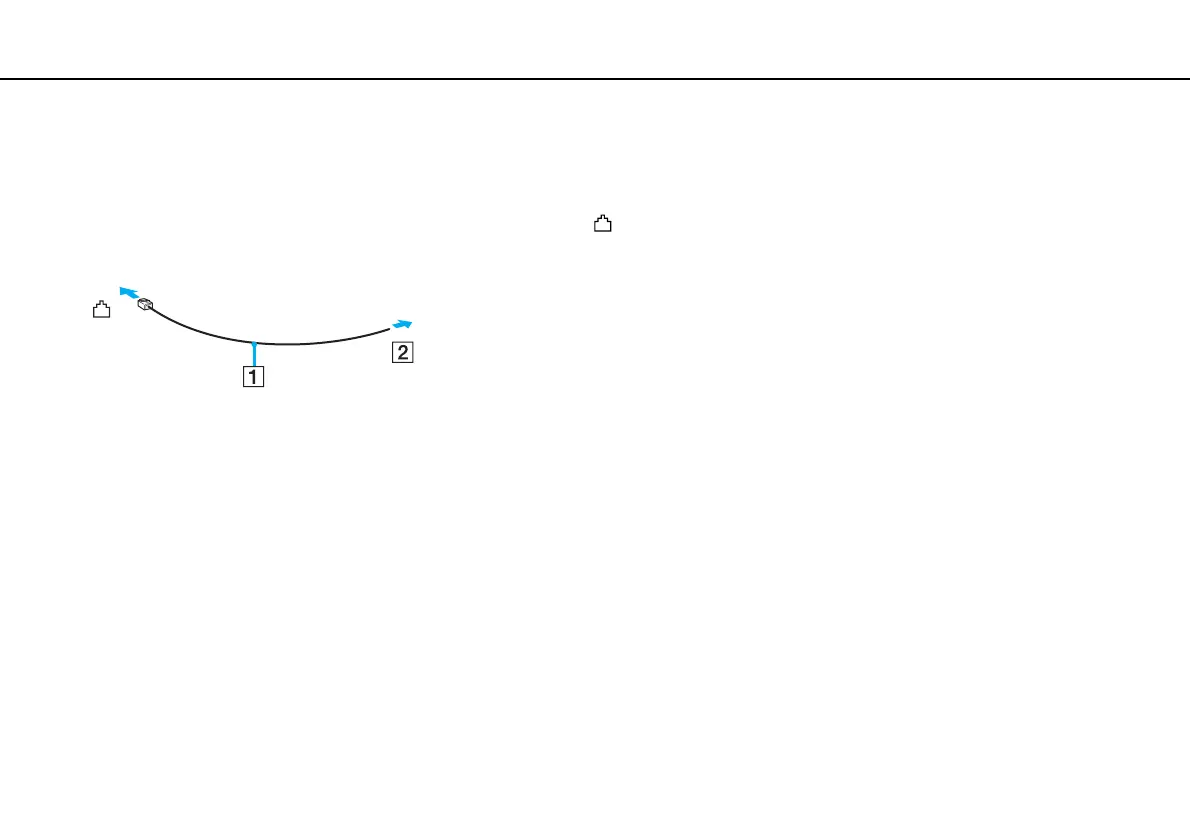
To connect a telephone cable
!
The following procedure applies to models with a built-in modem only.
1 Plug one end of the phone cable (1) into the modem port on the computer.
2 Plug the other end into the wall jack (2).
!
Your computer does not work with party lines, cannot be connected to a coin-operated telephone, and may not work with multiple telephone lines or a
private branch exchange (PBX). Some of these connections may result in excess electrical current and could cause a malfunction in the built-in modem.
If you connect a telephone cable coming through a splitter, the modem or connected device may not work properly.
To set up a dial-up connection to the Internet
!
The following procedure applies to models with a built-in modem only.
1 Click Start and Control Panel.
2 Click Connect to the Internet under Network and Internet.
The Connect to the Internet window appears.
3 Click Dial-up.
4 Follow the on-screen instructions.



 To Next Page