11
nN
Getting Started >
Locating Controls and Ports
Locating Controls and Ports
Take a moment to identify the controls and ports shown on the following pages.
!
The appearance of your computer may be different from those illustrated in this manual due to variations in specifications.
Front
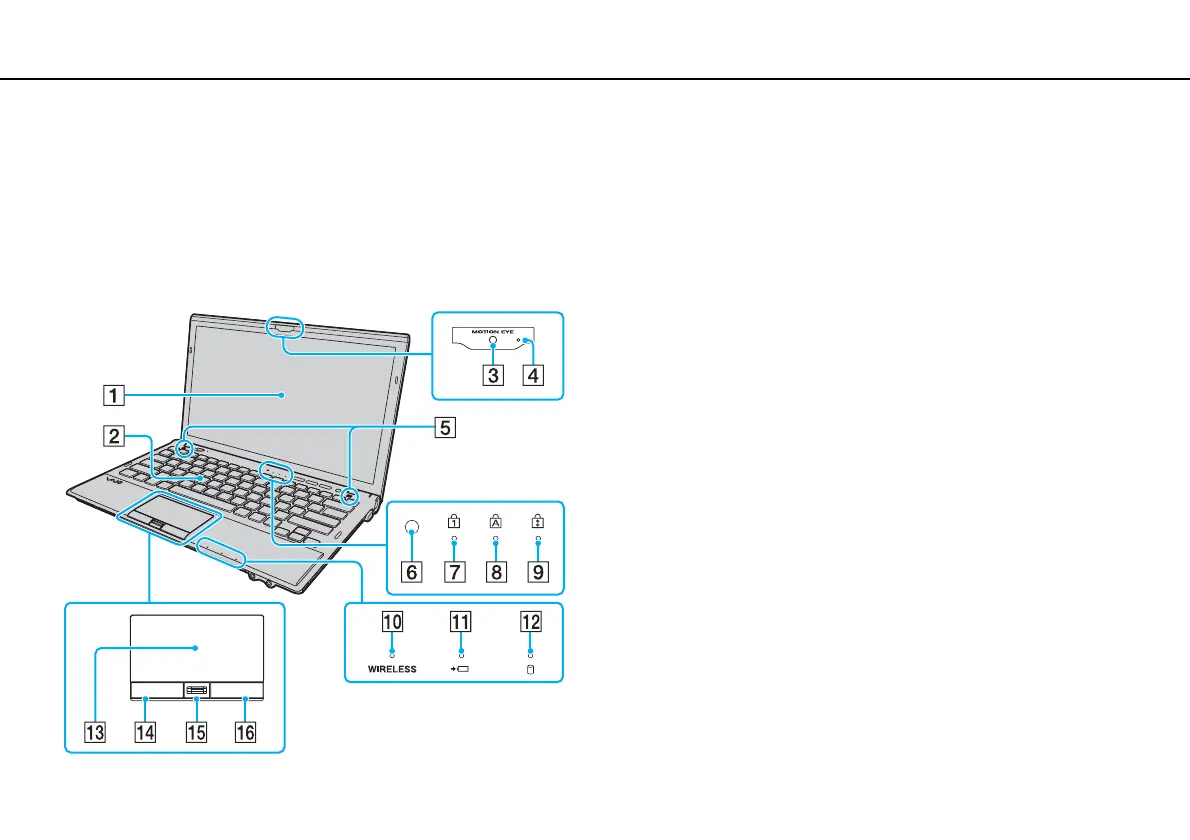
A LCD screen (page 157)
B Keyboard (page 33)
C Built-in MOTION EYE camera (page 38)
D Built-in MOTION EYE camera indicator (page 17)
E Built-in speakers (stereo)
F Ambient light sensor (page 35), (page 201)
Measures ambient light intensity for automatically adjusting the
LCD brightness to an optimum level.
G Num lock indicator (page 17)
H Caps lock indicator (page 17)
I Scroll lock indicator (page 17)
J WIRELESS indicator (page 17)
K Charge indicator (page 17)
L Disc drive indicator (page 17)
M Touch pad (page 36)
N Left button (page 36)
O Fingerprint sensor
*
(page 79)
P Right button (page 36)
* On selected models only.








 To Next Page