104
nN
Using Peripheral Devices >
Connecting a Port Replicator
Connecting a Port Replicator
Attaching an optional port replicator enables you to connect additional peripherals to your computer, such as a printer and an
external display.
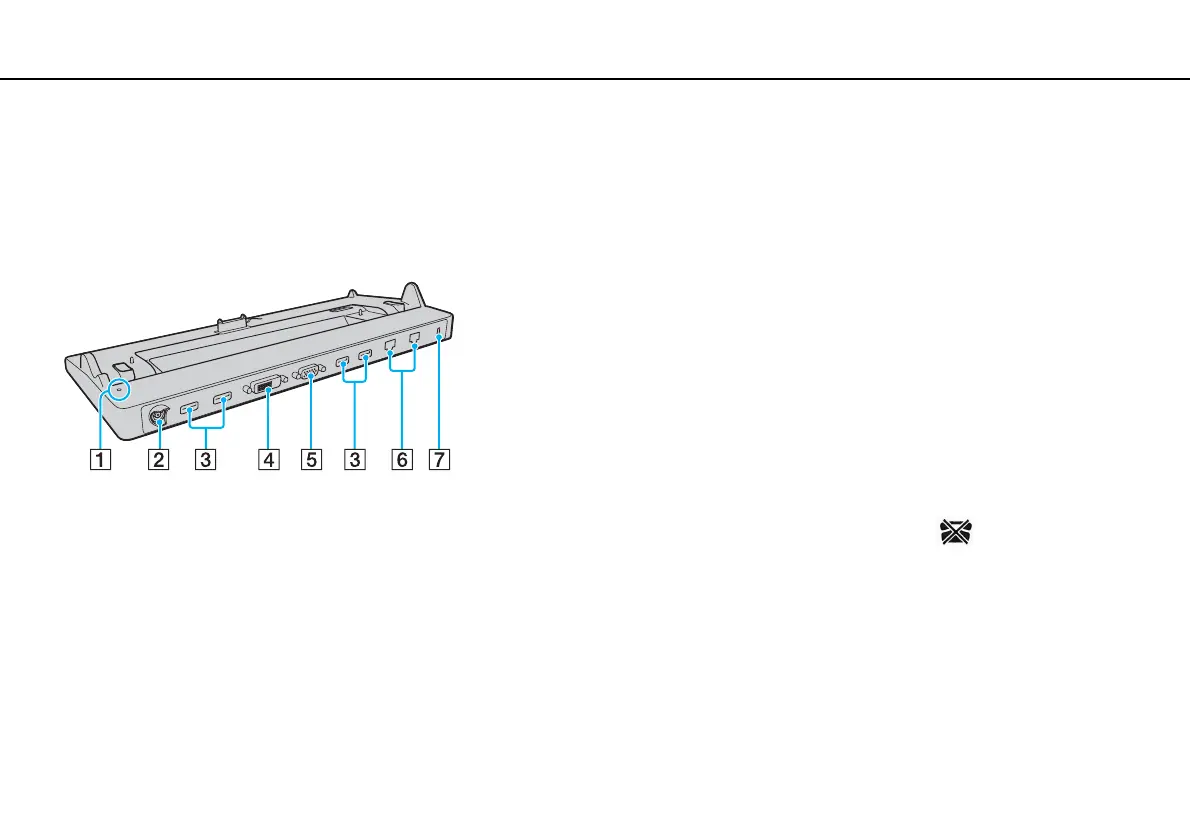
Locating Ports on the Port Replicator
!
Simultaneous use of the following ports is not possible.
- HDMI output port on your computer
- DVI-D port on the port replicator
- MONITOR port on the port replicator
A DC IN indicator
Illuminates while the port replicator is powered.
B DC IN port (page 18)
C USB ports
*1
(page 126)
D DVI-D port (page 116)
E MONITOR port (page 116)
F Network (LAN) ports
*2
(page 63)
G Security slot
*1
Compliant with the USB 2.0 standard and support high-/full-/low- speeds.
*2
The port replicator has a protective sticker covering each network
(LAN) port. Connect a 10BASE-T, 100BASE-TX, 1000BASE-T cable to the
network (LAN) port. Using an incorrect cable, such as a phone cable, may
result in an electric current overload that can cause a malfunction, excessive
heat, or fire in the network (LAN) port.








 To Next Page