EasyManua.ls Logo

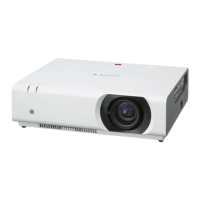
Sony VPL-CS6 - User Manual

Sony VPL-CS6
164 pages
Print Icon
To Next Page IconTo Next Page
Loading...
Data Projector VPL-CS6/VPL-CX6/VPL-EX1
© 2003 Sony Corporation
4-095-440-13 (1)
Data Projector
GB
FR
ES
Operating Instructions
Mode d’emploi
Manual de instrucciones
VPL-CS6
VPL-CX6
VPL-EX1

Table of Contents

Questions and Answers

  • J
    Jasmine HernandezSep 8, 2025
    What does it mean when the TEMP/FAN indicator lights up on my Sony VPL-CS6?
    • O
      ohicksSep 9, 2025
      If the TEMP/FAN indicator is lit on your Sony Projector, it suggests the internal temperature is unusually high. Make sure nothing is blocking the ventilation holes.
  • C
    carolinewrightAug 23, 2025
    How to fix a Sony Projector when the picture is not clear?
    • R
      Robert SkinnerAug 23, 2025
      If the picture on your Sony Projector is unclear, it could be out of focus; try adjusting the focus. Alternatively, condensation might have formed on the lens; if so, leave the projector on for about two hours to clear it.
  • H
    Holly WatkinsAug 25, 2025
    What to do if the LAMP/COVER indicator lights up on my Sony VPL-CS6?
    • B
      Betty MoodyAug 25, 2025
      If the LAMP/COVER indicator is lit on your Sony Projector, it means the lamp has reached the end of its life and needs replacement. It could also indicate the lamp is overheating; allow it to cool down for 90 seconds before turning the power back on.
  • L
    Lisa RamirezAug 27, 2025
    What to do if the Remote Commander does not work with my Sony VPL-CS6 Projector?
    • C
      Caitlin HartAug 27, 2025
      If the Remote Commander isn't working with your Sony Projector, the batteries are likely dead. Replace them with new ones.
  • D
    David DaughertyAug 27, 2025
    Why does the image extend beyond the screen on my Sony VPL-CS6 Projector?
    • A
      adamsshaneAug 28, 2025
      If the image extends beyond the screen on your Sony Projector, it could be because the APA key was pressed when there were black edges around the image. Try displaying the full image on the screen and then press the APA key. You can also adjust the 'Shift' setting in the INPUT SETTING menu.
  • R
    Renee MurraySep 22, 2025
    What to do if the powered tilt adjuster and the lens protector do not close on my Sony VPL-CS6 Projector?
    • T
      tonyawoodSep 22, 2025
      If the powered tilt adjuster and lens protector on your Sony Projector aren't closing, it could be because the AC power cord was unplugged while the projector was on. Reconnect the power cord to the AC outlet, then turn off the projector properly.
  • J
    Julie FranklinSep 16, 2025
    What to do if both the LAMP/COVER and TEMP/FAN indicators light up on my Sony VPL-CS6?
    • C
      Cole AllenSep 16, 2025
      If both the LAMP/COVER and TEMP/FAN indicators light up on your Sony Projector, it indicates an electrical system breakdown. Consult with qualified Sony personnel.
  • T
    Thomas AustinSep 18, 2025
    What to do if the powered tilt adjuster and the lens protector do not work at all on my Sony Projector?
    • R
      robert46Sep 18, 2025
      If the powered tilt adjuster and the lens protector do not work at all on your Sony Projector, it may indicate an electrical system breakdown. Consult with qualified Sony personnel. If it is necessary to use the projector in case of emergency, use it in the emergency mode.
  • D
    Dawn PalmerSep 7, 2025
    How to fix the picture flickering on my Sony Projector?
    • P
      Peter ColemanSep 7, 2025
      If the picture on your Sony Projector is flickering, it might be due to an improperly adjusted 'Dot Phase' in the INPUT SETTING menu. Adjust the 'Dot Phase' setting correctly.
  • D
    Diane OliverSep 4, 2025
    Why does 'Please check Input-A Signal Sel.' appear on my Sony VPL-CS6?
    • C
      Christine JohnsonSep 4, 2025
      The message 'Please check Input-A Signal Sel.' on your Sony Projector indicates an issue with the Input-A Signal Sel. setting. This can happen if you've input an RGB signal from the computer while the setting is configured for 'Component.' To resolve this, set 'Input-A Signal Sel.' correctly.

Sony VPL-CS6 Specifications

General IconGeneral
BrandSony
ModelVPL-CS6
CategoryProjector
LanguageEnglish

Related product manuals