35
Replacing the Lamp
Others
Do not put your hands into the lamp
replacement slot, and do not allow any
liquid or other objects into the slot to avoid
electrical shock or fire.
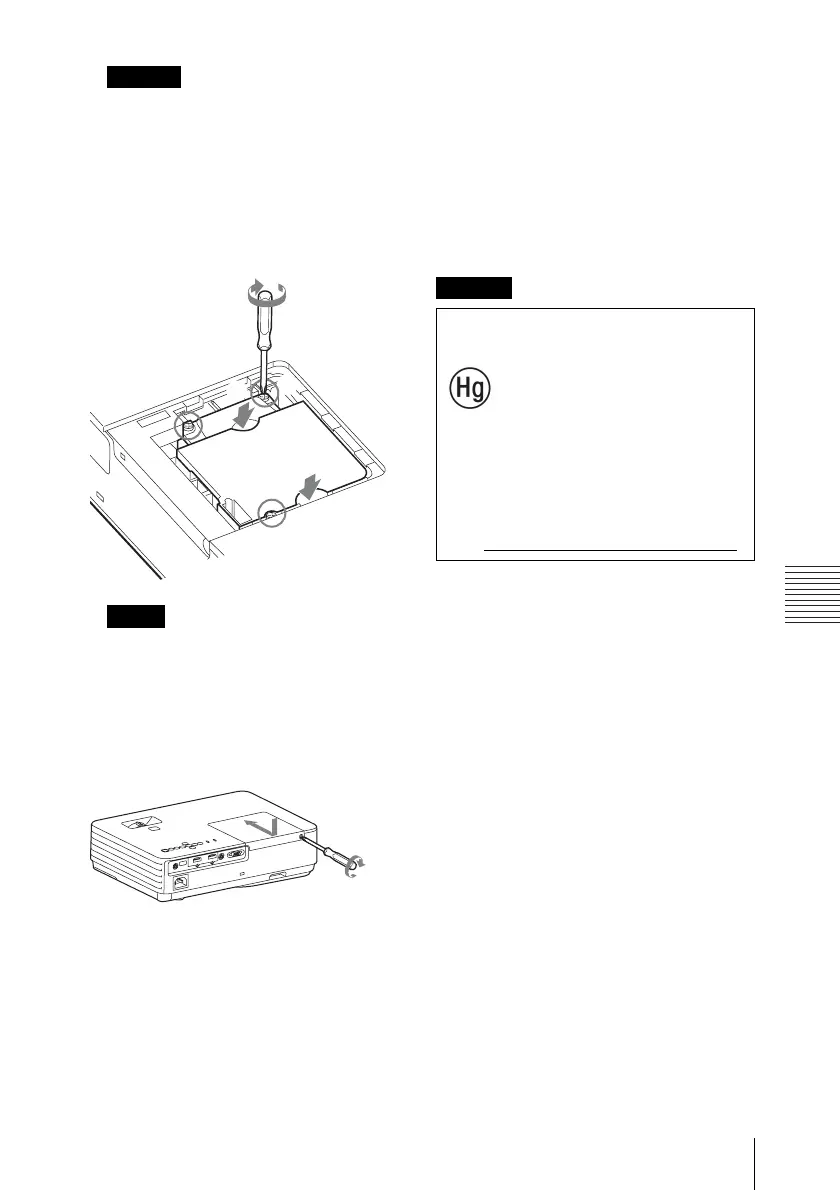
4 Insert the new lamp all the way in until
it is securely in place. Tighten the
3 screws.
• Be careful not to touch the glass surface
of the lamp and a inside conductor.
• The power will not turn on if the lamp is
not secured properly.
5 Close the lamp cover and tighten the
1 screw.
6 Connect the AC power cord to a wall
outlet and turn on the projector.
7 Reset the lamp timer for notification of
the next replacement time.
Select “Lamp Timer Reset” on the
Function menu then press the ENTER
key. When a message appears, select
“Yes” to reset the lamp timer (page 23).
Caution
Notes
2
2
1
1
2
Caution
For the customers in the
U.S.A. and Canada
Lamp contains
mercury. Dispose according
to applicable local, state/
province and federal laws.
For additional information,
see www.sony.com/mercury


 To Next Page