21
Connecting the Projector
Projecting the Picture
This section describes how to connect the
projector to a VCR.
For more information, refer to the
instruction manuals of the equipment you
are connecting.
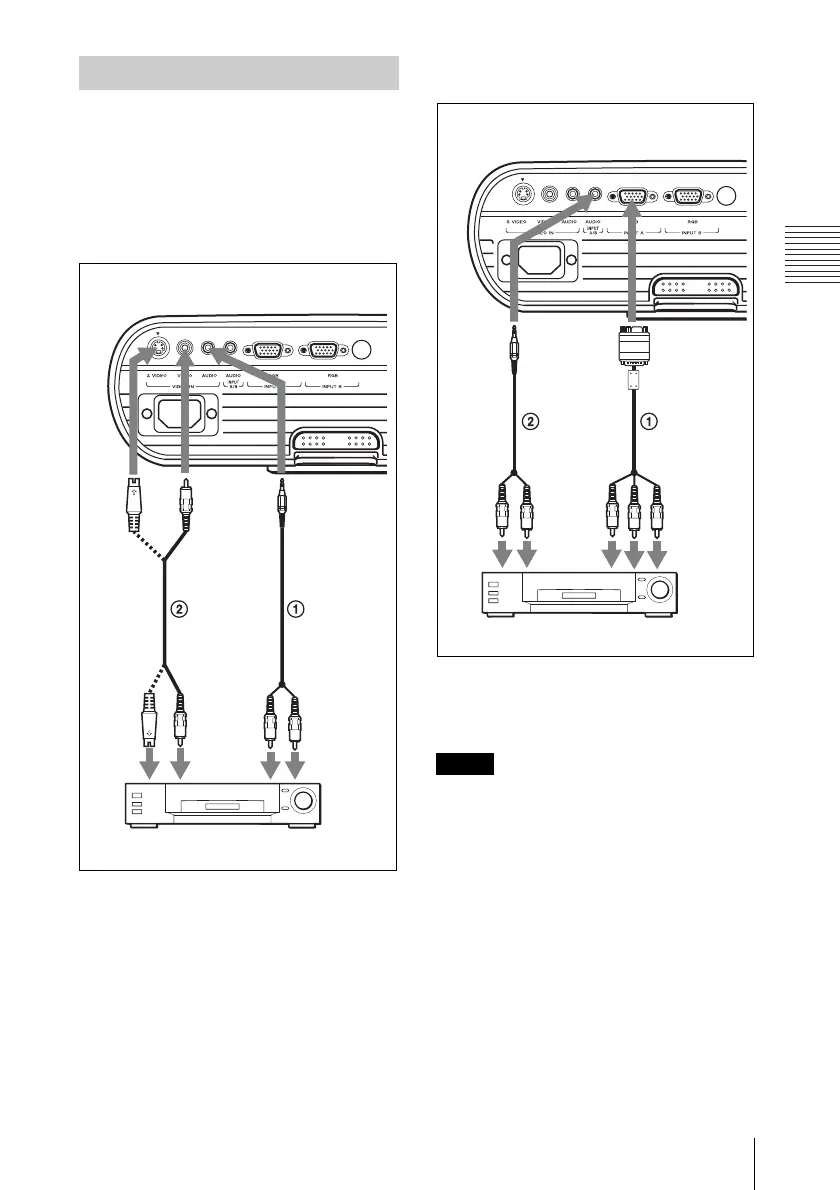
To connect to a video or S video
output connector
1 Stereo audio connecting cable (not supplied)
(Use a no-resistance cable.)
2 Video cable (not supplied) or S-Video cable
(not supplied)
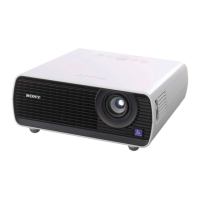
To connect to a video GBR/
Component output connector
1 Signal Cable (not supplied)
HD D-sub 15-pin (male) ↔ 3 × phono jack
2 Stereo audio connecting cable (not supplied)
(Use a no-resistance cable.)
• For stereo audio connection, connect the
stereo audio connecting cable to following
connectors:
VPL-EX5/ES5: INPUT A/VIDEO IN
AUDIO connector
VPL-EW5: INPUT A AUDIO connector
VPL-EX50: INPUT A/B AUDIO connector
• Set the aspect ratio using “Aspect” on the
INPUT SETTING menu according to the
input signal.
• When you connect the projector to a video
GBR output connector, select “Video GBR”
or when you connect the projector to a
component output connector, select
“Component” with the “Input-A Signal Sel.”
setting on the SET SETTING menu.
Connecting a VCR
VCR
to S
video
output
Rear side
to audio
output (R)
to video
output
to audio
output (L)
VPL-EX50
Notes
Rear side
to
audio
output
(R)
VCR
to video
GBR/
component
output
to
audio
output
(L)
VPL-EX50




 To Next Page