6
Network Presentations
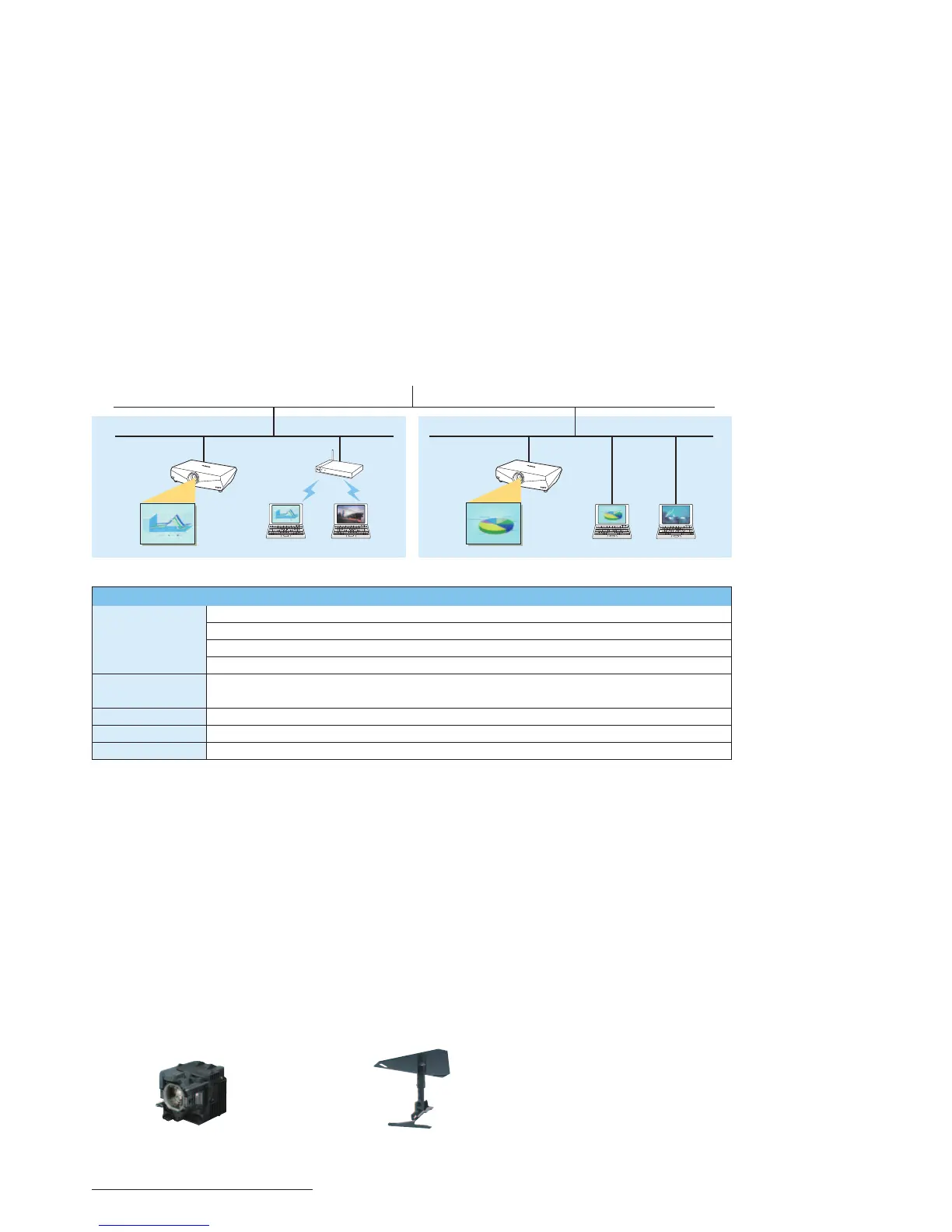
When the VPL-FX41, VPL-FE40 and VPL-FX40
projectors are installed on a LAN, presentations
can be projected from any PC on that network*
—
whether connected via a LAN cable or wirelessly.
Switching from presenter to presenter is as easy as
clicking a mouse
—
there’s no fussing with cables.
*
Requires supplied application software to be installed on your PC.
High-Speed Image Transfer over IP
Networks
Because the VPL-FX41, VPL-FE40 and VPL-FX40
projectors employ effi cient compression and
transmission techniques, they can receive and
project images via IP networks for effective
presentations from any networked PC.
In fact, they can even handle animated Microsoft
®
PowerPoint
®
presentations.
Network Presentations Using Up To Five
Projectors
Up to fi ve VPL-FX41, VPL-FE40 or VPL-FX40
projectors can be connected to a network, with
the image from a single PC projected on each of
them. This feature is ideal for both large venues
and multiple rooms in which images have to be
projected from various locations.
Network Presentations Almost Anywhere
By manually registering your PC’s IP address to the
VPL-FX41, VPL-FE40 and VPL-FX40 projectors, images
can be projected not only across the country, but
across the globe. This is ideal for applications such
as distance learning and long-distance corporate
communication.
Other Features
• Smart APA (Auto Pixel Alignment)
• Password-Authentication System
• Picture/Audio Muting
Network Presentation System Diagram
Sony cannot guarantee that application software will run properly even though all of the above system requirements are met.
Optional Accessories
LMP-F270
Projector Lamp (for replacement)
PSS-610//A
Suspension Support
-"/
8JSFMFTT
"DDFTT
1PJOU
3PPN" 3PPN#
71-'9
71-'&
71-'9
71-'9
71-'&
71-'9
1$1$ 1$1$
System Requirements to Run Supplied Application Software
Hardware CPU: Intel
®
Pentium
®
III 600-MHz processor or faster, and CPU recommended by OS
Memory: 64 MB or more (128 MB or more is recommended), and Memory recommended by OS
Hard disk: 10 MB or more of free capacity
Other hardware requirements: CD-ROM drive
Operating System Microsoft
®
Windows
®
98 SE, Windows ME, Windows 2000, Windows XP Home Edition, Windows XP Professional Edition,
Windows Vista Home Basic, Windows Vista Home Premium, Windows Vista Ultimate, Windows Vista Business
Browser Internet Explorer 5.0 or higher
Display Color resolution: 16-bit, 24-bit, or 32-bit
Network RJ-45: 10BASE-T/100BASE-TX
Notice Regarding Network Presentations:
• When an image is sent from a computer to the VPL-FE40 projector,
the image is processed using 1024 x 768 pixels.
• Animation effects and the slide show function in Microsoft
PowerPoint presentations can be used; however, transmission
delays may occur if a large number of effects are performed at
once or if several slides are turned at once.
• Network transmission is not suitable for video.
• Network transmission should not be used with sound.
• Applications that use DirectX
®
application programming interface
may not be displayed properly.
• When using Windows Vista, Windows XP, or Windows 2000
Operating Systems, the user must be logged into an account with
computer administrator access.
• Application software is provided in English and Japanese.
• Network presentations may not be possible depending on the
network environment and available bandwidth.
SONY54720_VPL.indd 6SONY54720_VPL.indd 6 10/3/08 3:31:12 PM10/3/08 3:31:12 PM



 To Next Page