GB
8
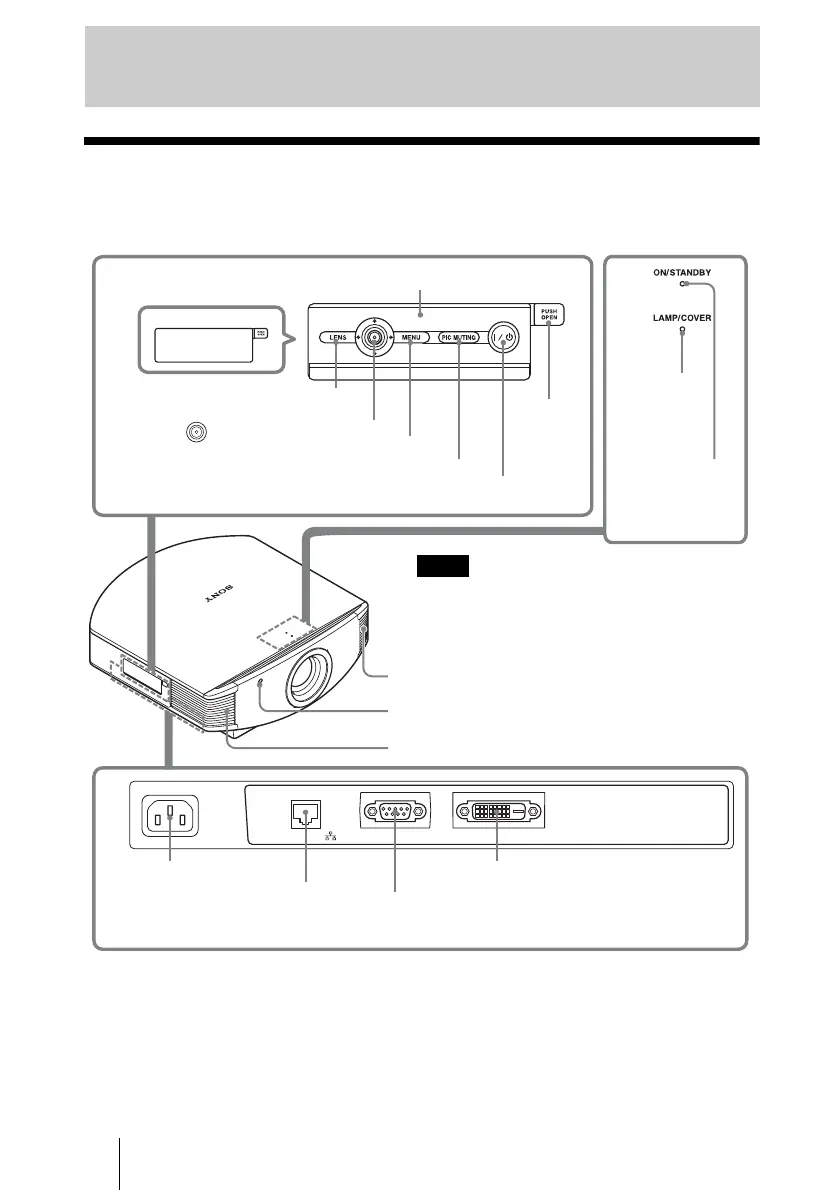
Front/Right Side
You can use the buttons on the control panel with the same names as those on the remote
control to operate the projector.
Location of Controls
~AC IN
NETWORK
REMOTE DVI-D
PIC MUTING button (1 page 26)
MENU button (1 page 35)
ON/STANDBY
indicator
(1 page 19)
Remote control detector (1 page 19)
Ventilation holes (exhaust) (1 page 13)
?/1 (ON/STANDBY) switch (1 page 20)
LAMP/
COVER
indicator
(1 page 58)
M/m/</, (arrow)/
(enter) button (1 page 35)
Ventilation holes (exhaust) (1 page 13)
NETWORK connector (1 pages 34, 53)
Connects to a computer, etc. for remote
control.
DVI-D connector (1 page 18)
While the ON/STANDBY indicator lights in orange,
the power saving mode is on. (1 page 47)
Note
LENS button
Open
button
CAUTION
For safety, do not connect the connector for peripheral device wiring that might have excessive
voltage to the NETWORK connector.
Follow the instructions for the NETWORK connector.
CAUTION
When you connect the NETWORK cable of the unit to peripheral device, use a shielded-type cable
to prevent malfunction due to radiation noise.
Control panel
Press the button and
open the cover.
REMOTE connector (1 page 34)
Connects to a computer, etc. for remote control.
~AC IN socket


 To Next Page