EasyManua.ls Logo

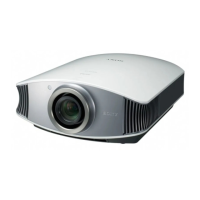
Sony VPL-BW7 - User Manual

Sony VPL-BW7
324 pages
Print Icon
To Next Page IconTo Next Page
Loading...
VPL-BW7
© 2009 Sony Corporation
4-155-211-62 (1)
Video Projector
Operating Instructions GB
Mode d’emploi FR
Bedienungsanleitung DE
Istruzioni per l’uso IT
Manual de instrucciones ES

Table of Contents

Other manuals for Sony VPL-BW7

Questions and Answers

  • S
    Stephen TaylorAug 8, 2025
    What to do if there is no picture on my Sony Projector?
    • T
      Tiffany WalkerAug 9, 2025
      If there's no picture on your Sony Projector, the issue might stem from several causes. First, ensure all cables are correctly and securely connected. If you're using a computer, and it's DDC2B compatible, connect the projector to the computer, then turn on the projector, and finally start the computer. Also, verify that the correct input source is selected. Check if the picture is muted and, if so, press the PIC MUTING button. Lastly, ensure your computer signal is set to output only to an external monitor.
  • Z
    Zachary SchultzAug 25, 2025
    Why is the picture noisy on my Sony Projector?
    • A
      Anita HicksAug 25, 2025
      If the picture on your Sony Projector appears noisy, it could be due to the combination of the number of dots input from the computer and the number of pixels on the LCD panel. To resolve this, try changing the desktop pattern on the connected computer.

Sony VPL-BW7 Specifications

General IconGeneral
Brightness2000 ANSI lumens
Contrast Ratio2000:1
Display TypeLCD
Projection Size30 to 300 inches
Lamp TypeUHP
Weight2.9 kg
Aspect Ratio4:3
Display Technology3LCD
Throw Distance1.2 to 12.2 meters
Zoom1.2x
Input PortsVGA, Composite, S-Video

Related product manuals